
mcpokcikbbfcdogkpaebcekojhphhlfc
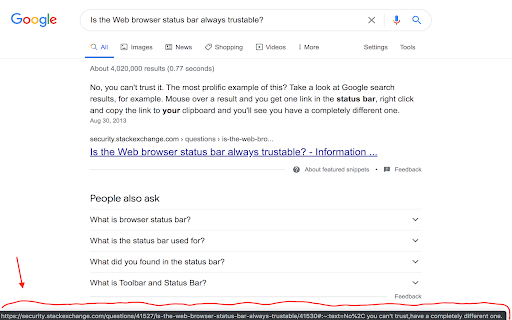
Copies True Link as shown at the status bar When you hover on a link the browser shows its URL at the status bar. But a lot of sites are faking this info. That is, if you will click on the link or copy its URL then you will get not what displayed at the status bar. This add-on adds new context menu item called "Copy True Link". By pressing it, the actual URL (as displayed at the status bar) will be copied to your clipboard.

Copy Clean URL to Clipboard
Copy the current tab's URL to clipboard after removing tracking parameters and other noise This is a small helper for grabbing bookmarks and similar references to the current tab's URL. It removes extraneous portions of the URL, leaving the minimum required URL.

copy-clean-url
Copy a url, without any tracking and obfuscation This addon copies a URL, but strips out any redirects or tracking IDs. You will get a clean URL. I'm currently handling only Facebook, but I will add more as the need arises.

Links Panel
Collate all the links on the page into an easily accessible panel Allows you to quickly see and filter all the links on the current page. Use the options to configure how the links appear, and what to consider at when filtering (URL, Title..., Case matching). Use Ctrl or Shift when clicking to select multiple links, and press enter to open them all. You can also optionally have links sent to a follower tab.

Link Revealer
See the true URL for all links and improve your security! Link Revealer extension is designed to improve your online security. When you hover on any link element, the underlying - href - will be displayed as the link's title. Moreover, a colored footer will also be displayed at the bottom of the page showing the link href. If the underlying domain for the link is similar to the page's domain, this color will be BLUE. If the link is third-party the color is GREEN. For a situation where the displayed URL in the link's text content is different than the underlying href, the footer color will be RED. The toolbar icon color will also be updated according to the above rules. For any link, if you right-click and select - Scan link for threats, the add-on scans the link with the SafeBrowsing JavaScript API (https://safebrowsing.google.com/). When you first install the add-on, please visit the options page to activate the safe-browsing API. From the toolbar popup, you can also turn the add-on ON or OFF. Moreover, you can hide the page's footer if you find it inconvenient. Please note that you can still scan links for threats even if the page footer is hidden. If you have a feature request or found a bug to report, please fill out the bug report form on the add-on's homepage (https://mybrowseraddon.com/link-revealer.html).
