
mcopkfempldfeokdlleknmnngdbbhega
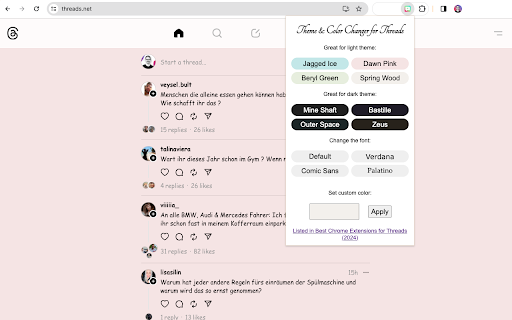


Create your own custom color theme on Threads. Make your experience more colorful! Make Threads More Fun and Colorful with this Easy-to-Use Chrome Extension! ★ Brighten Up Your Threads! Love using Meta's new Threads platform? This Chrome extension makes it even better! It's super easy to use and adds some cool colors and fonts to your Threads page. ★ Cool Features: 🎨 Change Colors: Pick different colors to make your Threads page look awesome. You can choose soft colors or bright ones – whatever you like! 🌈 Pick Your Own Color: Want something special? Use the color picker to find the perfect shade. 🔤 Change font style: Select from a small variety of fonts, transforming Threads' look and readability. ★ Why You'll Love It: 😊 Super Easy: It's really easy to set up and use. 🦄 Be Unique: You get to make your Threads look the way you want. 🤗 Always Fun: It makes your time on Threads more enjoyable. 🙏 Totally Free: This cool tool doesn't cost anything! ★ This extension is featured in Best Chrome Extensions for Threads: https://comment-generator.com/blog/chrome-extensions-for-threads.html ★ Contact If you want to report a bug or have a feature request, please do not hesitate to reach me directly at takkbbl4@gmail.com. ★ Disclaimer Theme & Color Changer for Threads does not belong or is not related to the official Threads™ application / website in any ways. It is an unofficial extension that is developed and maintained independently. Theme & Color Changer for Threads (browser extension) is a wrapper to the original Threads™ web application and makes it more fun and colorful. This Chrome plugin is not endorsed or certified by any third party. All third party logos and trademarks displayed on this Chrome plugin are properties of the third parties. Theme & Color Changer for Threads is distributed AS IS. For more info and terms of service, visit our web site: https://comment-generator.com

Cursor Style – Custom Mouse Cursors & Trails for Chrome™
Add cool and fun mouse cursors with animated trails. Personalize your Chrome™ experience with custom styles that match your vibe. How to change the mouse cursor in the browser to a custom one? — All it takes is a couple of clicks! We’ve got a huge collection of awesome cursors for every taste — animals 🐶, space rockets 🚀, cute food 🍕, magical creatures 🧚, and so much more! All cursors are in vector format, so they look perfect on any screen and at any size. 🎨✨ Want to save your favorite cursors? It’s easy! Just press the "Add" button under any cursor you like — and poof! it goes into your My Collection page! On the My Collection page, you can see all the cursors you’ve added, pick the one you want to use , or remove any with one click. It’s super fun and easy — like building your own magical toolbox! 🌟 New! Now you can add special effects that follow your mouse cursor! Make your browsing even more exciting with animated trails, sparkles, lightning, bubbles, and other cool effects that follow your every move! Each effect comes with advanced settings, so you can choose the color, size, speed, and style — something for every mood and imagination! 💥🧊🌈 💬 Even more magic — now with chat! We’ve just launched a brand-new Chat feature that lets you connect and talk with other people who love custom cursors just like you! Join fun discussions, share your collections, or make new friends from schools, fan groups, and creative communities around the world. It’s a safe and friendly place to hang out, get inspired, and share the joy of customizing your browser together! 🎉👩🎨👨🚀 Our collections are updated all the time, so be sure to visit again and discover what’s new! 🎁

Theme & Color Changer for YouTube - Colorize YouTube
Change color theme on YouTube™ to any colors you like! Create your own custom color theme Theme & Color Changer for YouTube is not just an extension; it's your personal designer, your magical brush that transforms your YouTube into something special, unique, and incredibly stylish. Imagine over 50 different pre-set color themes, and that's not all! With the color constructor, you can create your own unique themes. No limits, just your imagination! 🖌️ Over 50 Pre-set Themes Imagine your YouTube can look completely different every day. Today you choose a gentle pastel theme, tomorrow a bright neon color, and the day after tomorrow, dark and mysterious goth. All this is possible thanks to more than 50 pre-set themes that include all possible options for any mood. 🌈 Pastel Paradise: for those who love tenderness and calm. 🎃 Gothic Night: for true fans of darkness and mystery. 🕶️ Retro Blast: return to the '80s with bright and neon YouTube colors. 🌌 Galactic Journey: for those who dream of stars and space. 🍭 Candy Rainbow: bright and sweet colors for the boldest. 🎨 YouTube Color Constructor If none of the pre-set themes match your unique taste, don't worry! Our color constructor is what you need. You can create your own themes, choose any color, combine shades, and even add gradients. Your YouTube can be absolutely anything: from the color of your favorite sweater to the color of your cat's eyes. Your custom YouTube is now in your hands! 🕺 Ease and Convenience You don't need to be a tech genius to enjoy all the benefits of "Theme & Color Changer for YouTube". Installing the extension takes just a few seconds, and you're ready to change colors and themes at your discretion. Just a few clicks, and your YouTube looks completely different. Mood Change: Choose a YouTube theme according to your mood or season. A new day, a new theme! Personalization: Make your YouTube unique, reflecting your personality. Engage Friends: Surprise your friends with a new colorful YouTube and share your creative themes for YouTube. Fun Process: Play with YouTube colors, experiment, and enjoy the result. It's real fun! Don't miss the chance to turn YouTube into a colorful experience. Download "Theme & Color Changer for YouTube" right now and enjoy all the benefits of this wonderful extension. Trust us, your eyes will thank you, and your mood will improve with every new YouTube color. Other functionality: - On clicking on the more option in the popup, the YouTube tools page is redirected to youtube.com.

Custom Colors
Give color to your favourite websites! [ 💬 This extension is still in development. It has a notable performance impact on complex sites like YouTube or Twitch, specially when using the color cycle mode. Besides, colors are applied in a flashy way that can be quite annoying. At this point, this extension’s main purpose is to provide a bit of fun when trying and exploring new colors on your favourite websites. It needs a few issues to be solved to be able to be considered an accessibility improvement too. 💬] Custom Colors allows you to change the colors of the websites you visit. You can choose, for every specific site, the colors you want for all backgrounds and texts. These settings can be saved so every time you open these sites the colors you have chosen will be applied. Pick the colors you want for a specific site using the extension’s pop-up from a tab where that site is opened. To open the pop-up, you need to click on the extension’s icon. You can find all your active extensions at the top right corner of Chrome windows, clicking on the puzzle’s piece icon (🧩) [Here is where extensions are located in June 2021]. Once you have opened the pop-up, you will be able to see the list of sites with custom settings. Initially, there will not be any of them. Also, you will see one or two plus icons (➕). Use them to add the site of the current tab you are seeing the pop-up from to your list of customized sites. You can add a domain (e.g. youtube.com) or an specific URL (e.g. youtube.com/watch?v=BBSqiqqt_7E). Custom colors can be defined for backgrounds, texts that contain visited links (recently clicked), texts that contain unvisited links and texts that do not contain any links 😊. Customized sites are displayed in a table, and four of its columns correspond with these four possible selections. You can choose the colors you want for any of your saved sites by clicking on the table’s cells that belong to these four columns. When one of these cells is clicked, a little window with a color palette is opened. Here you can select any color you want from it for your site! There are a few options more: a random color can be generated every time you load the page (❔), colors can change continuously along the RGB spectrum (🔄) and you can also keep original colors (🚫), for instance, if you want to change backgrounds’ colors but not links’ ones. Don’t forget to save your settings clicking on the tick icon (✔). There are also settings defined for ‘all sites’: if these are enabled, they will be applied on every site you visit except on those you have defined custom settings for, because they will be prioritized on them. Custom settings can be removed or deactivated anytime, and even if ‘all sites’ settings are enabled, they won’t have an effect on saved sites that are not activated. Settings are applied automatically on sites that are opened, so you can have a preview of the colors you choose (if you discard your choice, colors are removed too). If at some time these automatic changes don’t work properly, they will function as they’re supposed to if you reload the page. FYI: Extensions are not activated automatically when they are installed. This extension, like many others you have tried probably, starts working on all the corresponding tabs at the right moment it is installed, but this is not the default behaviour. Take in mind that if you install an extension sometime and it doesn't work on the tabs you have already open, you may need to refresh those tabs with F5 key or by clicking on the reload button located in the browser's top left corner.

Palette for Notion - Customize Colors, Fonts & Themes
Customize Notion colors & fonts with beautiful presets, smart themes, and live preview. Make your workspace feel like you. Palette for Notion: Aesthetic Themes, Custom Fonts and Colors Elevate your workspace with custom color palettes, professional typography, and seamless visual capture. The ultimate styling suite for Notion. Redefine Your Digital Sanctuary. Notion is more than a tool; it is the canvas for your life's work. Palette for Notion transforms that canvas into a bespoke environment designed for clarity, focus, and aesthetic harmony. Move beyond default limitations and architect a workspace that mirrors your cognitive style. Curated Chromatic Control: Break free from standard themes. Apply custom background and text colors to distinguish disparate projects, reduce eye strain with calibrated contrast, or simply match your personal brand. Whether you require deep-focus dark modes or high-energy vibrant highlights, your palette is now under your command. Typographic Refinement: Words matter, and how they appear matters even more. Replace standard typefaces with a curated selection of fonts designed for long-form reading and data density. Optimize line heights and spacing to enhance readability and reduce cognitive load. Smart Preset Ecosystem: Your workflow evolves throughout the day, and so should your interface. Create and save "Style Presets"—switch instantly from a "Deep Work" minimalist monochrome to a "Creative Brainstorm" vibrant layout with a single click. Integrated Visual Capture: Bridge the gap between the web and your workspace. Capture high-fidelity screenshots, annotated regions, or full-page visuals and embed them directly into your active Notion page without breaking your flow. Why Palette for Notion? While other extensions add clutter, Palette adds clarity. It is a lightweight, privacy-focused layer that respects the integrity of Notion’s design while unlocking the flexibility you crave. Join the movement of aesthetic productivity. After the free trial, a paid license or subscription is required. v1.0.4 — May 31, 2026 Added support for Notion’s new web domains (notion.com and all *.notion.com subdomains, including app.notion.com). Palette now opens and runs correctly across both old and new Notion URLs. v1.0.3 — March 2, 2026 Stability and usability improvements for daily customization workflows.
