
mcimnmibpilhcpmalceffnaabmdfodhh

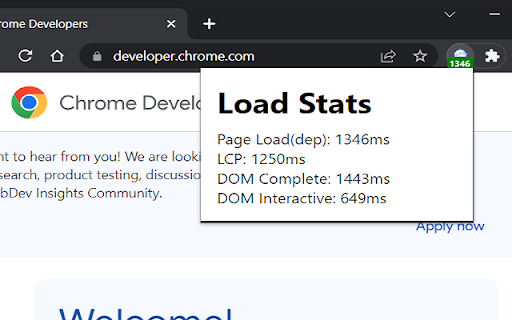
Shows Web Page load statistics on top left corner of the page Shows Web Page load statistics on top left corner of the page. You still can see your web page's LCP and other metrics with the dev tools but this extension makes it easier to have a look at core performance metrics. Using `window.performance.timing.domContentLoadedEventEnd` it shows a little badge text to see the time it took for the web page to fully load at a glance. Click on the extension to see more performance metrics.

Extractify
Extracts terms and definitions from a PowerPoint file Extractify is the ultimate tool for students looking to easily extract and organize key terms and definitions from their class readings and study materials. Extractify makes it simple to quickly pull important information from your lecture slides and study more efficiently. Upload your .pptx file and Extractify does the rest by automatically recognizing terms and definitions for you! Say goodbye to tedious manual highlighting and note-taking - Extractify does the heavy lifting for you. Plus, with the option to export your extracted information as a .pdf file, you can seamlessly integrate Extractify into your existing study workflow. Don't waste any more time sifting through pages of irrelevant information - install Extractify today and take control of your studying.

ScrapboxQuickLink
An extension that makes it easy to copy links in Scrapbox format. Third party extension for Scrapbox users. This is a Chrome extension to easily generate links for Scrapbox. Clicking on the extension menu that appears when right-clicking within a page will copy the link to the clipboard in the following format. * Right-click within a page: [page-title URL]. * Right-click on a selected text: [URL selection-text]. Please feel free to contact us for any improvements or bugs on GitHub. Please feel free to contact us. https://github.com/okaryo/ScrapboxQuickLink

Colorboard
Extract colors from your screen and save them to your library. Includes Color Picker, Color Extractor, Eyedropper, Palette Generator, Paint Tool, Color Converter, Profile Login, and more.

All-in-One Data Toolbox
Collection of handy Text/XML/JSON/CSV tools and more. If you often need to process various formats of data in daily work, this extension is right for you. Just paste what you want to process, and click on corresponding function button, then wait for the result to come out. It is fast and effective! Also, undo/redo operations are available for more convenience use. The extension currently has 50+ handy tools that cover a variety of data formats including XML, JSON and CSV etc. More tools will be added to it on a regular basis.
