
mcfncmgpoefggbpeloigfonenlmamgjf

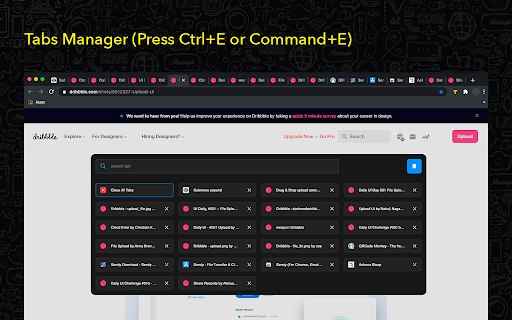

Quick access to all opened tabs. Manage browser tabs to easily navigate and switch between them. Tab Manager for Chrome is a must-have extension for anyone looking to streamline their browsing experience. Designed to give you quick and easy access to all your open tabs, this tool allows you to navigate between them with just a click. No more getting lost in a sea of open tabs—Tab Manager for Chrome provides a clear and organized overview, so you can instantly find and switch to the tab you need. Tab Manager for Chrome also lets you create custom tab groups, helping you keep related tabs organized and accessible. Whether you’re working on a project, researching multiple topics, or simply trying to keep your personal and work tabs separate, you can group your tabs and open them only when you need them. This not only declutters your browser but also improves your productivity by letting you focus on the task at hand. With a user-friendly interface and powerful features, Tab Manager for Chrome is the perfect solution for anyone who wants to take control of their browsing and enhance their efficiency. Say goodbye to tab overload and hello to a more organized, stress-free browsing experience. Organize browser tabs to a fully manageable list for quick search through opened tabs and easy access to any website you want. There can be created groups of opened tabs by theme, so you will be able to work exactly with needed websites and then collapse tabs altogether that will be saved for further until you want to edit or delete them. Navigation between opened tabs became so simple with 20 Tabs. There is an opportunity to use hotkeys to find saved domain names and open tabs. Every group of tabs is editable thus you can add or remove any tab from the list. As well there is an option to rename each group for more convenience. How you can use 20 Tabs: - Open a clear list of opened tabs with one click - Navigate between tabs using a search bar - Remove tab from the list in one click as well as add needed website - Create groups of browser tabs - Save to bookmark in a single click Take control of your tabs is the every - day assistant in working with browser tabs. Press the hotkey combination to open a search bar with a list of opened tabs. The search bar appears as well to simplify navigation between websites you visit. You are welcome with any suggestions about improvements. Visit our options page to contact us or rate.

Tab Manager v2
Search, group, move, and clean up tabs across browser windows with a keyboard-first workflow See every tab across every window, find what you need fast, move matching tabs in bulk, manage native tab groups where supported by the browser, and clean up duplicates without window hopping. - Search open tabs by title or URL, with optional browser history results in the same search box - Select matching tabs and move, group, or close them in bulk - Manage native tab groups directly where supported by the browser: rename, recolor, collapse, and ungroup them in place - Reorder tabs with drag and drop across windows from one focused view - Highlight duplicate tabs and clean them up quickly, with an option to ignore URL hashes - Stay on the keyboard with shortcuts, focus mode, and the command palette - Adjust theme, tab width, font size, toolbar visibility, URL display, and more - Support Firefox container-aware workflows when the browser exposes those APIs Free and open source. Core functionality runs locally in your browser. Open source: https://github.com/xcv58/Tab-Manager-v2 Support and issues: https://github.com/xcv58/Tab-Manager-v2/issues

Super Focus Tabs
Quickly find out tab/page. Reduce much more time while working with multiple tabs/pages. + Quickly find out tabs. + Quickly closing current tab by pressing double esc + Quickly find the page in your bookmark/history. + Quickly save the page by using shortcut key. + Quickly go back to previous active tabs by shortcut key. + Quickly go to latest created tab. + Support auto close unused tabs. + Support real time update. + Support page screenshots. + Support list view, thumbnail view and tree view, preview. + Support tabs, bookmarks, history, saved pages. + Support sorting, filtering, grouping, etc. + Support many functions such as saving and closing all tabs, merging windows, closing the duplicated pages, etc. + Many options for you to customize. Reduce much more time while working with chrome. Let try and experience.

Partizion — Tab and Session Manager
Partizion is a tab and session manager that just works. Never worry about losing tabs again. ✦ Magic tab manager — Partizion saves tabs for you ✦ Privacy focused — no ads, no tracking, and we never sell or share your data ✦ Reliable tab session manager — Over 1 Million sessions saved ✦ Used by professionals from Netflix, Google, Shopify, Uber, Spotify, and more ✨ AUTO-UPDATING TAB COLLECTIONS Don’t want to manually update tabs and bookmarks? Partizion’s powerful auto-updating feature will automatically save tabs when you open/close them so that you don’t have to. ✔️ Automatically saves tabs for you (when you open or close them) ✔️ Pick up where you left off — Just open your Partizion collection ✔️ Cloud synced — restore saved groups of tabs from any browser ☁️ CLOUD SYNCED SESSIONS A bullet-proof tab session manager for chrome. With local caching and backups, cloud sync, and a beautiful UI, you never have to worry about losing tabs again. ✔️ Automatically saves sessions for you ✔️ Restore a session or group of tabs anytime ✔️ Sessions are synced to the cloud ✔️ Privacy controls (encryption + auto-delete settings or completely disable syncing) Too many tabs open? Partizion tab manager helps you keep less tabs open by saving backups so that you can safely close any tabs that you don’t need open right now, knowing that you can always find and open them again later. Lost tabs? Partizion automatically saves cloud-synced tab sessions so that you can restore any tabs you may have lost. Want to pickup where you left off? Save groups of tabs, open them later in one-click. Enable auto-update and Partizion will save tabs for you. As a backup, you can always restore tabs from Partizion’s session manager. Organize your tabs Organize tabs into Collections by project, task, client, or anything else then close/reopen later from any browser. Restore tabs Use Partizion’s powerful tab search to search your saved tabs and collections. OR browse your sessions in chronological order to restore sessions that you may have forgotten to save. Custom Views View your saved tabs and collection how you like: Grid View, List View, Kanban View, and a Full view (shows everything). Sort and filter your views to create workflows and dashboards.

Tab Manager Plus for Chrome
Quickly find open tabs, see all windows in one view, find duplicates and limit tabs per window. The best Tab Manager for Chrome. The Marie Kondo for your Chrome Tabs! Do all these open tabs bring you joy? Let's organize them ^_^ The best tool to find, close, or switch to the tabs you want, when you have many tabs and windows. In a world of ever-expanding tabs in the browser - this is a helpful addition to keeping them organized and for quick switching between them! If you like it, please leave a review! We read all the reviews ❤ A simple and super-fast Google Extension to help you get the best overview over many tabs. It helps filtering your tabs, moving them, re-arranging them. Once you open Tab Manager Plus, you can type right away. The main focus in this app is speed - so you can find the tab you're looking for - right away! ➤ Display all Tabs & Windows quickly in current window ➤ Highlight duplicate tabs ➤ Select Tabs using Right Click, Ctrl, Cmd or Shift ➤ Quickly filter tabs by title and url ( just type - right away! ) ➤ Switch to found tab with "Enter" ➤ Move multiple highlighted tabs with "Enter" ➤ Switch to your latest opened tab with Shift+Ctrl+Space / Shift+Cmd+Space ➤ Limit open tabs - Tab Manager will open a new tab in a new window once your limit is reached ➤ Create new Tabs & Windows ➤ Move Tabs between Windows ➤ Delete Tabs & Windows ➤ Pin/unpin Tabs ➤ Supports incognito mode, if you enable it ➤ 6.0.0 ( 1st October 2024 ) - You can now open single tabs from your saved sessions - Experimental: Try to restore window names and colors after a browser restart - Fix: Vertical layout takes now the full width in popups - Fix: Vertical view has now nicer separators when used in full window, that take the whole screen width - Fix: Sometimes favicons would not load properly - Fix: Make sure session tabs are fully restored before closing the popup - Fix: Moving many tabs could stop early because of popup closing in the meantime - Fix: Closing many tabs could stop early because of popup closing in the meantime - Fix: Discarding many tabs could stop early because of popup closing in the meantime - Fix: Selecting a color for a window would hide all other windows until the next open - Fix: Windows that were saved out of bounds of the current monitor, could not be restored - Fix: Windows that were too big for the current monitor, would not be restored - Fix: Don't animate scrolling if animations are disabled - Fix: Dragging tabs would sometimes drop them in the wrong location, now they will be added to the closest tab in the new window - Fix: Favicons sometimes stuck, based on browser cache - Fix: Also use favicon url based on pending url if tab is loading - Fix: Don't attempt to show empty favicon - Fix: pending urls not being read when calculating window title - Fix: window title not updating after tabs fully loaded - Fix: IPs being shown as weird numbers in window title/name - Fix: title being based on whole url, instead of hostname while tab was loading - Fix: Try to find nicer window title if it matches hostname - Fix: Group by top-Ips, like 192.168.*.* - Fix: If you selected incognito tabs and normal tabs based on a search, and tried to move them to one window then it would fail because they can't be mixed together. Now it will open 2 windows - one with normal tabs, one with incognito tabs. ➤ 5.2.1 ( 22nd September 2024 ) - Fix: White page crash when tab had no hostname / title ➤ 5.2.0 ( 22nd June 2020 ) - Improves search! Searching for "google mail" will highlight tabs that have both words included #107 - Improves search! Searching for "google OR mail" will highlight tabs that have either of the worlds included #106 - Fix: Searching for the same string length would not trigger another search, but that could have stopped an accent selection #93 - Shift-right click will now select tabs in between the last selected tab #104 #94 - Design Fix: default font size set to 16px - Default popup size increased to 800x600 - Default design changed to blocks - Improvements: Background clean up added, to keep resources low - Improvements: Don't render windows in the background while the color/title selection is active - Improvements: Warn when trying to backup empty sessions #98 - Fix: Doesn't allow users to export empty session files, shows a warning instead - Fix: Don't show import/export options for sessions if the feature is not enabled #98 - Fix: Make it more obvious that you can type right away #86 - Fix: Pluralization fixes when only 1 tab was selected #87 ➤ 5.1.5 ( 17th June 2020 ) - Dark mode has now dark input fields, to ease the eye strain - Slight design and color adjustments - Fix: Properly close title/color popup after pressing enter/escape ( instead of closing the TMP popup ) - Fix: When selecting a tab in dark mode, the text was unreadable - Fix: Changed the way how tabs are counted - sometimes it was possible to open more tabs per window than allowed ➤ 5.1.4 ( 17th June 2020 ) - Moving multiple tabs would sometimes not work when using the button or [Enter] key. This should be fixed now ➤ 5.1.3 ( 7th November 2019 ) - Fix: Popup width adjustable again instead of stuck to 800px - Fix: Only open the popup from context menu if current browser supports it ➤ 5.1.2 ( 4th November 2019 ) - Overhauled and more friendlier context menu. You can now open the popup from the context menu, if opening as own tab is the default. You can now also access the changelog from the context menu - Increase popup size/width steps to 25 - Fix: Hide saved windows when a filter is active - Fix: Don't break rows on tabs based on the hidden tabs - Fix: Sometimes when using the keyboard the tabs would not highlight properly. This should be resolved now. - Fix: Background color for dark mode. - Performance improvements, such as not rendering hidden tabs to the DOM ➤ 5.1.1 ( 1st November 2019 ) - Fix: The "highlight duplicate tabs" button may have disappeared - it should be back now ➤ 5.1.0 ( 31st October 2019 ) - You can now see which tabs are playing sounds and/or music. For this you need to have the "animations" option turned on. The tabs with active sounds will pulsate - You can see now which tabs have been discarded by the browser to save memory - the icons will lose their color if they are in a discarded / memory-saving state - You can also discard tabs well. Simply select one or more tabs, and press the "discard tabs" button in the bottom right corner - New keyboard possibilities : Use the arrow keys to jump between tabs and windows. Use shift+arrow keys to select tabs. Press Escape to delete a search / unselect everything at once. - The big block view has now bigger icons. Easier to read on TVs and big resolutions - Small design fixes for dark and compact modes and the options page - Fix: Sometimes switching to a tab would not focus the new window properly - Fix: Sometimes "open in own tab" would not focus on the tab correctly if it was already open - Fix: Sometimes the bottom search bar would disappear / be pushed below. This should be resolved now - Scroll to the new window when restoring it from saved windows - Scroll to the new saved window when saving it - When drag and dropping a tab outside of Tab Manager Plus into another program or the browser ( which is not really intended/supported ) it will now paste the URL on drop - Under the hood : A rewrite of the extension and upgrade to the latest React version. A big change under the hood with slight performance improvements - General performance improvements - More options texts regarding shortcuts ➤ 5.0.8 ( 29th October 2019 ) - You can now backup and restore your saved windows - You can now select multiple tabs by using right mouse click while holding shift/ctrl or command. Select the first tab with a right click, and then select the last tab with shift+right mouse click, to select all the tabs in between. - You can now set in the options if you'd like to have the Tab Manager open as a popup by default, or in its' own tab - Design fixes to have the right amount of tabs per row displayed in the block view - Stops auto-scrolling to the first active tab, if the user has already started scrolling - Some small fixes to make sure we load correctly also on slower machines - Fixes to dark mode in its' own tab - the background was not displayed in the full window - Removed buggy animation transitions that would get stuck on hover ➤ 5.0.7 ( 28th October 2019 ) - Dark mode - you can now enable the dark mode in the options! - Close the popup when clicking on a tab, window or restoring a session, but don't close it when we're in a Tab Manager page of its own ➤ 5.0.6 ( 25th October 2019 ) - Fixed issue where current tab wouldn't be closed when pressing the "close tabs" button - Backwards compatibility with older browser versions ➤ 5.0.4 ( 23rd October 2019 ) - Save/restore windows ( beta ) - you can now save and restore windows into your local storage. Please note : History of the tabs will not be preserved. ( Disabled by default ) - Fixes for search box displays on some configurations - Adjustments for wide screens - Various other small fixes - Close popup after pressing enter ➤ 5.0.3 ( 15th August 2019 ) - Added context menu to open Tab Manager in its' own tab - Small fixes for icon borders not rendering properly - Fixes for the search bar when the popup is too narrow - Added popup title and favicon - Disable popup auto-closing until we have a better solution - Fixed Firefox error where a new window would not be created ➤ 5.0.2 ( 6th August 2019 ) - Hotfix for Chrome to support the browser based api ➤ 5.0.1 ( 6th August 2019 ) - Fixes to rate and review buttons - Added donate option - thank you for keeping this extension alive! - Changed description of colorize button to include hint that the window name can be changed as well - Changed colorize button to settings - Adjusted fonts, so they look nicer - Font changes in options menu - Added title detection for the about: protocol - Launched for Firefox as well! ➤ 5.0.0 ( 5th August 2019 ) - Added rate and review buttons - Updated depreciated chrome api calls to newer ones - Prepared Firefox compatibility ➤ 4.9.9 ( 27th February 2019 ) - If the current tab is not in the initial popup screen, then we'll scroll down to it - "Minimize inactive windows" will only minimize windows on the same monitor ( requires additional permission ) - Small fixes to window titles from last update ➤ 4.9.8 ( 27th February 2019 ) - Add option to enable/disable window titles - Smarter window title detection, especially for super-long titles ➤ 4.9.6 ( 24th January 2019 ) - Nicer wrapping of windows - Show the tabs with the highest count first in the title - Fixes in list views for high width popups, sometimes the titles were cut off ➤ 4.9.5 ( 23rd January 2019 ) - Unnamed windows will show now the top domains in it instead - Added a close option to the naming and color popups ➤ 4.9.4 ( 28th June 2018 ) - Fixes to stuck tab counters - Auto-close forgotten tab managers after 100 seconds - Various bugfixes and style changes ➤ 4.9.3 - Fixes for older Chrome versions ➤ 4.9.1 - You can now auto-hide Chrome windows that aren't active, having only one Chrome window in focus at a time - There's now a separate section for minimized windows - so it's easier to spot them - Clicking on a window will activate that window ( instead of having to click on a tab ) - Fixes to window coloring - sometimes the colors would be lost / applied to the wrong window - New options page ➤ 4.9.0 - Allows you to give windows colors - You can now minimize and maximize windows from Tab Manager - Minimized windows are now shown as faded out and at the end of the list - You can now set the width and height of the popup in the options The main purpose of Tab Manager Plus is to find "lost" tabs easily. You can open the Tab Manager with a keyboard shortcut - Ctrl+M / Cmd+M or by clicking on the icon - and then you can type right away! The Tab Manager will then show you all tabs that match your search terms - by tab title, and by url. If you've found your tab, and it's the only one selected - press "enter" - and you will jump right to it! If you don't like one of the layouts, there's in total 4 more views available : ★ Block view ( Shows you groups of icons - each window is one group ) ★ Big block view ( same as above, but with bigger icons ) ★ Horizontal view ( every window is one line, and every tab is represented by an icon ) ★ Vertical view ( a list of all your tabs - with readable titles ) You can move tabs between windows in every view - and you can select tabs with your right mouse button ( or CTRL+click on Mac ). Once you have selected a few tabs, simply press the "enter" key, and all tabs will be moved to a new browser window. Are you stuck with lost duplicate tabs? Simply press the "duplicate tabs" icon, and Tab Manager will highlight the Duplicates for you. You can then press "Enter" as well, and they will be moved to a separate window. ➤ Don't like animations? You can turn off / turn on animations in the options. ➤ The window is too big - the tabs take too much space? Switch to a compact view in the options - it's less beautiful, but more space efficient. ➤ In each window you will find 2 action buttons. One + icon, that opens a new tab in that window, and a x icon, which closes the whole window. If you don't like these 2 buttons, then you can disable them in the options as well. If you want to have an overview over your incognito tabs as well - make sure to go into the extension settings, and to enable the extension in Incognito mode. Depending on how many scripts are running inside your tabs, cleaning out duplicates from time to time can also speed up your computer by reducing the CPU load. Please take care of your computer. - We don't share ANY data with anybody. Everything happens offline and in your browser only. - This version does NOT have any malware or hidden ads. We made this, because we were fed up with the previous version that was infested with malware and ads. - We love Tab Manager - we hope you love it, too. ★★★★★ If you like it, please leave a rating. ★★★★★ If you have suggestions, leave a comment in the support box. This app is not affiliated with Google or Google Chrome. Google Chrome is a registered trademark of Google, Inc. Tab Manager Plus does not monitor your links or page visits, and does not track any of your searches or filters. ★★★★★ Please enjoy this free Chrome Extension :-)
