
mcdjmnipdjjlmjmcdegeeloekjlfiadd
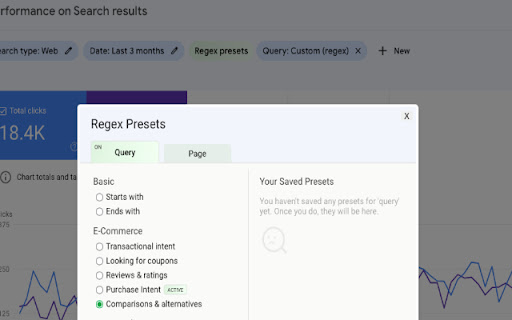
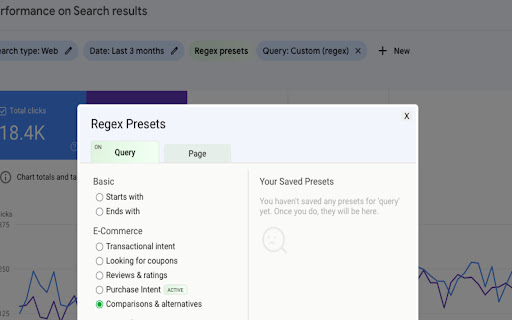
Better Regex in Search Console is the ultimate time saver for SEO professionals 😎 Better Regex in Search Console is the ultimate time saver for SEO professionals. This simple yet powerful Chrome extension comes with out-of-the-box useful regex presets you can use in the "Search results" report in Google Search Console, and even lets create and save your own for later use. Built-in Regex Presets: save time and copy-pasting with the built-in presets specially crafted for SEO professionals. Save Your Own Presets: The built-in presets not good enough for you? no problem! add and save your own presets for repeat use. Seamless Integration with Google Search Console: Better Regex In GSC seamlessly integrates with the Search Console UI while providing enhanced regex functionality.

Gandalf
Gandalf is a powerful Chrome extension designed to transform your Google Search Console experience. Gandalf is the ultimate Chrome extension for digital marketers and SEO professionals who want to find the needle in the haystack of their Search Console data. Just as the wizard Gandalf guided the Fellowship through Middle-earth, our extension guides you through the complex landscape of your website's performance in search results. Precise Keyword Categorization: Uncover your most impactful keywords with Gandalf's advanced algorithms. Our extension helps you identify and categorize your top-performing search terms, providing invaluable insights into your site's visibility. Custom Metric Filtering: Dive deep into your data with customizable filters. Sort and analyze your search performance based on crucial metrics such as Impressions, Click-Through Rate (CTR), and Position. This granular control allows you to focus on the metrics that matter most to your SEO strategy. Intuitive Data Visualization: Transform raw data into actionable insights with Gandalf's user-friendly interface. Our extension presents your Search Console data in clear, easy-to-understand visualizations, helping you spot trends and opportunities at a glance. Time-Saving Automation: Let Gandalf do the heavy lifting. Our extension automates the tedious task of data sorting and analysis, freeing up your time to focus on strategy and implementation. Regular Updates: Stay ahead of the curve with frequent updates that ensure Gandalf remains compatible with the latest Search Console features and provides cutting-edge analysis tools. Whether you're a seasoned SEO wizard or just beginning your journey into the realm of search optimization, Gandalf is your trusted companion in navigating the complexities of Search Console data. Don't just guess at your site's performance – let Gandalf illuminate the path to SEO success. Download Gandalf today and discover what's really going on in the depths of your search data!

SEO Search Simulator by Nightwatch
Simulate search engine queries from any location on Google and easily check and track your website or your competitor's rankings. Simulate unbiased search engine queries from any location on Google and effortlessly check the rankings of your website or your competitors'. Nightwatch's search simulator is an indispensable tool for SEO professionals seeking a straightforward and effective solution for rank tracking, enabling you to monitor website positions in SERPs (search engine results pages). For those conducting numerous searches, encountering rate limits or captchas can be a challenge. For a more robust solution that surpasses browser and extension limitations, explore the Nightwatch app (https://nightwatch.io).

Agital - GSC Calculations
Calculates percentage change for clicks, impressions, CTR, and position in GSC. Adds Google Algorithm Updates to Timeline graphs Take control of your organic traffic performance reporting with Agital’s GSC Calculations extension. This Chrome extension calculates and displays percentage changes for clicks, impressions, CTR (Click-Through Rate), and position directly within your Google Search Console dashboard. Now with version 1.6, you can also view percentage changes directly in the tables below the graph. We also included the ability to see when Google rolled out algorithm updates displayed on the GSC graph timeline interface, giving you valuable context for your SEO performance trends. With instant calculations, you get immediate percentage change insights for key metrics, saving valuable time by avoiding manual calculations. The extension integrates seamlessly with Google Search Console, making it effortless to track and analyze your SEO performance. Designed for efficiency and accuracy, the Agital - GSC Calculations extension boosts your productivity by providing precise and reliable calculations, all in one user-friendly interface. Agital, a leading digital marketing agency specializing in SEO, PPC, Social, and performance analytics tools, brings you this innovative solution to simplify and enhance your SEO reporting efforts. v1.3 added support for more international number systems and their usage of spaces, commas, and periods. v1.4 introduces percentage change calculations in tables and an option to view Google algorithm update dates on the graph timeline interface. v1.5 adds latest Google Core Update date. v1.6 adds June 2025 Google Core Update date.

Google Search Console Enhanced Analytics
Google Search Console Enhanced Analytics is a simple, time-saving extension that enhances your analysis. Google Search Console Enhanced Analytics let’s you easily select and compare dates, generate percentage changes or generate search volumes. It enhances your analysis! Features - Select a custom standard period (either in the UI or in the extension) - Do a quick comparison - Do a custom comparison - Generate percentage changes - Generate search volumes - See exact metrics above the chart - Export all generated data to Excel Privacy Your privacy is extremely important to me. This extension does not store any data. Does this extension need Google Search Console property access? No. The only thing this extension does to calculate data is use the info inside your browser. You do not need to give access to your Google Search Console property and I don’t store / send any data to a server. How do you save my DataForSEO credentials? To make sure you don’t need to login every time you open my extension, I give you an option to save your data. Save data, don’t remember me > Your credentials are saved in the session storage of your browser and are kept there during your browsers session. Save data, remember me > Your credentials are saved in the local storage of your browser and are kept there until you delete your data inside the extension or remove the extension.
