
mccljpkenpobhgohcjkdbfghagblbdni
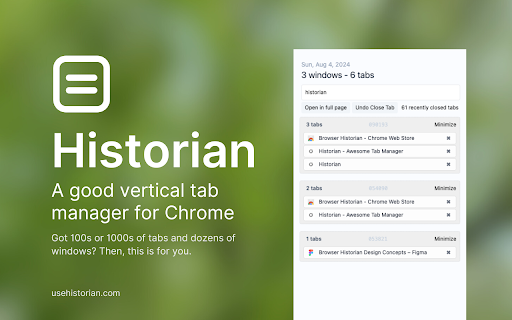


A per-window sidebar for searching, switching, and organizing tabs with groups, pinned tabs, and fast actions. Historian is a sidebar for managing tabs in Chrome. It is built for people who keep a lot of tabs open and want a simpler way to find, switch, and organize them. - View tabs for the current window in a clean sidebar. - Search tabs by title or URL. - See pinned tabs and Chrome tab groups in one place. - Switch to a tab with one click. - Use quick actions to close, pin, mute, duplicate, reload, or move tabs. - Find matching tabs from other windows when you search. - It keeps the current window front and center. - It makes large tab sets easier to search and clean up. - It gives you a simpler alternative to the default tab strip. - Install Historian. - Open it from the Chrome side panel. - Search, switch, and organize tabs as you browse. Historian helps you stay on top of busy browser windows without getting in the way.

Visual bookmarks
Simple speed dial bookmarks page, including search, add, edit, delete and dragging bookmarks. The visual bookmarks page replaces the default new tab. Bookmarks page, includes searching, adding, editing, deleting and dragging bookmarks. The ability to generate thumbnails and use your own background image. Great possibility of customization and using your own styles. Ideas, questions and suggestions https://github.com/k-ivan/visual-bookmarks-chrome/discussions Bugs and future requests https://github.com/k-ivan/visual-bookmarks-chrome/issues

Tabbiy - Auto Group & Sidebar Tab Manager
The ultimate sidebar tab manager! Auto-group, customize titles, save, hibernate & switch tabs fast for a clutter-free browser. 🚀 Tabbiy: The Ultimate Sidebar Tab Manager & Auto-Organizer Tabbiy is an elegant sidebar tab manager designed to end the headache of having too many tabs. By providing a powerful vertical tab list and auto-grouping features, Tabbiy turns your cluttered browser into an organized, high-performance workspace. Whether you want to reduce Chrome memory usage or find a specific page in seconds, Tabbiy is the productivity tool you’ve been looking for. ✅ End Tab Clutter: Transform a messy horizontal tab bar into a clean, searchable sidepanel list. ✅ Smart Auto-Grouping: Automatically group tabs by domain or custom rules to keep related tasks together. ✅ Save Memory & CPU: Hibernate tabs or move idle pages to a "Staging List" to drastically boost browser speed. ✅ Custom Tab Titles: Rename any tab to eliminate vague labels and identify your content at a glance. ✅ Fast Switching: Use shortcuts to jump between current and recent tabs instantly, perfect for cross-page comparison. ✅ Pro Data Portability: Export your tab lists and titles in JSON, HTML, CSV, or Markdown (Pro). 1️⃣ Sidepanel Management (ALT+D): A dedicated vertical interface for grouping, saving, hibernating, and drag-and-drop reordering. 2️⃣ Auto-Grouping: One click to categorize tabs by domain. Pro unlocks 3 sets of custom rules, fixed colors, and unlimited groups. 3️⃣ Tab Hibernation: Suspend active tabs to free up RAM and quickly resume access whenever you need them again. 4️⃣ Tab Staging (Saving): Move temporarily unused tabs to a staging list to clear your interface while maximizing memory release. 5️⃣ Rename Tabs: Easily edit any tab title directly from the list to clear up vague labels. Your custom titles are saved automatically for quick identification. 6️⃣ Multi-Format Export: Free JSON export; Pro version unlocks CSV, HTML, and Markdown for professional backups. 7️⃣ Quick Switch (ALT+E): A lightning-fast shortcut to toggle between your current page and the last opened one. 8️⃣ Dark & Light Themes: Beautifully designed UI that matches your system theme for a comfortable visual experience. 💬 How do I disable auto-grouping? 🌲 Simply click the "Auto" button at the bottom of the sidepanel to turn off grouping and clear all current groups. 💬 How can I group tabs more effectively? 🌴 Go to "Settings" -> "Grouping Rules" to define custom patterns, then click "Apply" to see the magic happen. 💬 Does it support collapsing groups? 🌵 Currently, we focus on a "visible at a glance" design to help you find tabs faster without extra clicks. 💬 Can I use individual features without Auto-Grouping? 🍀 Yes! All features—sidepanel, hibernation, saving, and renaming—work independently to fit your specific workflow. 💬 Is Tabbiy free to use? 🌳 Yes! The core features—including the vertical Tab Management, auto-grouping, tab hibernation, and tab saving—are 100% free forever with no ads. Pro version is entirely optional for power users who need advanced automation. ✅ Status prompts for Sidepanel list buttons have been updated to top-right overlays for better visibility. ✅ Optimized tab loading status within the list to enhance loading behavior. ✅ Added an entry for the "Close Duplicate Tabs" function to the context menu. ✅ Removed redundant shortcut configurations for closing the Sidepanel. ✅ Redesigned feedback form for a smoother and more intuitive submission experience. ✅ Optimized Welcome Page styling and added skeleton screen preloading for a smoother visual experience. 🍺 Productivity starts with a clean browser. Tired of messy tabs slowing you down? Install Tabbiy today and refresh your browsing experience! 📨 Questions or Feedback? We’d love to hear from you: support@tabbiy.top Crafted with ❤️ by Tyrus Labs.

Vertical Tabs & Bookmarks
Vertical grouping of tabs, quick search in favorites and in the history of page views Convenient navigation through tabs, search for open tabs, search in favorites. + Add tags for quick search. Easy interface, and fast speed version 1.14.* - stable version Added history. Increased speed and improved styles. 1.14.3 Improved response speed. 1.14.4 Fix bugs. 1.14.5 Styles and functional. 1.14.6 Fixed search in bookmarks. 1.14.7-8 Added sorting tabs, removing duplicate bookmarks and customizing the interface. 1.14.9 fix bugs 1.14.10 Number of open tabs added to the icon Button added to tabs, add remove tab in bookmarks Second click disables tag 1.14.11 1) increased window height 2) added tabs animation 3) scroll saved in tabs

Vertical SidePanel Tab Group Manager
Manage tabs and groups in side panel. Support multi-level group, tab search, tab rename, recent used/closed tab, saving bookmarks... This Extension helps you manage your tabs and groups more structurally in the vertical sidebar. Features are as follows: 1. Display tabs and groups vertically in the sidebar, supporting batch selection and drag order. 2. Support cascading management between groups, allowing you to drag/drop/right-click to set up subgroups. 3. Support fuzzy searching for tab titles and URLs. 4. Support lists of recently accessed tabs and recently closed tabs. 5. Right-click on the tab menu: 1. Quick grouping: Create new groups, remove from groups, and move to other groups in the current window. 2. Rename: Support changing the name of the tab. 3. Move window: Support moving the tab to a new window or existing other windows, with target window previews. 4. Other common tab functions: Refresh, copy, close, create new, copy link, save bookmark. 6. Right-click on the group menu: 1. Change group name and color. 2. Subgroup management: Quickly set parent group, leave current parent group, remove subgroup, retain group (allowing groups without tabs to be retained). 3. Group move window: New window or existing other window, with target window previews. 4. Save bookmark: Save all subgroups and tabs in the group to a single bookmark folder. 5. Other common group functions: Close group, ungroup. 7. Settings: 1. Choose between "Light" and "Dark" themes manually. 2. Choose between "Normal" and "Slightly Smaller" font sizes manually. 3. Choose between "Custom" and "System Automatic" group colors manually. Changelog: Version 1.1.6: 1. Fix: Improve some user experience. Version 1.1.5: 1. Feature: Added customization for predefined group colors 2. Feature: Added quick actions to locate current tab and expand/collapse all groups 3. Feature: Added quick creation of new tabs within groups Version 1.1.4: 1. Fix: Resolved various experience issues. Version 1.1.3: 1. Feature: Group menu supports nested sub-groups for indentation display. Version 1.1.2: 1. Fix: Improve some user experience. Version 1.1.1: 1. Feature: Automatically open the right-click group menu after creating a new group/subgroup.. Version 1.1.0: 1. Feature: Added cascading management for groups. Version 1.0.7: 1. Fix: Resolved various experience issues. Version 1.0.6: 1. Feature: Added right-click option to expand/collapse all groups. 2. Fix: Resolved various experience issues. Version 1.0.5: 1. Feature: Saving bookmarks supports selecting the target folder. Version 1.0.4: 1. Fix: Resolved various experience issues. Version 1.0.3: 1. Fix: Optimized the drag-and-drop experience for moving tabs and groups. Version 1.0.2: 1. Feature: Supports multi-select of tabs; allows batch operations for grouping, moving windows, and closing tabs. 2. Fix: Resolved various experience issues.
