
mbopgebldggceembcmicigfajmnmjlfo
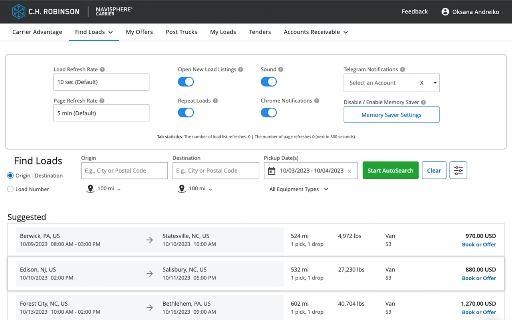

Let us help you find the loads you need faster and easier! Google Maps Plan out your route with a single click, no matter if you have a one-pick-one-drop or a one-pick-ten-drops shipment. Automatic RPM Calculator For each shipment that you select, we will automatically calculate the rate per mile so that you can easily compare prices and see if the offer meets your target price. Notifications Each search window you can individually choose to have new loads automatically opened in a new tab, receive sound notifications, Chrome notifications, or Telegram notifications. We are an independent company, and we are not affiliated with or controlled by C.H. Robinson in any way.

NATVM Manager
Auto upload data of NATVM website, it take data from excel sheet and put into NATVM website for, it makes easy and very fast data uploading Application supports the following browsers: Chrome (latest) 1. NATVM Manager Filler is not official India government software, app and extension. 2. If you use this extension, then it will be your responsibility that how you are using this extension. 3. The main purpose of this extension is to make Data Entry easy, but if you use this extension to upload data unofficially, then it will be your responsibility. NATVM Manager will not have any responsibility in this.

bexio Time Tracking Templates
This extension allows saving and loading of form data within the bexio time tracking page. This extension improves handling of time tracking in bexio. How? It enables the user to save the form data as templates. The templates are placed as buttons directly on the time tracking page. So with one click the form will fill out all the values you saved earlier. Sidebar These templates are also available in the panel within the browsers sidebar. In the sidebar panel you can manage the templates (edit/delete) as well as reach out to further features: ManicTime (https://www.manictime.com) You can also import entries from ManicTime and use features like, Time, Date, Billable, Notes etc. to directly apply Time entries, including selecting a template for all the other values. Data is yours only All the data is saved in your browsers storage, they are not accessible from outside nor are they sent outside of your browser. FULL FEATURE OVERVIEW & FEATURE REQUESTS & ISSUE REPORT: https://github.com/SoulcodeAgency/bexio-chrome-extension CHANGELOG: https://github.com/SoulcodeAgency/bexio-chrome-extension/blob/main/CHANGELOG.md

ChatGPT for Google Search
ChatGPT Assistant for Web Search is a cutting-edge browser extension that harnesses the power of OpenAI's ChatGPT to revolutionize your search experience, providing you with AI-generated answers, insights, and suggestions directly on the search results page. Seamless Integration: The ChatGPT Assistant effortlessly works with popular search engines like Google, adding an intuitive chat interface alongside your search results. This allows you to engage in a dynamic and interactive manner with the AI, helping you find the information you seek quickly and easily. AI-Powered Answers: Driven by OpenAI's advanced language model, ChatGPT, the extension processes your search query and generates accurate, reliable, and detailed answers. This not only saves you time by eliminating the need to sift through multiple web pages but also empowers you with a deeper understanding of the subject matter. Interactive Conversations: Ask follow-up questions, clarify doubts, and request additional information through the chat interface. ChatGPT Assistant facilitates an engaging and interactive search experience, simulating a conversation with a knowledgeable AI companion. User-Friendly Interface: The clean, minimalistic, and intuitive design ensures a smooth and enjoyable user experience. The ChatGPT Assistant helps you focus on getting the information you need without any distractions or unnecessary clutter. Secure and Private: Your API key and search queries are stored locally on your device, ensuring that your data privacy is maintained. The extension does not share your data with any third parties. Customizable Options: Configure the extension to use your own ChatGPT API key and manage other settings (coming soon) to personalize your experience. Tailor the ChatGPT Assistant to your preferences for a truly unique search experience. To begin, simply install the ChatGPT Assistant for Web Search extension, provide your ChatGPT API key, and enjoy a smarter, more efficient, and engaging search experience that will change the way you interact with the internet. Note: This extension requires a valid ChatGPT API key, which can be obtained from the OpenAI website. Usage of the ChatGPT API may be subject to OpenAI's pricing and usage limits. Please ensure you are aware of these limitations before using the extension.

Auto Bookmark
Keeps a pinned bookmarks page open to prevent the browser window from closing when the last tab is closed. [Overview] A simple extension designed to prevent browser windows from accidentally closing when you close your tabs. ・Automatic Pinning: Automatically opens and pins the bookmarks page (or favorites page) at the far left of every normal window. ・Prevent Window Closure: Even if you close the last active tab, the pinned bookmarks page remains open, preventing the entire window from closing. ・Duplicate Cleanup: If multiple bookmarks pages accidentally open, it automatically cleans them up and keeps just one. The extension monitors tab states in the background to ensure that at least one pinned bookmarks page is always safely maintained.
