
mboblcadblfhhmalejaafnikfmkdanfb
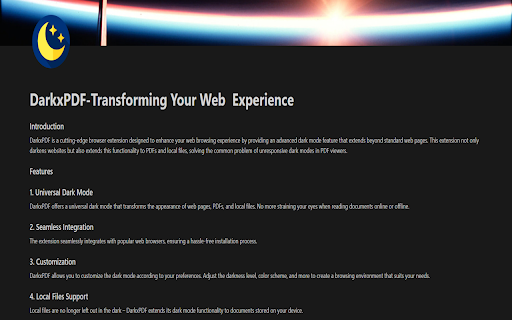
Enable dark mode for web pages and PDFs. DarkX PDF is the must-have browser extension that enhances your online experience with dark mode, and the best part - it's completely free! - Universal Dark Mode: DarkX PDF brings dark mode to the entire web. With a single click, it transforms the appearance of web pages, making them easy on the eyes, reducing glare, and enhancing readability. - Enhanced PDF Viewing: Say goodbye to eye strain during late-night reading or study sessions. DarkX PDF extends its dark mode magic to PDF documents, ensuring your reading experience is as comfortable as possible. - Reduce Eye Strain: DarkX PDF significantly reduces the eye strain caused by prolonged screen exposure, making it ideal for late-night browsing and reading. - Boost Productivity: Dark mode isn't just about aesthetics; it can help you focus better and work more efficiently, especially in low-light conditions. - Universal Compatibility: DarkX PDF works on most websites and PDFs, ensuring that you can enjoy dark mode across a wide range of content. - User-Friendly: It's easy to use with a single click. DarkX PDF simplifies dark mode activation and customization, so you can enjoy your online content the way you want. - Free and Convenient: DarkX PDF is completely free to install and use. You get all these fantastic features without spending a dime. While DarkX PDF excels on most websites , it may exhibit minor quirks on websites with pre-existing dark mode functionality or those primarily using dark color themes. We're continuously working to improve compatibility for a smoother experience. Install DarkX PDF today and enjoy a more comfortable and productive online experience. It's the ultimate dark mode solution for web pages and PDFs, and it's all about making your browsing better.

True Dark Mode for PDF Viewer
Advanced PDF viewer with dark and sepia modes, smart invert, and site-based controls. Transform your PDF reading experience with a custom PDF viewer built for comfortable reading. This extension replaces the default browser PDF tab with its own viewer, giving you true dark mode, smart image preservation, sepia mode and cleaner control over how PDFs look and behave. • True Dark Mode Darkens pages while preserving images and charts. • Smart Invert Keeps images, charts, and diagrams readable while preserving the overall dark theme. • Sepia Reading Mode Switch to a warmer sepia mode, with optional paper texture for a softer reading experience. • Sharp Rendering High-DPI rendering and re-rendering on zoom help keep text clear and crisp. • Works with Web and Local PDFs Supports both online PDFs and local files, with onboarding for file access when needed. • Per-Site Control Disable the extension’s visual features for specific websites without losing viewer functionality. • Privacy-First Runs locally in your browser. Your PDFs are not uploaded anywhere.

PDF Dark Mode – Night Mode for PDF Reader
Read any PDF in dark mode instantly. Smart AI-powered PDF Viewer for Chrome. Reduces eye strain with brightness & sepia filters. Read any PDF in dark mode completely offline! PDF Dark Mode Viewer is a smart, AI-powered extension that reduces eye strain, eliminates blinding white screens, and makes reading long documents pain-free. Unlike simple color inverters, our intelligent Smart Night Mode detects images and diagrams, keeping them natural while turning the background a pleasing dark color. Core Features: Smart Night Mode: Protects your eyes without ruining PDF images or graphics. Total Control: Fine-tune Brightness, Contrast, Saturation, and Sepia to match your room's lighting. Instant & Automatic: Works immediately when you open any PDF file in Chrome. Local File Support: Works offline with PDFs saved on your computer (Important: You must enable "Allow access to file URLs" in the extension settings). Blazing Fast: Zero lag, lightweight, and uses minimal memory. Whether you're studying late at night, reading research papers, or just prefer a dark theme, this is the only PDF viewer extension you will ever need. Say goodbye to eye fatigue and hello to comfortable reading!

PDF Dark Theme
Applies a dark theme to your PDF viewer ⚠️IMPORTANT⚠️: This extension won't work until you give it permission to access file URLs. You can do so by heading to your browser's extension page and enabling file access there. ⚠️IMPORTANT⚠️: This extension will only work on PDFs that you have installed locally on your computer. If you want it to work on PDFs you find online as well i.e. http://www.africau.edu/images/default/sample.pdf, I recommend you use Arshpreet Buttar's DarkPDF extension instead @ https://chrome.google.com/webstore/detail/darkpdf/cfemcmeknmapecneeeaajnbhhgfgkfhp?hl=en. ⚠️IMPORTANT⚠️: Your PDF viewer should be set to light theme for this extension to work. If you try to open up a light PDF document in a dark PDF viewer, this extension is going to invert the colors for both of them. Leaving you with a dark PDF document and a light PDF viewer. You need to have both of a light PDF document and a light PDF viewer for the desired results. EDIT: As pointed out in the reviews, you can't change the theme for chrome's default PDF viewer without changing the theme of your browser (as of May 2024 at least). I use the Vimium C PDF Viewer chrome extension instead, which gives me a different PDF viewer that can have a theme independent of the browser. Put chrome in dark theme, put vimium C pdf viewer in light theme, and it should work out. You can find that extension here. https://chromewebstore.google.com/detail/pdf-viewer-for-vimium-c/nacjakoppgmdcpemlfnfegmlhipddanj This extension is a fork of Buttar's extension (from above) except it's one file only. EDIT: I ended up switching to Buttar's extension myself, but in case people still want this one I'll leave it up. If anyone wants to use my logo, it's public domain no attribution required (no warranty). Code is GPLv3.

PDF Dark Mode
Dark mode toggle for PDF files. This extension is currently in beta, so it may have bugs. It serves to create a Dark Mode for PDF files viewed in Chrome. Due to the limitations of Chrome's PDF viewer, it can only invert colors and apply broad filters. The app currently enables a standard inversion mode, and a sepia mode that gives off "kindle dark mode" vibes. It is entirely open source, so please feel free to suggest features, report bugs, or make contributions using the support URL on this page. Support future updates by donating at https://buymeacoffee.com/adamcodes Update Beta 0.5: Fixed a bug where no PDF would be detected due to how Chrome now renders PDFs as of December 2025. Added hotkeys to toggle dark and sepia modes. Please try them out! Thanks to those of you who emailed me to let me know something broke :)
