
dhhcfpbikhlkoicblakagcmfpnnkhkpl
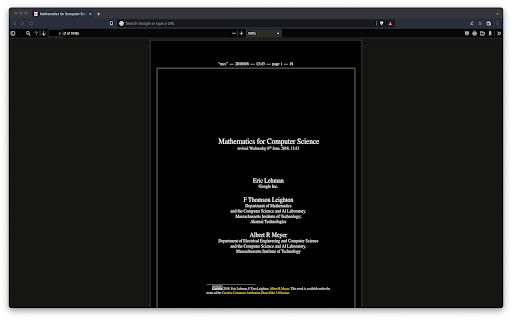

Applies a dark theme to your PDF viewer ⚠️IMPORTANT⚠️: This extension won't work until you give it permission to access file URLs. You can do so by heading to your browser's extension page and enabling file access there. ⚠️IMPORTANT⚠️: This extension will only work on PDFs that you have installed locally on your computer. If you want it to work on PDFs you find online as well i.e. http://www.africau.edu/images/default/sample.pdf, I recommend you use Arshpreet Buttar's DarkPDF extension instead @ https://chrome.google.com/webstore/detail/darkpdf/cfemcmeknmapecneeeaajnbhhgfgkfhp?hl=en. ⚠️IMPORTANT⚠️: Your PDF viewer should be set to light theme for this extension to work. If you try to open up a light PDF document in a dark PDF viewer, this extension is going to invert the colors for both of them. Leaving you with a dark PDF document and a light PDF viewer. You need to have both of a light PDF document and a light PDF viewer for the desired results. EDIT: As pointed out in the reviews, you can't change the theme for chrome's default PDF viewer without changing the theme of your browser (as of May 2024 at least). I use the Vimium C PDF Viewer chrome extension instead, which gives me a different PDF viewer that can have a theme independent of the browser. Put chrome in dark theme, put vimium C pdf viewer in light theme, and it should work out. You can find that extension here. https://chromewebstore.google.com/detail/pdf-viewer-for-vimium-c/nacjakoppgmdcpemlfnfegmlhipddanj This extension is a fork of Buttar's extension (from above) except it's one file only. EDIT: I ended up switching to Buttar's extension myself, but in case people still want this one I'll leave it up. If anyone wants to use my logo, it's public domain no attribution required (no warranty). Code is GPLv3.

Chrome Web Store
Add new features to your browser and personalize your browsing experience.

PDF Viewer for Vimium C
This viewer uses an unofficial version of PDF.js project to show content of PDF files, and actively requests Vimium C's support. The PDF.js is v2.15.349+, up-to-date on 2022/08/08 and built from commit 40f9f7e9097e1168e98f1e2987726c5c31693617 of https://github.com/mozilla/pdf.js. And my modification is up to https://github.com/gdh1995/pdf.js/commit/c785e93bb11febb98b373db74aca358d8ac086fc. Recent update: 1. (2022/08) This version turns off the experimental feature of "using iframe to show top-frame PDFs" by default, because in some edge cases (e.g. on some web servers) it would fail in accessing PDF files. While you may re-enable it as you like. There should be no other difference after a PDF file gets showing. 2. (2022/08) update the version of PDF.js 3. (2022/04) fix some issues of Vimium C's `scroll*` and `Marks*` commands.

Vimium C - All by Keyboard
A keyboard shortcut tool for keyboard-based page navigation and browser tab operations with an advanced omnibar and global shortcuts Vimium C is an open source browser extension that provides keyboard-based inner-page navigation, browser tab operations, and an enhanced search panel, so you may take full advantages of your browser without a mouse or touchpad. It supports all original commands of Vimium and some new useful commands (a full list can be seen in a help dialog in the Vimium C Options page). And it can map a same key sequence to different commands for different websites (and/or for different active elements in page). For example: * press `f` to hint all clickable elements of the current web page * press `o` to show a search panel ("Vomnibar", a safe iframe) to search in your history, bookmarks, opened tabs and configured search engines, and you can even remove a history or tab by selecting a search result and pressing Shift+Delete * press j, k, h, l to scroll down/up/left/right on web pages * press "/" to search for text; press "v" to enter Visual Mode (just like VIM) * press Shift+J, Shift+K, `g0`, `g$` to switch to the previous/next/first/last tab * press `x` to remove a tab, and Shift+X to restore recently closed tabs (sessions), and many other commands * command repetition: for example, pressing `5X` (`5`, Shift+X) will restore 5 recent closed tabs * configure key mappings to bind Vimium C's tens of commands to other key sequences, and add options to switch command behaviors * apply block lists and allow lists of key mappings on configurable special websites and URLs It can copy any selected text and current tab's title and URL to the system clipboard, and read the clipboard to search the copied text using a specified search engine. It can also enable/disable websites' image loading and even JavaScript execution, if you trigger its command "toggleCS". This functionality requires a permission of "Change your settings that control websites' access to features such as cookies, JavaScript ...", and Vimium C promises that it won't do any thing secretly, but only act on what key sequences you press. It will provide 8 "global" browser shortcuts: createTab, previousTab, nextTab, reloadTab, and some others, so you may bind some key sequences to them, and then these commands will work even when a page has no focus (e.g. when the browser address bar is focused). It will register an omnibox keyword "v", and if you input "v" and press Space on the browser address bar (omnibox), you can do searches for history, bookmarks and tabs just like you're inputting on its Vomnibar. It supports encoded URLs, and you can search Chinese, Japanese and Korean words in URLs of history and bookmarks. You may configure it to decode URLs in a charset of your locale . It will download all synced settings from the Internet during the first installation, and you may enable/disable the syncing on certain computers. If you have any exclusion rule for key mappings, it will monitor browser tab URL changes to re-check whether a new URL matches your URL pattern list. For more information about release notes, rebinding your keys and how to use many of Vimium C's features, please see here: https://github.com/gdh1995/vimium-c#readme , or https://gitee.com/gdh1995/vimium-c#git-readme . There're also wiki pages. V2.xx now uses the Manifest V3 feature on your browser, and the minimum required version has been increased to Chromium 102 on Vimium C v2.11.x. In the future, Vimium C v2.14+ may require Chromium 109+, so that it will work faster and more robustly. # Declaration for Applicable Regions When people in "all regions" visit this store, Vimium C and other extensions published by [gdh1995](https://github.com/gdh1995) are always available. But This behavior is only to make these extensions easier to use, but DOES NOT EXPRESS OR IMPLIED the author (gdh1995) "agrees or has no objection to" that "Taiwan" can be parallel to "China", which was an **inappropriate** status quo in the stores' pages on 2021-06-03. According to [The Constitution of the People's Republic of China](http://www.npc.gov.cn/npc/c505/201803/e87e5cd7c1ce46ef866f4ec8e2d709ea.shtml) and international consensus, Taiwan is an inalienable part of the sacred territory of the People's Republic of China.

Dark Reader
Dark mode for every website. Take care of your eyes, use dark theme for night and daily browsing. This eye-care extension enables night mode by creating dark themes for websites on the fly. Dark Reader inverts bright colors to make web pages high contrast and easier to read. Adjust brightness, contrast, the sepia filter, font preferences. Enable dark mode on every web page or give websites a sepia tone. Enable or disable Dark Reader for specific websites, automatically sync with system dark mode, or detect already dark websites and leave them unchanged. This is the original Dark Reader extension. Since 2014, we continuously evolve alongside modern web technologies to deliver fast and reliable dark mode support for people sensitive to bright light. By installing the extension you agree to these terms of use https://darkreader.org/terms/
