
mbddbbpmiaolaaaibacpldhkndckndib

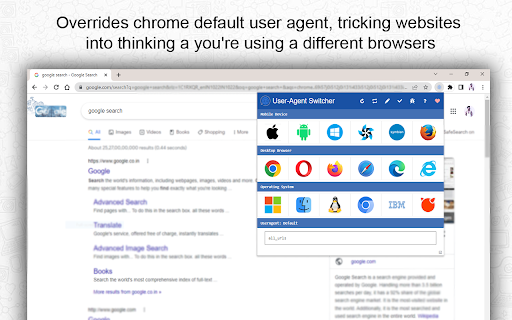
From the toolbar popup, you can easily change the user agent of your browser. There are 26 well-known user-agent strings available. Please open the toolbar popup and select the desired user-agent button to use this add-on. The first row of the toolbar popup is for user agents for mobile devices, the second row is for user agents for desktop devices, and the final row is for selecting operating systems. Please force all open tabs to refresh after choosing a user agent. Please fill out the bug report form on the addon's site (https://www.downloadhub.cloud/2023/01/user-agent.html) to report bugs.

User Agent Switcher
Explore User Agent Switcher to set a random user agent for the browser from a list or to change browser string to a custom value. Boost Your Browsing Power with Our Extension! Take control of your browsing experience with our powerful random user agent switcher and manager. This innovative tool empowers you to modify how websites perceive your browser, opening up a world of customization and possibilities. Whether you’re a developer, tester, or privacy-conscious web surfing, this extension is your gateway to seamless web navigation. 📌 💡 Why Use a User Agent Switcher Chrome Extension? This chrome extension is essential for anyone who wants to: 🌐 Test websites on different devices without switching hardware. 🌐 Bypass website restrictions based on your browser type or OS. 🌐 Ensure your online identity is secure and anonymous. 🌐 Simulate different browser environments effortlessly. ✨ Key Features 1️⃣ Customizable Settings: Modify and save strings for future use. 2️⃣ Easy Switching: Switch between multiple values in just a few clicks. 3️⃣ Privacy Protection: Randomize your browser identity with the random string. 4️⃣ Developer-Friendly: Debug and test websites across diverse platforms with ease. 5️⃣ Broad Compatibility: Works seamlessly as a user agent switcher for Chrome on any device. 📍 Who Can Benefit from an Extension? The user agent switcher and manager is ideal for: 💻 Developers: Test web applications in different environments. 💻 SEO Specialists: Analyze how search engines perceive your site. 💻 Privacy Advocates: Shield your browsing identity from trackers. 💻 Marketers: Evaluate ad targeting strategies effectively. ☝️Tips for best performance 📌 Pin feature to get user smart agent and manager for faster access. 📌 Combine the extension with VPN services for an added layer of privacy. 📌 Enable advanced logging to debug browser behavior during testing scenarios. 📌 Pair with responsive testing tools for seamless development across device types. 🛠️ How It Works ✅ Install the user smart agent manager and switcher from the Chrome Web Store. ✅ Open the extension from your toolbar. ✅ Select or input your desired configuration. ✅ Instantly change your browser identity to suit your needs. 🚀 🔒 Enhanced Privacy Features Stay ahead in the privacy game with: 🏆 Random Selection: Use the random user agent switcher and manager for varied browsing identities. 🏆 Privacy: Conceal your real identity with features like clear visitory identity chrome. 🏆 Anonymous Browsing: Blend in with our browser user agent chrome options. 🧪 Advanced Use Cases Explore advanced functionalities with our extension: 📋 Test how sites react to various browser agent strings. 📋 Bypass compatibility issues using the tools. 📋 Debug cross-platform applications without needing multiple devices. 📋 Use the user smart agent switcher and manager for dynamic switching. 🌟 Why Choose Our Random User Agent Switcher and Manager for Chrome? Here’s what sets us apart: ⚡ Friendly Interface: Navigate with ease and efficiency. ⚡ Comprehensive Management: Access all settings via the user smart agent manager and switcher. ⚡ Speed & Performance: Experience lightning-fast identity switching. 🦉 FAQs ❓ What is a user agent switcher? 🤓 An extention lets you change the string your browser sends to websites, helping you customize your browsing experience. ❓ Can I use this to test websites? 🤓 Absolutely! The is a must-have tool for developers and testers. ❓ Does it support randomization? 🤓 Yes, the random user agent switcher and manager ensures privacy by randomly altering your user agent. 🔒 📋 How to Get Started 1️⃣ Download the user agent switcher chrome extension. 2️⃣ Configure your settings using the browser agent string tool. 3️⃣ Test, browse, and enjoy unrestricted access. 💡 Tips for Ultimate Usage 🔄 Use the random pick feature to stay anonymous. 🗂️ Save frequently used strings for quick access. 🖥️ Experiment with various browser agent strings to explore new possibilities. 🔗 Compatibility & Requirements This extention for Chrome works on: 🪟 Windows 🍎 Mac (supports change browser string mac chrome) 🐧 Linux 🤖 Android (via Chrome) No additional setup is required. Just install and go! 🚀 🟢 Pros 🌟 Intuitive interface that's beginner-friendly yet powerful for advanced specialists. 🌟 Optimized for speed with minimal performance impact on your browser. 🌟 Lightweight installation with no need for additional software. 🌟 Built with privacy and security in mind, ensuring no data leaks. 🌟 Regular updates to enhance compatibility and introduce new features. 🏁 Final Thoughts Take your browsing to the next level with the extension. Whether you're a tech enthusiast, privacy-conscious person, or web developer, this extension is your ultimate toolkit to clear visitory identity chrome. Download it today and experience the web like never before.

Switch UA PRO
Take control of your browsing by easily changing your User-Agent with what you want. Selection mode available: Manual, Auto, Random With this extension you can choose which UA the sites will see. Designed for developer to test the web-view by quickly switching between desktop and mobile versions and for users who want more privacy while browsing. Unlike other similar extensions, this one also intercepts iframes and client-side javascript. Features: - selection of the preferred from a list - customization - auto-switch every N requests or minutes - auto-switch following the "device OS type" rule (to see more, once installed, click on the blue question mark in the popup) Note: - to use the extension while browsing incognito, remember to enable the tick during installation or later in the settings section.

YPP SwiftProxy Changer
YPP SwiftProxy Changer, the ultimate extension. You can seamlessly switch between multiple proxy servers. Introducing YPP SwiftProxy Changer, the ultimate Chrome extension designed to simplify your proxy management experience! With YPP SwiftProxy Changer, you can seamlessly switch between multiple proxy servers, ensuring optimal privacy, security, and browsing freedom. New in Version 0.0.3 - Changed the Change UserAgent button with Configure Browser Settings button where you can select your User Agent and enabled/disable webRTC and iframes protection. New in Version 0.0.2 - Upgraded privacy with WebRTC protection, now fine-tuned and activated alongside headers for enhanced security. - Minor adjustments made to existing protection features, ensuring they are fully functional and up-to-date. - For added safety, iframes are now disabled on all pages if you activate Headers Faking to prevent websites from gathering your information. - Experience dynamic icon changes in Chrome for an immediate understanding of your privacy level: Red Icon: Alert! The sites have access to your real computer details and might obtain your IP address. Yellow Icon: Safer! The sites are blocked from accessing your real IP address, timezone, or language, but can see real browser user agent. Green Icon: Fully Secure! Congratulations, you are 100% protected with complete privacy assurance. 🌍 Instant Proxy Switching: Change your proxy settings with just a few clicks, enabling you to access geo-restricted content and bypass censorship effortlessly. 🔒 Robust Privacy & Security: Protect your privacy by masking your IP address, modifying headers, and altering the window.navigator object, ensuring that websites and third parties cannot track your online activities. 📍 Spoof Location & Timezone: YPP SwiftProxy Changer can also change your location and timezone, making it even more difficult for trackers to pinpoint your real identity. 🕵️ User-Agent Customization: SwiftProxy Changer also allows you to modify your browser's user-agent string, further enhancing your online anonymity. By changing the user-agent, you can disguise your browser and operating system, making it harder for websites and trackers to identify you based on your browsing fingerprint. ⚡ Lightning-Fast Connection: Our extension is optimized for speed, providing you with a swift browsing experience without compromising on security. 🔧 Custom Proxy Configuration: Add, remove your proxy servers with our user-friendly interface, making it simple to manage your proxy list. 🌟 Compatibility & Easy Integration: Our extension works seamlessly with Google Chrome, allowing you to enjoy a hassle-free browsing experience. YPP SwiftProxy Changer is perfect for users who value their online privacy, need to access geo-blocked content, or simply want a more secure browsing experience. Say goodbye to manual proxy configuration and start enjoying the convenience of YPP SwiftProxy Changer today!

User Agent Switcher for Google Chrome™
Quickly and easily switch between popular user-agent strings. Do you want to view your website using different user agents to ensure the website looks good on both desktop/mobile view. Our software User Agent Switcher for Google Chrome™ supports the most popular browsers such as Google Chrome/Firefox/Opera/Safari etc and much more. Check your website for UI issues for mobile/tablet/desktop mode and ensure your website is usable on all 3 platforms. To get started, simply install the software User Agent Switcher for Google Chrome™ Choose the browser you wish to emulate and the operating system The website will load promptly and you can check for errors Ensure your website works for all operating systems and all types of browsers. Its quick and simple to use, this software is also 100% free to use. Disclaimer: Please note this extension is NOT made by Google and is made by an independent development team. All copyrights belong to their respective owners. Google doesn’t endorse or sponsor this Chrome extension. User Agent Switcher for Google Chrome™ is not owned by, is not licensed by and is not a subsidiary of Google Inc.
