
mbclkgocofhagldefeogoionalbpckoo
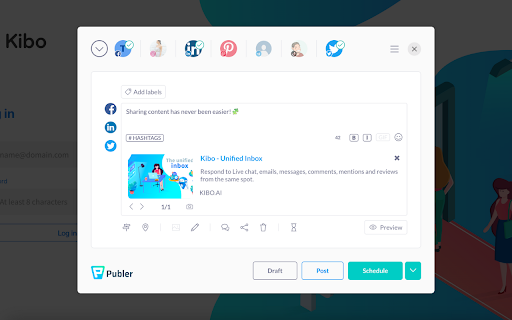


Share content across Facebook, Instagram, Twitter, LinkedIn, and all major social networks in just a few clicks The Publer Chrome extension allows you to create & schedule social media posts without having to open Publer on a new tab. By installing this extension, you will be able to share with your network the article you're reading, a cute picture you find on the internet, or a quote you think it's worth sharing simply by right-clicking on them. To share a webpage or a link, simply right-click on it and select "Share page with Publer". To share a quote or text, simply select it, right-click on it and select "Share selection with Publer". To share an image, simply right-click on the image and select "Share image with Publer". To make it easier for you: - A "share" button will appear below every image that you see on the web - The current webpage you're on will be automatically attached when activating the extension Both these options can be disabled at any time by visiting the extension's settings page.

Replug | URL Shortener & Links Management
Shorten, track and optimize your links with catchy call-to-actions, retargeting pixels, branded links and powerful analytics. Replug is a feature-rich URL shortener tool that lets you create simple short links or branded short links (custom domain short links). Install Replug URL shortener chrome extension to get the most out of the links you share. Click on the extension icon in the toolbar to quickly create the shortened link of the page you’re visiting. Replug is not just a link shortener tool; it’s an all-in-one link management tool that lets you track and optimize your links with catchy call-to-actions, retargeting pixels, branded links, and powerful analytics. Shorten Links: Easily shorten long and unattractive URLs to short links in just a few clicks. Branded Short Links: Create branded short links or custom domain links to build and improve your brand authority. For example, turn any link like “www.thirdpartywebsite.com/link” to “your brand.co/link”. Call-to-actions (CTAs): Add CTAs to your shortened links (even third party links) to collect leads, drive traffic to your website and increase conversions. Edit Short Links: Easily change or edit the destination URL of your short links. Social Media Bio Links: Create beautiful landing pages for your the bio links of Instagram, TikTok and other social media platforms. You can create bio links landing pages from our dashboard by signing in to your account. Custom Widgets: Add 3rd party widgets to your links. For example, opt-in forms from tools like Optinmonster, Sumo, Poptin or your own lead forms. Retargeting Pixels: Replug allows you to add retargeting pixels to your links and retarget anyone who clicks on your links. QR Generator: Easily a smart QR code with every branded short link you create. Advanced Link Analytics: Make informed decisions by analyzing KPIs such as clicks, impressions, conversions, visitors by country, visitors by source, and many more. Password Protected Links: Restrict access to your links by protecting them with passwords. Other replug features include UTM Builder, RSS Automation, Deep Links, Automated Reports, and tags. Visit https://replug.io to create your account and use our advanced features.

Paced Email
Temporary disposable emails by Paced Email. Temp mail with extra privacy and anonymous identity protection. Create disposable or personalised email addresses from your browser with the official Paced Email extension. Anonymously shield your real identity from companies and advertisers who want to track you online. Block and unblock them anytime you want. Boost your productivity by choosing when inbound messages reach you. Batch into daily, weekly, or monthly digests for a calmer inbox. Extension features: • Email field icon to auto-generate burner emails with a single click • Right-click context menu • Single click copy to clipboard • Generate and manage Paced Email inboxes • Account switching

Switchy.io | Advanced URL Shortener
Create short branded links directly from the page you are visiting with the all-in-one links engagement platform! Discover the all-in-one links engagement platform. Never share a link as before! Switch your links into your most engaging support. Shorten, share & track your links in second ⏱ Thanks to Switchy Chrome Extension, you can create custom your links preview, use branded domain, add retargeting Pixels, UTMs tags, notes, tags or even embed widgets to run marketing campaigns. Manage all your links in Folders, run A/B testing campaigns, georedirection & many others features... Ready to switch?

AI Meeting Notes Taker & Screen Recorder
Berrycast screen recorder records, transcribes and generates AI meeting summaries for Zoom, Google Meet and MS Teams. Berrycast is an AI powered screen recording and video messaging platform (used by 100,000+ Users) Our platform allows you to automatically record and transcribe your meeting conversations, then use AI to summarize the discussion. Afterward, share a link of the video with ease via email, instant message, or in your task management tool. Even if you are not the host of the meeting. You can also use Berrycast to communicate more effectively, efficiently, and expressively with everyone using Berrycast for creating and requesting screen recorded video messages as well. Here is how the Berrycast AI meeting notes taker and screen recorder works? ➕Install Chrome extension or Desktop application ⏺️Launch recorder & select recording mode - Screen + Camera or Camera Only ⏹️Stop recording. Video gets immediately uploaded to the cloud. 🎥Now video is available with transcripts (we detect 60+ languages) to review 🤖Use AIWriter to summarize video conversation or use different prompts 🔗 Now share video via direct link, email and social media with transcripts and AI summary Berrycast also supports the following features: 🎥 Screen + Face recorder ✂️ Trim your video 📑 Transcripts (60+ languages) 🤖 ChatGPT powered AIWriter ⬇️ Download your video 📧 Email integrations (Gmail and Outlook) 👀 See who has viewed your video 📺 Video replies and comments More than 100,000 people use Berrycast every day to capture their meetings, record screen and video messages including project managers, marketers, sales people, recruiters, developers and engineers without worrying about note taking. You need to simply launch the recorder and your video will start recording with the transcript. Then once the video is recorded and available to view, you can use our AIWriter feature to do the following to generate meeting notes: 👉 Summarize Conversation - Generate a quick summary out of the entire meeting in one or two paragraphs. 👉 Define Action Items & To-dos - Summarize entire meeting conversation in the form of actions items and to-dos. 👉 Clean my transcript - Simply correct the meeting (grammar and spelling mistakes) transcripts through AI. 👉 Email ready to send - Get ready to send email draft that is pre-written and can be sent immediately. ❓ How do I record screens on Windows & Mac? 👉 You can install the Chrome extension or you can install our desktop application as well. ❓ Is Berrycast a free screen recorder tool? 👉 Yes. We offer a 14 day full feature trial. ❓ Does the Berrycast screen recorder record audio and video? 👉 Yes. Our tool records both system and microphone audio. ❓ Is it possible to record meetings without noticing anyone? 👉 Yes. Our recorder is bot free. Hence nobody would notice your video being recorded. ❓ Can I edit my screen recording videos? 👉 Yes. We offer video trim/edit functionalities. ❓ Can I edit/correct transcripts? 👉 Yes. You can edit and update the transcript to correct your mistakes. ❓ Can I download the transcripts? 👉 Yes. You can download the transcripts. ❓ Can I use AIWriter multiple times? 👉 Yes. You can use the prompts unlimited times. ❓ Can I share videos with others? 👉 Yes. You can copy the direct link, send email and embed it on an external website. ❓ Can I invite my team members to try the Berrycast tool? 👉 Yes. If you are on a pro plan. ❓ Which browsers does your online screen recorder work with? 👉 Berrycast works with Chromium based browsers & Safari.
