
maldceleendeilpfaoafibpahoopnnof

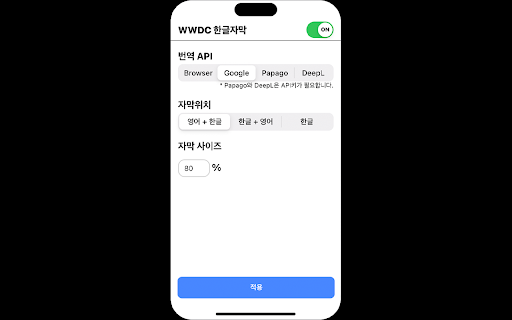
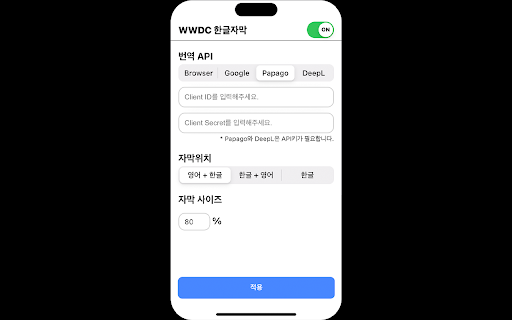

WWDC 한글 자막 띄우기 Apple WWDC 영상 하단 Transcript를 기반으로 한글 자막을 생성해줍니다. (영상에 Transcript가 존재하지 않으면 번역이 불가 할 수 있습니다. 😢) 개인공부용으로 만든 많이 부족한 프로그램이기에 피드백을 주시면 감사하겠습니다 😅 번역은 아래 세 가지 방식 중 선택이 가능합니다. 1. Google API 2. DeepL Free API 3. DeepL Pro API 'GoogleI' 번역을 선택할 경우, 별도의 API Key 발급과정은 필요하지 않습니다. 'DeepL Free API' 또는 'DeepL Pro API'를 선택할 경우 API Key를 발급받아야 합니다. Deprecated : - Chrome browser 자체 번역 (Manifast v3 업데이트로 인해 삭제) - Papago API (네이버에서 지원 종료로 인해 삭제) 번역 기능을 사용하기 때문에 번역이 매끄럽지 않을 수 있습니다. 자막이 화면을 가릴 경우 자막 크기를 조절해보세요. 😊 Apple WWDC: https://developer.apple.com/videos/ Icon Attribution: https://www.flaticon.com/ Language icons created by Freepik - Flaticon Special thanks to Minsson

Video CC translator
Instantly translate video subtitles (subtitles) from platforms like Udemy, Udacity, and YouTube into your preferred language. Translate Udemy, YouTube, and Udacity video lectures into your preferred language! This extension automatically translates subtitles (Closed Captions, CC) in real-time using Google Translate and DeepL. Easily understand foreign-language courses and maximize your learning experience! 💡 Translation Features • Supports all languages provided by Google Translate. • Works in full-screen mode. • Allows subtitle position adjustment. • Customizable subtitle styles. • 🔥 DeepL translation is now available. For any questions or suggestions about this extension, please contact dev.fachory@gmail.com.

Udemy Dual Subtitles - Subtitle Translator
Dual subtitle translator for Udemy. Bilingual subtitles in 50+ languages. Supports Udemy Business, course preview & fullscreen. Udemy Dual Subtitles — the most popular Chrome extension for bilingual subtitle translation on Udemy. Translate Udemy course subtitles into your native language and display two languages at the same time. Over 30,000 learners worldwide use this tool to watch Udemy online courses with dual language captions. Actively maintained for 4+ years with 40+ releases. Udemy Dual Subtitles is a subtitle translator that turns any Udemy course into a bilingual learning experience. It takes the original Udemy captions and adds a real-time translated subtitle underneath — so you can read both languages simultaneously while watching the video. No more pausing to look up words. No more switching between tabs to use a dictionary. Just press play and learn in two languages at once. ✅ Dual Bilingual Subtitles Display translated subtitles alongside the original Udemy captions. See both your native language and the course language on screen at the same time. The original text and translated text appear as two lines — easy to compare and follow. ✅ 50+ Languages Supported Translate subtitles into over 50 languages — one of the widest language selections among all Udemy subtitle tools. Covers European, Asian, Middle Eastern, African, and South Asian languages. See the full list below. ✅ Real-Time Subtitle Translation Translated captions appear instantly as the video plays. No delay, no buffering — just seamless bilingual subtitles synced perfectly with the course content. ✅ Customizable Subtitle Styles Full control over subtitle appearance: font size, text color, background color, font weight, and opacity. Make the dual subtitles comfortable for your eyes. You can even hide the original subtitles and show only the translation. ✅ Download & Export Subtitles Export subtitles in SRT (with timestamps) or TXT (plain text) format. Choose from three export modes: original only, translated only, or bilingual side-by-side. Great for offline review, note-taking, or building a vocabulary list from course content. ✅ Udemy Business Compatible Works perfectly with Udemy Business (corporate/enterprise) accounts. If your company provides Udemy Business for employee training, this extension works the same way. ✅ All Udemy Page Types Supported Compatible with all Udemy page layouts — the classic version, the new Beta version, and course preview pages. We continuously adapt to Udemy's platform updates so you never lose access to dual subtitles. ✅ Fullscreen Support Dual subtitles remain visible in fullscreen mode. No compromise between an immersive viewing experience and bilingual captions. ✅ Smart Language Detection On first install, the extension automatically detects your browser language and sets it as the translation target — no manual configuration needed. It also intelligently detects which subtitle language is currently active on the video player. ✅ Auto-Save Settings Your language preferences and subtitle styles are saved locally and persist across lectures and sessions. Open any new lecture and your dual subtitles appear automatically — set it once and forget. 🎯 WHO IS THIS FOR? 👨🎓 International Students Studying on Udemy but the courses are in English (or another language you're not fluent in)? Dual subtitles let you follow along in your native language while still seeing the original text — perfect for technical courses in programming, data science, web development, design, and more. 👩💼 Working Professionals Taking Udemy courses to upskill but the content is in a foreign language? Don't let language be a barrier. Translate course subtitles in real time so you can focus on the subject matter, not on deciphering every word. 🌍 Language Learners Learning a new language through immersion? Dual subtitles are one of the best tools for language acquisition. Watch real-world course content with both your target language and native language captions, and pick up vocabulary and expressions naturally. 🏢 Udemy Business Teams If your organization uses Udemy Business for employee training, Udemy Dual Subtitles helps multinational and multilingual teams get the most out of every course — no matter what language they speak. 📱 Casual Learners Just want to enjoy Udemy courses without the language struggle? One click and you have bilingual subtitles on any course that has captions enabled. Step 1: Install the extension from Chrome Web Store Step 2: Open any Udemy course and start playing a lecture Step 3: Make sure the official Udemy subtitles (closed captions) are turned on Step 4: Click the Udemy Dual Subtitles extension icon in your browser toolbar Step 5: Select the language you want to translate subtitles into Step 6: Toggle the translation switch ON That's it! Bilingual dual subtitles will appear on the video immediately. Your settings are remembered, so next time you open any lecture, dual subtitles activate automatically. Udemy Dual Subtitles supports translation into over 50 languages, covering European, Asian, Middle Eastern, African, and South Asian language families. Popular choices include: ...and 40+ more languages. The extension interface itself is also localized in 31 languages, so you can use it in your preferred language. Q: Do I need a Udemy Pro or paid account? A: No. Udemy Dual Subtitles works with any Udemy account — free or paid — as long as the course has subtitles available. Q: Does it work with Udemy Business? A: Yes! Fully compatible with Udemy Business (corporate/enterprise) accounts. Q: Why don't I see the dual subtitles? A: Make sure the official Udemy subtitles (closed captions) are turned on first. Udemy Dual Subtitles translates the existing captions — it cannot generate subtitles for courses that have no captions. Q: Can I translate from any language to any language? A: The extension translates whichever subtitle language is currently active on the Udemy player into your chosen target language. So yes — any available source language to any of the 50+ target languages. Q: Can I customize how the subtitles look? A: Yes. You can adjust font size, text color, background color, font weight, and opacity. You can also hide the original subtitle and show only the translation. Q: Can I download the translated subtitles? A: Yes. You can export subtitles in SRT or TXT format — original, translated, or bilingual. Q: Does it slow down the video or cause lag? A: No. The extension uses smart incremental translation — it only translates subtitles near your current playback position, not the entire course at once. This keeps performance smooth. Q: Does it work on Edge or other Chromium browsers? A: Yes. Any Chromium-based browser (Chrome, Edge, Brave, Arc, Opera, Vivaldi) can install and run this extension. Q: Is my data safe? A: Yes. Udemy Dual Subtitles does not collect or sell your personal data. Your subtitle preferences and settings are stored locally on your device. Q: Does it work on the Udemy course preview page? A: Yes. The extension supports course preview pages as well as full lecture pages. Q: What happens when Udemy updates their website? A: We actively track Udemy's platform changes and release updates promptly. The extension has been maintained for over 4 years through multiple Udemy redesigns. • 4+ years of continuous development since January 2022 • 40+ version releases — actively maintained and updated • Compatible with every Udemy page version (Classic, Beta, Preview) • Featured on Chrome Web Store • 50+ translation languages — one of the widest selections available • Fast response to Udemy platform changes — we ship fixes within days • Manifest V3 — built on the latest Chrome extension architecture • Privacy-first — no personal data collection, no tracking Version 4.3.0: • Support for Udemy's new preview page layout • Improved caption language detection accuracy Version 4.2.0: • Adapted to Udemy's new page style changes Version 4.0.0: • Full support for Udemy's new Beta version We actively maintain this extension to keep up with every Udemy platform change — so your dual subtitles always work. 💡 TIPS FOR THE BEST EXPERIENCE 🔹 Always enable official Udemy subtitles first — the extension translates existing captions, it does not generate new ones. 🔹 If a course offers multiple subtitle languages, choose the one closest to your translation target for best accuracy. 🔹 Use the options page (right-click the icon → Options) for advanced subtitle style customization. 🔹 The extension remembers your settings per device — just set it once and forget. 🔹 Works great for building vocabulary: download the bilingual subtitle file after watching a lecture and review it offline. Have a question, found a bug, or want to suggest a feature? We'd love to hear from you! If you find Udemy Dual Subtitles helpful, please leave a rating and review on the Chrome Web Store. Your support helps other learners discover this tool and motivates us to keep improving. Thank you!

Slid: AI-powered Video Note-taking App
Take notes faster and easier with Slid Take video notes with ChatGPT! Slid is a video note-taking tool that makes it easy to capture screens while watching videos on YouTube or online courses. You can also write notes using ChatGPT. You can always ask ChatGPT for anything, request quizzes, or take notes with its assistance while watching videos on any website. 1. Integrated ChatGPT: With the integrated ChatGPT, you can ask AI Sliddy about anything you're curious about in the video, study notes, and summarized notes. You can also experience new learning opportunities, such as quizzes based on notes. 2. Slid Video-Note: You can take notes while watching videos, making it easy to capture important information as you go. 3. 1-click Capture: You can capture important scenes in just one click while watching the video, making it easy to record and reference. 4. Real-time Transcription: You can get the transcription of the lecture in real-time through the Smart Live-text feature and insert them into the notes. 5. Grab Text from Images: Don't worry if the image you captured has a lot of text. You can extract text from the image and insert it into your notes. 6. Automatic Note Saving: Your notes are automatically saved on the Slid website, allowing you to review them on various devices such as mobile phones and iPads. 7. Supports Various Formats: You can download saved notes in various formats such as PDF, Word, and Markdown.

NDIC - 누렁이 영어사전 (Noorung Dictionary)
영어 단어의 뜻과 예문을 쉽게 찾을 수 있습니다. [4.5.5 업데이트: 2026.04.13] - 아이콘을 눌렀을때 팝업으로 열기 기능이 추가되었습니다. - 팝업으로 열기 혹은 사이드패널로 열기는 설정에서 선택 가능합니다. - 설정 페이지 스크롤 버그가 수정되었습니다. [4.5.4 업데이트: 2025.08.13] - Ctrl+Shift+E 로 사이드패널을 열 수 있음 (Mac : CMD+Shift+E) - 추후 지원 사항 - 사이드패널이 열릴때 인풋에 포커스 주는 기능은 아직 브라우저에서 지원되지 않습니다. - 브라우저 레벨에서 API가 추가되면 바로 업데이트 할 예정입니다. [4.5 업데이트: 2025.07.26] - 검색된 단어를 사이드패널에서 볼 수 있도록 변경 - 로고 및 익스텐션 이름 수정 - 피드백 남기러 가기 수정 - 버그 제보나 개선 의견은 아래 링크에서 해주세요! https://slashpage.com/ndic [4.4 업데이트: 2022.07.24] - 주요 버그 수정 - 변형된 단어 제안 기능 추가 [4.2 업데이트: 2022.05.08] - 사전 보조키 및 위치 설정 추가 - 다크 테마 지원 [이렇게 사용하세요] - 검색할 단어를 더블클릭하거나 드래그하면 단어 위에 사전이 나타납니다! - 주소창 옆의 익스텐션 버튼을 눌러서 검색하실 수도 있어요. - 사이드패널이 열려 있으면 더블클릭/드래그 시 사이드패널에 결과가 나타나요. - 설정 메뉴에서 가장 쓰기 편한 방법을 찾아보세요. 고맙습니다.
