
majobfiinhihjjndfdncncgdfgdncnek
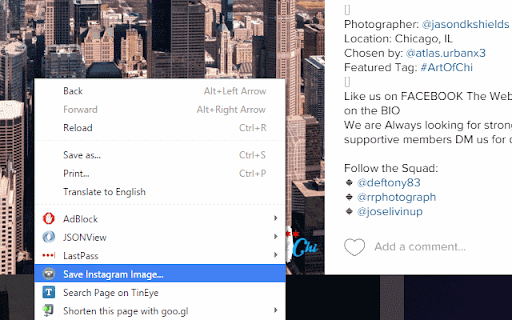
This extension allows saving of any Instagram or Flickr image via a single click on the context menu. 7/29/2024: An update required a change to the URLs that this extension is active on (to support the "www" no longer being included by Flickr in their default scheme), which may require you to manually re-enable the extension for it to work. Note from the Developer: If you find something is not working, please use the "Support" option to let me know before leaving a negative review. As you can tell from the release notes below, the websites this extension works on change their structure in a way that breaks this extension's functionality periodically. I have no affiliation with them, so don't know when those changes are going to happen until they get released to my account and I happen to run into the situation myself, then need to find free time to implement and release a change. Letting me know that something is not working using the Support option helps expedite that process. One known issue is that there was a change on IG that caused video download functionality to break, and I haven't yet been able to find a workaround for it. I apologize for the issue, and will update things once I'm able to find a workaround. Summary: This extension is the only way to immediately save any image from Instagram or Flickr with a single right-click context menu click! Images from the main feed, a post or photo's page, or a user's overview or favorites page will save directly to your browser's default download location when you click on the option this extension adds to the right-click context menu. Release Notes: 1.0 added support for saving from the Timeline and Post Instagram pages 1.1 added support for saving from the user overview page 1.2 added support for higher quality, un-cropped images 1.3 fixed the plugin for Instagram's updated page layout model 1.4-5 updated name and logos in response to trademark complaint from Instagram 1.6 fixed handling for new types of videos 1.7 IG changed their app, and I can no longer modify the URL to get the un-cropped version, so this update gets the version currently loaded on your screen (if you click on a picture from a timeline to see it large, it'll grab the full version). I'm looking into a solution, but none are obvious. 1.8 Chrome v65 changed the behavior of downloads in a way that broke this (opening images in a new tab rather than downloading them) - the download logic has been modified so that things work properly again. As an added bonus, the source user's name is now prefixed onto the file name. 1.9 changed the download logic because of another Chrome update that broke the previous download type 2.0 added the ability to download from Flickr 2.1 fixed an odd bug 2.2 updated the IG save logic for videos due to updated website structure 2.3 fixed a bug downloading videos with no comments 2.4 fixed a user-reported issue where file extensions had characters appended to them 2.5 added a "Labs" menu item off the main icon with in-development features - SaveStorm: When checked, any single click on IG or Flickr is interpreted as a download request. Works properly, but needs to be only enabled for short periods. - DL All Flickr: saves all open Flickr single-image tabs at one go. Still buggy when pulling large numbers down. 2.6 makes the Ctrl+Click (open in new tab) block that IG put in place work properly again 2.7 fixed an issue where videos downloaded from IG would have characters after the file extension 2.8 fixed an issue where clicking within a tag on the image would prevent the download from working 2.9 added the ability to download full-resolution photos or videos from Instagram Stories by left-clicking on the application icon in the top bar during playback 2.10 fixed video downloads 2.11 Added the ability to download IG TV posts 2.12 Updated the logic used to retrieve the username for the file prefix based on updates to IG's page structure 2.13 Updated the username retrieval logic when the page structure changed again 2.14 Updated IG Story photo retrieval logic based up an updated page structure 2.15 Included substantial updates around logic used with IG to retrieve video URLs, made necessary by some functionalities I was using being deprecated 2.16 Updated IG story retrieval logic to retrieve the highest-res image, and fixed saving videos from multi-image posts and from a user profile page based on structure changes 2.17 Updated image URL retrieval logic to pull from sourceset if available, fixed video URL retrieval from profile page, fixed video URL retrieval from main feed when after the initial set of posts. 2.18 Turned off debug log that I accidentally left enabled and caused extra noise in the console. 2.19 Updated the username retrieval logic when the page structure changed again 2.20 Fully fixed the issue of some images from Newsfeed downloading thumbnails rather than full-res. Partially fixed downloading videos from Newsfeed - it now works for the first batch of items on newsfeed, but there's a known issue for downloading videos beyond the infinite scroll and from a User page in a multi-image post - which you can work around by going to the Post page. 2.21 Fixed IG video downloads that were broken due to a new data structure, and migrated to Chrome Extension Manifest v3 2.22 Small update to name generation logic for images that internally use webp filetypes, which was causing invalid filenames 2.23 Small update to name generation logic issue causing long filenames including an HEIC filetype; these are now treated as jpg files. 2.24 Update support for PNG files 2.25 Fixed context menu not showing in Flickr and updated IG username discovery logic

Instant Downloader
This extension helps you to download all the images from an Instagram's user profile page in a click. Navigate on a user profile and you will have an icon in your bottom-right corner of your screen. It opens a popup with every single image ready to be downloaded and the option to "Download all" at the same time. Note: This app will work till the Instagram changes its structure. We will try to update the app if Instagram changes but cant guarantee it Version 3.1 (November 2022) ----------------- - Fix: "Download all" button works again. - Added more text instructions and simplified the extension. Version 3.0 (June 2020) ----------------- - Removed storage permissions to accomplish new Chrome Store policy. Only need to accept download permissions to download the images on Instagram. - Added images counter. - Added instructions of use. - Fix: Only retrieves post images (not images in profile picture nor highlighted stories). - Fix: Refresh the image counter on scroll. Version 2.0 (Mar 28, 2018) ---------------------------- * Full re-design for minimal non-intrusive interface. * Easier to use: One click and instants are displayed in a grid. Download button downloads em all. * New download system that works perfectly after the latest Google Chrome version update. Please note: This application is not provided by Instagram company. It's made by users for users.

Lenz Image Downloader
Download images from Instagram in a quality of your choice (supports high-quality image downloading) With this tool, you can download high-quality images from Instagram pages. To use the extension, open a new page on Instagram or reload an existing page. The extension adds a new label to each image on the top left side of the images. Each label indicates the current image quality. By pressing each label, you will get the image on the default browser download's directory. Features: Supports 150, 240, 320, 480, 640, 750, and 1080 pixel qualities. Supports renaming each image to include page title. Based on Manifest V3 (do not use any resource when the extension is not used). Saves images in the well-known JPEG/JPG format. Developer Notes: Unlike general-purpose image downloaders (such as Download All Images), this extension tries to grab the image links from HTML5's image "srcset" attribute. This is the fastest method to find available image resources.

InSaverify | Web for Instagram
Fastest way to use Instagram with all functions right from your browser. Upload/download stories or IGTV and more. InSaverify a simple and powerful tool with many features to make your social user experience even better. With one click in your browser, you will be taken to the popular social network - Instagram, where you can share photos and videos, view the news feed and chat with friends. Private messages (DM) work completely, so it is easier for you to communicate with loved ones. You will love the user-friendly InSaverify | Web layout for Instagram. Based on many reviews and experiences, the perfect Chrome app has been created with an intuitive design and a beautiful interface, as well as many useful features. With this app for Instagram you can now: - Upload photos or videos - Direct Messages (DM) are fully supported for Desktop version Instagram - Open / Download photos and videos in full HD - Everything you can do normally on your phone on the Instagram mobile website (like, follow, comment, browse, ..) This app for Instagram requires only the minimal permissions required to work to improve your security. IGTV download is also supported. Now you can shoot fresh videos without time limits and share them on Instagram directly from your computer. Upload photos and videos, browse the news feed just like classic Instagram app for mobile phones, download IG Stories or any post (photo or video) directly on your PC - all this and much more - useful features of the Web for Instagram extension. Important: InSaverify is not belong or connected to the official Instagram application or website in any way. It is an independent, unofficial app developed and maintained separately. The InSaverify browser extension acts as a wrapper for the original Instagram web application, enhancing usability with various improvements and styling adjustments. This Chrome extension is neither endorsed nor certified by any third party. All third-party logos and trademarks displayed within the extension remain the property of their respective owners. InSaverify is provided "AS IS." For more information, including our privacy policy and terms of service, please visit: https://socwebpig.com/privacy-policy.html. Leave feedback and ask questions of interest about our product Web for Instagram ! We develop new features and always listen to feedback.

Web Downloads For Instagram™ website
Enhance the website experience by extending its functionality to save images, video and Storie In today’s digital age, web downloads from popular websites are becoming increasingly popular. With the rise of streaming services, downloading content from the web has become a convenient way to access media. Whether it’s stories, image, or video, the tool are a great way to get the content you want without having to wait for it to be delivered.
