
maehgokeeglkcmoncpimbdhbhfhhafhi
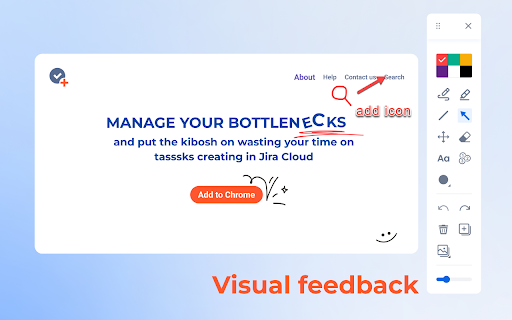
Useful extension for taking screenshots and adding annotations to them. Visualize, annotate, and share screenshots in a few clicks! Easy-to-use extension for taking screenshots and adding annotations to them. Visualize, annotate, and share screenshots with your team members in a few clicks! 🖌️ Color palette of the most used colors 🧰 All the necessary annotation tools - line, pen, geometric shapes, text, etc. ✒️Ability to add annotation on the live web page 🟢 The ability to delete all recent actions with screenshot markups 💻 Download ready-made images to your PC or copy them to a clipboard 🔝Are you a Jira user and want more features? Try TaskCompose for Jira Cloud. It's a simple and functional tool for visualizing bug reports, JPD ideas, or regular Jira issues. Send visual feedback from any Chrome tab directly to Jira without distracting from your workflows. https://marketplace.atlassian.com/apps/1231078/taskcompose-for-jira-cloud?hosting=cloud&tab=overview https://chrome.google.com/webstore/detail/taskcompose-for-jira-clou/kfbnpkfjhmbadkpaidjhabanbfapdmnp

Capture in Chrome for monday.com and Jira (ex. Issue Creator)
💡 Capture tasks directly from your browser. Take screenshots, annotate, and create items with one click — no more switching tabs. Capture in Chrome for monday.com and Jira (ex. Issue Creator) - the all-in-one Chrome extension for fast visual bug reporting, screen capture, and seamless task creation. ✔ Works with both Jira Cloud and monday.com 🐛Report bugs faster - send visual feedback instantly 📷 Take screenshots & annotate - highlight issues directly on the webpage using pen, shapes, or highlighter tools 🔗 Link visual web elements - connect parts of the page directly to your issues ⚡ Support both Jira and monday.com - use the same extension across platforms Why You Should Try It ► Create tasks 10x faster in monday.com and Jira Skip the tedious copy-paste and manual steps. The app enables you to capture, annotate, and create tasks in seconds, boosting your team’s productivity and enhancing your bug reporting workflow. ► Seamless visual communication Highlight bugs, UI issues, or areas for feedback on any webpage. Submit tasks instantly to your Jira projects or monday.com boards - without leaving the site you’re testing or reviewing. Main features: - Screenshot capture + in-browser annotation - Quick task creation in Jira & monday.com - Smart templates & auto-generated task titles - Draft recovery for unsaved inputs Get the most out of the extension - by adding it to Chrome and installing the connector apps with a 30-day trial for Jira and a 14-day trial for monday.com to see if the app suits you: 🔗 Issue Creator App on Atlassian Marketplace https://marketplace.atlassian.com/apps/1231078/task-compose-for-jira-cloud?tab=overview&hosting=cloud Stop describing bugs. Start showing them - in Jira and monday.com. With Capture in Chrome, visual bug reporting has never been easier.

Scrolling Screenshot & Full Page Capture
✨ The Ultimate Screenshot & Annotation Tool ✨ ➤ Long webpage screenshot capture 🔥 ➤ All features included in free version 🔥 ➤ Save and edit annotations forever 🔥 ➤ Over 100K users love this tool 🔥 Markup Hero is the only tool that offers multi-page scrolling screenshots for ultra-long websites – a problem other tools can’t solve. No website is too long or too complicated to get the perfect scrolling screenshot. Capture, annotate, and share with powerful editing tools that are always accessible. 🆓 FREE FOREVER WITH PREMIUM OPTION ➤ Premium features is just $3/month ➤ unlimited screenshots and edit forever 1️⃣ Scrolling Screenshot – Capture entire webpages, even extra-long ones 2️⃣ Multi-Page Slicing – Break long screenshots into manageable pages 3️⃣ Selected Area – Capture just what you need 4️⃣ Full Desktop – Grab your entire screen 5️⃣ Upload & Edit – Work with existing images and PDFs ➤ 20+ markup tools including arrows, text, pen, highlighter, and signatures ➤ Blur sensitive info with one click ➤ Insert images or other screenshots ➤ Add multiple pages – reorder like a PDF 🔥🔥 ➤ Crop, rotate, and zoom with precision ➤ All screenshots saved to your history ➤ Past markups can be edited forever 🔥🔥 ➤ Create folders and collections ➤ Title and search your screenshots ➤ Star favorites for quick access ➤ Instantly shareable links ➤ Expiring links for sensitive content ➤ Let others add annotations to your screenshots 🔥🔥 ➤ PDF export with one click ➤ Copy to clipboard for quick pasting 🔥 NEW: AI-POWERED SCREENSHOT FEATURES Extract text from any screenshot or image with just one click! More AI features coming soon, including background removal, image replacement, and text summarization. ➤ Product managers explaining features and collecting feedback ➤ Developers showcasing code and performing QA ➤ Designers creating comps and mockups ➤ Educators grading assignments and providing feedback ➤ Students completing coursework and asking questions ➤ Sales teams creating collateral and proposals ➤ Entrepreneurs… for literally everything! ➤ Chrome Extension (this one!) ➤ Desktop App for Mac, Windows & Linux ➤ Slack App ➤ Google Drive ➤ Notion ➤ API for developers Join over 40,000 users who have made Markup Hero their go-to screenshot and annotation tool. Try it now – no account or credit card required to get started! 🔗 Visit https://markuphero.com for more info or to download our desktop app.

Amazing Screenshot and Annotate Tool
Capture screenshot of web page easily and conveniently, and the powerful graffiti allows you to edit screenshot as you like Amazing Screenshot screenshot and annotation tool is a simple, free screenshot capture extension that allows you to easily implement screenshots and annotation functions with just one click. Meet the requirements of high-quality, high-resolution screenshots, support PNG, JPG, PDF formats, built-in rich annotation tools, allowing you to easily edit screenshots, and you can also use it as a graffiti tool to edit web content at will . ✍Screenshot function: ☑︎ Screenshots of some areas ☑︎ Screenshot of the entire page ☑︎ Screenshot of the visible area ☑︎ Support saving screenshots in PNG, JPG, and PDF formats. ☑︎ Screen capture keyboard shortcuts ✍Screen shot annotation function: ☑︎ write text ☑︎ Obfuscate sensitive information ☑︎ Use arrows and stickers ☑︎ Include rectangular boxes or lines ☑︎ Picture cropping ☑︎ Insert picture ☑︎ Support saving screenshots in PNG, JPG, and PDF formats. privacy: We will not collect, store, use, transfer or sell your personal privacy information.

Screen Capture, Screenshot, Annotations
Get more out of your screen captures!The best screen recorder and screen capture & screenshot tool to record screen. Scrn.me is the most popular tool for your day to day. Whole page screenshot, sharing and much more. All the missing features of Google Chrome™ Are you looking for the fastest way to share and save screenshots? Entire page screenshot, or just the visible area? Screen Capture ▸ Capture a screenshot of the page you visit, full page, selected area or visible part ▸ Capture a screenshot of your entire screen or a specific application window ▸ Capture visible part, entire screen or app window Annotate Screenshot ▸ Resize or crop a screenshot to the size you need ▸ Annotate your screenshot with rectangles, circles, arrows, lines, etc. ▸ Add text to your screenshot with or without background color, change text font and font size ▸ Blur sensitive information on your screenshot ▸ Highlight important part on your screenshot ▸ Select a local image or paste a copied image from your clipboard to annotate This is a free extension for taking screenshots. Best for # Full page screenshot # Desktop screenshot # Screenshot editor # Crop # Highlight and paint # Save local or share online It is powerful and simple. It has more features than you can imagine in one place This extension is able to capture 100% of both the vertical and horizontal content appearing on any webpage on the Internet. It is very easy to save the captured file onto your computer or print it / or share it to any social network.
