
madnlaffkfcdkhfjgnlehofbakkaflgd
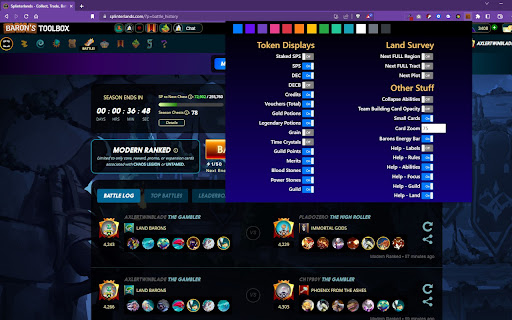
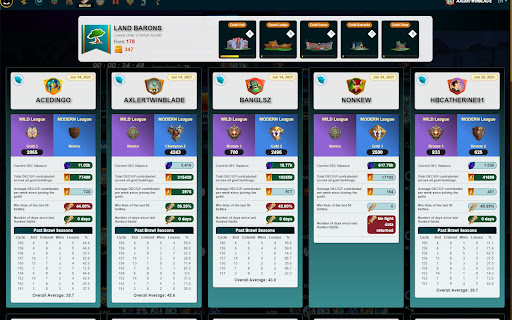


This Barons Toolbox chrome extension is specifically for the www.splinterlands.com trading card game. Barons Toolbox - Splinterlands UI Browser Enhancement for the game Splinterlands! Splinterlands leverages Web3, Crypto, NFT's on the HIVE Blockchain. Splinterlands is a Fantasy based TCG / CCG (Trading Card Game) where you get a set of rules and you have 3 minutes to build the best team you can for that ruleset, using on the cards you own or are renting. Features: 1) Battle screen Focus ability Highlighting! 2) Battle Screen visible abilities filtering bar! 3) Battle screen Show card names on screen. 4) Adjustable Card size with a ZOOM setting for you to make then as small as you like 5) Guild stats for all guild members at a glance! Includes past 10 brawls! 6) Barons Land display! much easier on the eyes and you can see all cards at once. 7) Barons Land Market Display and filtering! shows all plots for sale lowest price first. 8) Barons Help Screens - always accessible information screens for: Rules, Abilities, and Focuses (great for new players!) This tool is brought to you by:

Taby
Quickly move between tabs, bookmarks and history Taby is a navigation extension designed to optimize your browsing experience. Taby provides quick access to all your open tabs, bookmarks, and browsing history through an easy-to-use, mouse-free command palette. You can quickly search and filter through your tabs, bookmarks, and history. Plus, you can customize it with different themes, resize the command palette. We’d love to hear your suggestions! Please feel free to leave comments, rate the extension, and share your feedback to help us make Taby even better for you. Your privacy is important to us. We ask for permissions to access storage, history, and bookmarks to ensure Taby works properly, and we never store any personal data. Taby is also open-source! You can explore and do not hesitate to leave star, it would support me a lot the code here: https://github.com/ByHelyo/taby Try Taby today for a faster, easier browsing experience! - Display all opened tabs, bookmarks and history in current window via a convenient command palette or popup. - Navigation with filtering options - Search by title, URL, or index - Powered by a fuzzy search filtering - Navigate between tabs using arrow keys - Switch to a tab with 'Enter' or a simple click - Move the position of the command palette - Shortcut for duplicate tab. - Choose from 5 different themes - Adjust the command palette size - Reverse scrolling - `Alt+Q` to open/close the popup. - `Alt+W` to open/close the command palette. - `Escape` to close the menu. - `Enter` to switch to the selected tab. - `↑` `↓` arrows to navigate and select tabs above and below the currently selected tab. - Optional shortcut to duplicate current tab.

Michael's Upgrade for TrakED
Upgraded features for TrakED in the THS. (This extension is not an official product of the THS or Intersystems TrakCare software.) Upgraded features for Trak ED in the LGH. Features: - Re-enable spell check in the triage page - Use the enter key when logging in - Handover sheet for ED Main Floor and EMU - ED Main Floor filters and persistent sort - Triage Summary print out - Filter and count results of an enquiry - Count patients currently breaching length of stay targets -- This extension is not an official product of the LGH or InterSystems Trak software.

WhaleVault
Secure Graphene Cross-Chain Key Store Extension WhaleVault is a better, safer cross-chain way to access all your graphene accounts from Chrome-based browsers (including Brave Desktop, Opera Desktop, Yandex Mobile Android, and Kiwi Mobile Android), Firefox, and Firefox Android. Most well-known graphene blockchains are supported out-of-the-box, including all Steem, Hive, Blurt, Whaleshares wlsWorld, BitShares, and EOS/Vaulta-based chains. The extension injects the WhaleVault API into each website's javascript context, so that any website that you authorize can safely and securely request a signature or encrypt/decrypt a memo without ever having direct access to any of your private keys. Because it adds functionality to the normal browser context, WhaleVault requires permission to read and write any web page that wishes to access the extension. You can always "view source" of WhaleVault the way you would any Chrome extension, or from the official GitHub repo: https://github.com/alexpmorris/whalevault WhaleVault also offers a news/alerts feed with domain warnings for alerting users to related crypto site hacks, scams, and other potential phishing attempts. As an additional precaution, you should only allow "site access" to the WhaleVault extension in Chrome for those trusted websites that require it. For those not using Keychain, WhaleVault will also act as a polyfill for Steem Keychain, Hive Keychain, and Blurt Keychain for seamlessly and securely transacting with any app or wallet that supports them. That includes Hive-Engine / TRIBALDEX support, all from a single extension! WhaleVault is a multi-chain fork by @alexpmorris of the Steem Keychain browser extension. Steem Keychain (repo at https://github.com/MattyIce/steem-keychain) was originally created by @yabapmatt, developed by @stoodkev, and funded by @aggroed. Many thanks to them for creating a great template upon which to build WhaleVault! A more detailed overview of WhaleVault may be found at: https://wlsworld.vip/@alexpmorris/whalevault-secure-graphene-cross-chain-key-store-extension For the official WhaleVault Firefox Add-on, visit: https://addons.mozilla.org/en-US/firefox/addon/whalevault/

Hive Keychain
Secure Hive Wallet Extension. Hive Keychain is an extension for accessing Hive-enabled distributed applications, or "dApps" in your Chromium or Firefox browser! The extension injects the Hive Keychain API into every website's javascript context, so that dApps can read from the blockchain. Hive Keychain also lets the user create and manage their own identities, so when a dApp wants to perform a transaction and write to the blockchain, the user gets a secure interface to review the transaction, before approving or rejecting it. Because it adds functionality to the normal browser context, Hive Keychain requires the permission to read and write to any webpage. You can always "view the source" of Hive Keychain the way you do any Chrome extension, or view the source code on Github: https://github.com/hive-keychain/hive-keychain-extension
