
hcoigoaekhfajcoingnngmfjdidhmdon

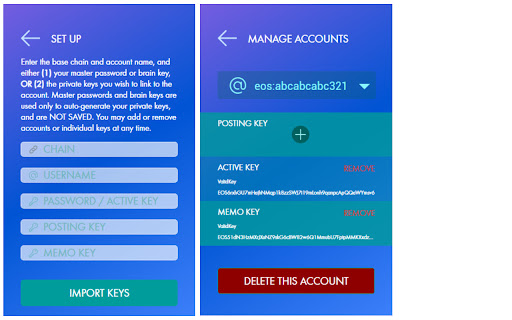
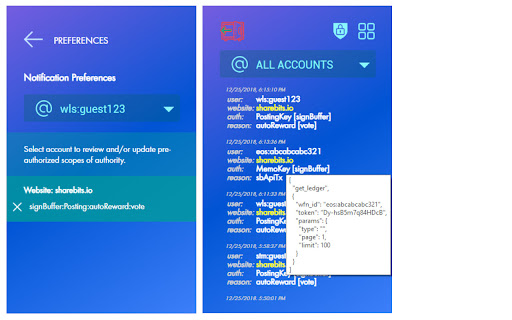

Secure Graphene Cross-Chain Key Store Extension WhaleVault is a better, safer cross-chain way to access all your graphene accounts from Chrome-based browsers (including Brave Desktop, Opera Desktop, Yandex Mobile Android, and Kiwi Mobile Android), Firefox, and Firefox Android. Most well-known graphene blockchains are supported out-of-the-box, including all Steem, Hive, Blurt, Whaleshares wlsWorld, BitShares, and EOS/Vaulta-based chains. The extension injects the WhaleVault API into each website's javascript context, so that any website that you authorize can safely and securely request a signature or encrypt/decrypt a memo without ever having direct access to any of your private keys. Because it adds functionality to the normal browser context, WhaleVault requires permission to read and write any web page that wishes to access the extension. You can always "view source" of WhaleVault the way you would any Chrome extension, or from the official GitHub repo: https://github.com/alexpmorris/whalevault WhaleVault also offers a news/alerts feed with domain warnings for alerting users to related crypto site hacks, scams, and other potential phishing attempts. As an additional precaution, you should only allow "site access" to the WhaleVault extension in Chrome for those trusted websites that require it. For those not using Keychain, WhaleVault will also act as a polyfill for Steem Keychain, Hive Keychain, and Blurt Keychain for seamlessly and securely transacting with any app or wallet that supports them. That includes Hive-Engine / TRIBALDEX support, all from a single extension! WhaleVault is a multi-chain fork by @alexpmorris of the Steem Keychain browser extension. Steem Keychain (repo at https://github.com/MattyIce/steem-keychain) was originally created by @yabapmatt, developed by @stoodkev, and funded by @aggroed. Many thanks to them for creating a great template upon which to build WhaleVault! A more detailed overview of WhaleVault may be found at: https://wlsworld.vip/@alexpmorris/whalevault-secure-graphene-cross-chain-key-store-extension For the official WhaleVault Firefox Add-on, visit: https://addons.mozilla.org/en-US/firefox/addon/whalevault/

Guarda Crypto Wallet
Browser extension for Ethereum and any blockchain Secure non-custodial crypto wallet extension for Bitcoin, Ethereum, TRON, Monero, DeFi, token swaps, staking and dApps across 80+ blockchains. Store, send, buy, swap and manage crypto directly from your browser with Guarda Wallet — a multi-chain Web3 wallet built for everyday crypto use and advanced blockchain tools. 🟦 Multi-Chain Crypto Wallet Access Bitcoin, Ethereum, TRON, Solana, Monero and dozens of leading blockchains in one browser wallet. Manage more than 10,000 assets with one secure extension. 🟦 Buy, Swap and Sell Crypto Use built-in crypto exchange features directly inside your wallet. Buy crypto, swap assets across supported networks and manage transactions without leaving the extension. 🟦 dApps and Web3 Access Connect to dApps directly from Chrome. Use browser-based connections for DeFi, staking platforms, NFT tools and Web3 applications. 🟦 Advanced Wallet Features Go beyond basic wallet actions with staking, Bitcoin multisig and additional tools for users who need deeper control over crypto assets. 🟦 Non-Custodial Security Your private keys stay under your control. Guarda encrypts wallet data locally and never stores sensitive access information. 🟦 24/7 Support Fast human support whenever you need help.

Kondor
Koinos Wallet in your browser Kondor is a browser extension to manage a wallet for Koinos Blockchain

Keeper Wallet
Keeper Wallet is your entry point to the Waves blockchain and Waves-powered web services 🔷 Store your account keys securely Seed phrases and private keys are encrypted and stored within the extension and cannot be accessed by the dApps and services on the web, giving you peace of mind that your funds are always safe from hackers and malicious sites. 🔷 Manage your assets – Check full asset info and balance, add assets to favourites and filter them by name or ID – Transfer assets and NFTs quickly and intuitively: hover over the three dots next to the asset or NFT and choose the transfer arrow option. – Exchange assets instantly directly in Keeper. Click the “Swap” button, select the pair of assets and specify the amount. 🔷 Sign transactions Third-party applications are required to request your signature for each transaction. Before signing, you can review the transaction details, then confirm or reject it. Complete transactions with just one click, no need to enter any sensitive information. 🔷 Switch between wallets You can create or import multiple Waves wallets and switch between them easily. 🔷 Backup your accounts Export your accounts to the encrypted Keystore file and store it in a safe place. Use it to restore access to your accounts or import them into Keeper on a new device. To create the backup, go to settings and select “Export accounts”. 🔷 View transaction history Keeper displays up to 100 most recent transactions for each account. You can apply a range of filtering options, including transactions with incoming or outgoing transfers, transaction ID, asset ID or name, and wallet address.

Forbole X
A comprehensive multi-crypto management tool in your browser All-in-one non-custodial crypto wallet supporting multiple assets Easy to use with sufficient hints to guide you through Support all types of transactions: stake, send, receive, vote on proposals
