
lpkjmgldcglmfilmnkcacbolkpkghdaa

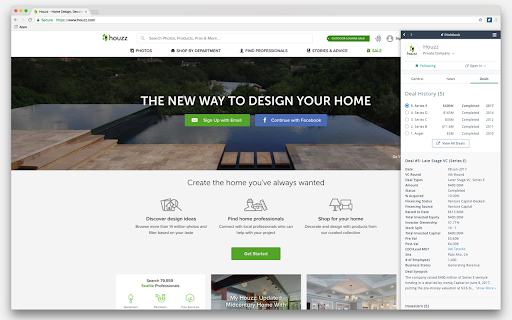

PitchBook Extension for Google Chrome™ Access PitchBook’s VC, PE and M&A data directly from your browser. Uncover essential information on companies, investors, deals and more as you browse the web, read the news or do online research. With comprehensive public company data and unparalleled private market insight always just a click away, it’s easy to find, vet and pursue promising opportunities—without leaving your current workspace or moving between tabs. To use this product, you must log in with an existing PitchBook Desktop account. Highlight and right-click on a company, scan a news article or search within the extension to uncover everything from basic details to hard-to-find company info (like a pre-money valuation, the full financing history, employee count, competitors or an executive’s contact information) as you browse. ➤ Streamline your workflow Get all the company information you need in one place. Your search history and followed companies are synced across PitchBook Mobile, Desktop and Chrome. Evaluate investment and acquisition targets with access to key details on companies and contacts and easy navigation to the full PitchBook Desktop. ➤ Connect with dealmakers Reach the right contact and personalize conversations with data that links people to companies, deals, funds, venture capital and private equity firms, news stories and more.

Chrome Notes
A simple notepad extension for Google Chrome NEW: You can now use speech to text NEW: You can now open Chrome Notes with Ctrl+Shift+X (Command+Shift+X on mac) NEW: You can now download and upload complete backups NEW: Chrome Notes adds a right click menu option to send the selected text to a new note! NEW: You can now have multiple notes! NEW: You can now customize the font size! A simple notes extension, right in your browser! Easily copy around a few words to and from different browser windows and other apps. Thank you for over 100,000 users, 100 ratings and 4.5 stars! Chrome Notes remembers your notes and mode, even after closing your browser or restarting your computer! Notes are stored in local storage, so nobody else will ever see them, not us, and not Google, Microsoft, or Apple. Features: * Resizable notepad * Shortcut buttons for cut, copy, paste, and select all * Normal keyboard shortcuts work too * Save as a .txt file * Open in new window * Speak selected text out-loud * Remembers last notepad size for you next time * Store multiple notes, and quickly create, edit, share, or delete * Focus mode for distraction free writing * Adjustable font size * Right click and send selection to new note * Download and upload full backups * Speech to text (click the mic and speak to put your words on the notepad) * Keyboard shortcut Ctrl+Shift+X (Command+Shift+X on mac) to open Chrome Notes is the smart, simple notepad built for you 😊

Google Translate Open SideBar in Chrome
Google Translate Extensions For Chrome. Google Translate Open SideBar in Chrome The only site and application that comes to mind for translation is Google Translate. Google Translate has made a difference in translation. Google Translate Extensions For Chrome. Google Translate Open SideBar in Chrome

Chrome Dice
A simple dice rolling extension for Google Chrome Chrome Dice is a simple dice rolling extension for Google Chrome. Simply click the button and click a die to roll, wherever and whenever. * Ad-free * Works offline * Very small (less than 0.1mb) * No permissions and no data

Stopwatch for Google Chrome™
A simple and portable Stopwatch for Google Chrome™ Need to use an accurate stopwatch to measure an experiment? Use your Chrome browser today to act as a stopwatch once you install this software extension. Here is how you can begin using this stopwatch software 2) Click on the extension icon 3) Press the start button to start the stopwatch 4) Press the stop button to stop the stopwatch This is a free and simple stopwatch software. Try using it today.
