
lpghmonmihhnfodlfndcbhcghfchknop
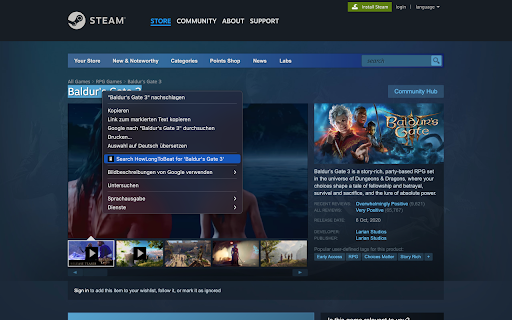
Search on howlongtobeat.com for highlighted text by right clicking This convenient extension enhances your browsing experience by adding a HowLongToBeat.com search option to your right-click menu. This works on every website. If you come across a game and want to find out how long it takes to beat, simply highlight the game's name, right click, and select "Search HowLongToBeat.com for " from the menu. The search results will open in a new tab, giving you quick access to valuable information about game lengths, playtimes, and more.

alike03's Subscription Info on Steam
See on Steam if the game is currently available on any Subscription package like Xbox Game Pass PC & Console, Ubisoft+ or EA Play Have you ever bought a game only to discover later that it was already included in a subscription service you're subscribed to? You're not alone; I've experienced that frustration too. So, I thought, "What if I could see this information directly on Steam?" This addon checks your game selections against a database, displaying current availability on Xbox Game Pass for PC and Console, Ubisoft+, EA Play, and EA Play Pro. Enjoy an ad-free experience with alike03's Subscription Info. You can support me by purchasing games through my affiliate link on the Contributors Page—it provides a small contribution to me at no extra cost to you. If you're feeling generous, you can also support me directly via PayPal or Ko-fi. Your support is greatly appreciated!

Show Great on Deck on Steam
See what Games are verified for the Steam Deck and which Medal they have on ProtonDB in the Steam Store. The Steam Store does not display the Steam Deck Verification Status on every page. This extension adds this status to a lot of pages, so you can see at a glance which games are compatible with the Deck. Furthermore the Verification Status is often not up-to-date. To solve this issue, the extension adds a medal from ProtonDB to the search results, front and app page. For more info, head over to the ReadMe on Github: https://github.com/cptpiepmatz/great-on-deck-search/tree/main#readme

Is It On Game Pass
Check if Steam games are available on Game Pass and see what deals they have on GG.deals Save money on PC games! Instantly see which Steam games are included with Xbox Game Pass and if there are great deals for them elsewhere. ★ What it does: Shows real-time Game Pass availability while you browse Steam - never accidentally buy a game that's already included with your subscription again. ★ Key Features: • Visual indicators on Steam game pages (Available, Coming Soon, Leaving Soon) • Price comparison with retail & keyshop deals from GG.deals • Works on store pages, search results, wishlists, and sale pages • Clean, non-intrusive badges that blend with Steam's design ★ Why I built this: Like many PC gamers, I kept buying games on Steam only to discover they were free with my Game Pass subscription. This extension solves that problem instantly.

Allkeyshop - Compare Game Prices
Shows you the best deals and discount coupons available while you're surfing on the web See the best deals available on the best games while surfing the web. This extension automatically compares video game prices from all leading sellers, including Amazon, Steam, Origin and Uplay and displays the best price available directly on the page. You can compare all sellers, their payment methods and fees effortlessly all while browsing. Allkeyshop Extension always have the best and most up to date coupons and offers you the chance to participate in regular giveaways and win prizes. The Allkeyshop Extension does not collect any personal information and is free to use. You can find our Privacy Policy here: https://www.allkeyshop.com/blog/privacy-policy-allkeyshop-com/ Save time and game for longer with this extension, while letting us find the best deals on the games you want!
