
lpddjdnikpccbkbgladjmmbjoajmklon
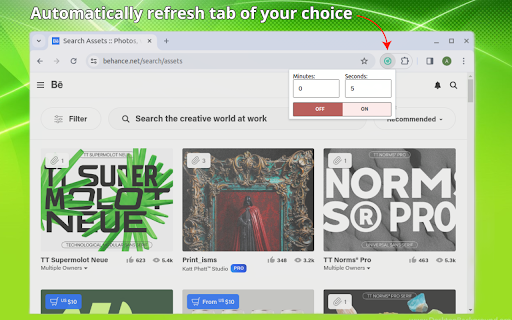
Use Auto Refresh for Chrome™ extension to enable automatic refreshing of any web page (tab) of your choice. 🔥 Welcome to Auto Refresh for Chrome, the ultimate tool for enhancing your browsing experience with effortless page refreshing capabilities! 🔄 Designed specifically for Chrome users, our extension streamlines the process of staying updated on your favorite websites, saving you time and effort. Let's explore the features and benefits that make auto refresh chrome the must-have extension for anyone looking to optimize their browsing workflow. 1. Install the application auto refresh for Chrome by clicking the Add button. 2. Pin the application to the quick access panel (will be shown in a screenshot after installation). 3. Click on the application icon on any Chrome browser tab that you want to refresh periodically. 4. Select the desired interval for refreshing and click the On button. 5. The timer on the application icon will show how many seconds are left until the refresh. 6. Enjoy! Now it will happen automatically. ❇️ How auto extension works: 1️⃣ Effortless Automation: Say goodbye to manual page reloading! Our auto refresh extension automates the process, ensuring your pages stay current without any intervention on your part. Enjoy uninterrupted browsing while our extension takes care of the rest. 2️⃣ Tailored for Chrome: Our extension is optimized for Chrome, offering seamless integration and a user-friendly experience. Whether you're a casual user or a power user, Auto Refresh Chrome enhances your browsing workflow with its intuitive interface and robust features. 3️⃣ Enhanced Productivity: Boost your productivity with automatic page refreshing. With Auto Refresh for Chrome, you can focus on what matters most while staying informed with the latest updates on your favorite websites. It's the perfect companion for multitaskers and busy professionals. 4️⃣ Customizable Intervals: Take control of your browsing experience with customizable refresh intervals. Whether you need real-time updates or prefer periodic refreshes, our extension offers flexibility to suit your preferences. 5️⃣ Seamless Integration: Enjoy a seamless browsing experience with Auto Refresh Chrome. Our extension integrates seamlessly into Chrome, ensuring minimal disruptions to your workflow. Simply install and let it work its magic in the background. 6️⃣ Efficiency at Your Fingertips: Activate auto page monitor for Chrome with just a few clicks and enjoy hassle-free browsing. No more wasted time — our extension handles it all for you, allowing you to focus on what matters most. 7️⃣ Stay Updated, Stay Informed: Whether you're monitoring live data, tracking news updates, or keeping an eye on social media feeds, Auto Refresh for Chrome ensures you never miss a beat. Stay updated and informed with automatic page refreshes. 8️⃣ Optimized Performance: Our extension is designed for optimal performance, ensuring smooth operation without slowing down your browser. Experience fast and responsive browsing while auto page reload chrome works quietly in the background. 9️⃣ Intuitive User Interface: Navigate our extension with ease thanks to its intuitive user interface. Whether you're a tech-savvy user or a novice, Auto Refresh for Chrome offers a user-friendly experience for all levels of expertise. 🔟 Effortless Installation: Getting started with auto refresh chrome is quick and easy. Simply add the extension to your Chrome browser and start enjoying automated page refreshing in seconds. No complicated setup or configuration required. 💻 Download auto refresh for chrome today and revolutionize the way you browse the web! Experience the convenience, efficiency, and productivity benefits our extension has to offer. With Auto Refresh Chrome, staying updated has never been easier. 🧑💻 I hope you enjoy using it - if you do, please tell your friends about it and help me out by giving it a positive review. Thanks!

Custom Cursor for Chrome™
Fun custom cursors for Chrome™. Use a large collection of free cursors or upload your own. Customize your Chrome browser experience with our free collection of mouse cursors at Custom Cursor. At Custom Cursor we have created a giant collection of hand-drawn cute cursors. We have over 10,000 different packs available on our website for you to enjoy. With your help, our collection has grown so big that we divided it into categories that should fit every taste, like: - Minecraft; - Cute Cursors; - Anime mouse packs; - Memes; - Spy x Family pointer packs with Anya Forger; - Among Us; - Two types of Minimal pointers for work and studies; - Games; - Roblox; - And many, many other funny elements for you to play with. Some of our mouse pointer packs are bundled with the Custom Cursor browser extension, but most of them await you on our website. Keep an eye out for new and trending additions. To simplify navigation, we've organised our collection into Editor's Picks collections, each with a unique theme. Examples include: - Green arrows for autumn; - Christmas themed arrows; - Holidays editor's picks; - Halloween; - Custom Cursor collaboration with Daieny Schuttz; - Pink pointers editor picks; - Summer mouse decorations; - Rainbow colors; and much, much more on our website. If you can't find what you're looking for, use the "UPLOAD CURSOR" button to add your own. Manage your personal arrow collection on the Upload page and adjust cursor size in the "Manage" section. Newly added collections will be uploaded to the Custom Cursor for Chrome extension and can be found at the bottom of the collection list. Your added packs will appear in “My Collection”. Create your own collection of mouse cursors from any images with Custom Cursor Creator tool on our website. It will allow you to create new packs from almost any arrow or pointer shaped image on the internet. ------------------- ! After installing the extension, refresh previously opened tabs to use it on those pages. Note that the extension may not work on Chrome Web Store pages or the home page. Open another website (e.g., google.com) to test the extension. If you like the extension you can also check our Custom Cursor for Windows app. Preview arrow appearance by clicking on it in the extension window and moving the mouse to the empty space within the window.

Auto Reload Chrome
Seamless Auto Reload Chrome lets you set custom tab reloader time to auto refresh pages. Try the Auto Reloader for Chrome extension. ⚡ Auto Reload Chrome delivers effortless automation for every user. Whether you’re a developer refining your work or a regular user following updates, this extension ensures your content remains current and consistent. 🧭 How to Get Started 1. Install the page reload extension – Visit the Web Store and add it to your browser. 2. Pin the icon – Keep it visible on your toolbar for easy access and instant control. 3. Open any site – Go to the website you want to keep updated. 4. Activate browser refresh – Click the icon and choose URL reload interval in seconds. 5. Let it work – Continue your tasks while the tab stays active and updated automatically. Instead of wasting time manually renewing the browser, auto reload for chrome does it for you, automatically and in perfect timing. It’s light, reliable, and designed to support both professional testing and everyday browsing. 🌍 Perfect tab reloader for all kinds of users: - Developers verifying frontend or backend changes - QA testers tracking dynamic components in action - Traders monitoring real-time dashboards and prices - Shoppers refreshing limited-stock or flash-sale offers Each tab refreshes independently in seconds, and you can choose where reload tab extension should be active. With auto reload chrome, the browser gains the flexibility to keep important pages active while you focus on other tasks, ensuring content stays current. 💡 Key Benefits for Everyday Browsing: - Automatically refreshes tabs every few seconds for steady updates - Keeps dashboards, live chats, and analytics charts updated with no clicks - Prevents ticketing, cart, and booking sites from expiring during inactivity Auto reload google chrome support helps your browser stay fresh as you move between tasks. Developers and testers appreciate its precision. The tab reloader and page reloader features allow controlled renewal for specific websites under observation. This makes auto reload Chrome perfect for debugging DOM changes, network responses, and live content updates using a dependable chrome auto reload plugin. 🚀 What makes url reload tool stand out: 1️⃣ Simple interface for quick setup and instant activation 2️⃣ Second-based updates for consistent test or viewing intervals 3️⃣ Independent tab refreshes for precise control 4️⃣ Resource-efficient reload page chrome extension performance It’s not just for developers, anyone can use auto refresh chrome features to make browsing smoother. Designed as an easy solution, it stays remarkably precise and lightweight. Professionals gain a clear advantage with auto reload tab chrome, as every update, commit, or data change appears instantly. QA engineers rely on page refresher for short, repeatable cycles that reveal bugs. ⚙️ Why you’ll love this chrome auto reload extension: ▸ Safe and private, designed with user control in mind for dependable use ▸ Built to perform auto refresher functions, with google chrome auto reload ensuring stable use ▸ Updated regularly to ensure compatibility with page refresh extension improvements In short, Auto Reload Chrome is a flexible tool for everyone. Whether you want to test, track, or just browse without interruptions, this auto reloader for chrome adapts to your needs. Keep pages fresh, save clicks, and let Auto reload Chrome handle refreshes for you, fast, clean, and effortless. Install this trusted auto reload for chrome tool and enjoy truly seamless browsing. 💬 Q&A Section for chrome auto refresh extension ❓ Who can use Auto Reload Chrome? 💡 Anyone! It’s perfect for developers, QA testers, traders, students, and everyday users who want tabs to refresh automatic. ❓ Can it work on internal company sites or local testing environments? 💡 Definitely. Auto reload chrome is often used by developers and QA professionals to monitor pages running on localhost or internal domains during testing. ❓ How often can it update urls? 💡 Update intervals can be set in seconds only, ideal for frequent testing updates without performance issues. ❓ Is it safe to use? 💡 Absolutely! Page refresh extension respects your privacy, uses no trackers, and performs renews securely inside your browser. ❓ Does it affect browser performance? 💡 Not at all. The extension is lightweight and optimized to run efficiently in the background without slowing down your system. ❓ Can I use it for multiple open tabs at the same time? 💡 Yes, each tab can be managed individually, allowing you to enable or disable page refresher as needed.

Tab Auto Refresh
Use 🔄 Tab Auto Refresh to auto reload Chrome pages — a fast, simple page reloader that keeps any webpage up to date. 🖥️ Whether you're monitoring dashboards, tracking live updates, or keeping an eye on important data, this tab refresh extension gives you full control over how often your pages reload. ⏲️ With auto reload for chrome extension, you can set precise timers and let the auto refresh tab function do the work for you. 🔀 No more manual clicking or switching between pages. Auto refresh tab will do it for you. 🔄 Just choose your interval and enjoy performance without distractions. 👀 The tab auto refresh chrome feature is ideal for users who frequently monitor marketplaces, crypto charts, analytics dashboards, helpdesks, and social feeds. 🔺Thanks to the intelligent refresh for chrome extension, you always see the latest information exactly when you need it. 🔺The chrome auto reload tab system is lightweight, fast, and designed for maximum stability. ⚡ Set up reloader for chrome in seconds, thanks to the clean and intuitive interface. ① No coding ② No complex menus ③ Just install the tab refresh extension and start using it instantly 🎉 Key features include: 1️⃣ Custom timers for each page 2️⃣ Safe and stable performance 3️⃣ Background refresher for seamless workflows 4️⃣ Compatibility with almost any website 5️⃣ Autorefresh Users who need a simple page reloader will love the straightforward layout. 🧐Here’s what makes this auto refresh extension stand out: 💠 Reliable tool 💠 Effortless setup 🔄 Tab Auto Refresh is also ideal for professionals who work with dashboards, because it ensures auto update web page content appears without delay. ✨ With chrome extension auto reload functionality, you won’t miss important updates ever again. 🖥️ Whether you want a lightweight auto refresher or a more powerful reload for chrome workflow, this extension adapts to your needs instantly. More reasons to use this refresh chrome reloader tool: ▸ Supports autorefresh actions across multiple pages ▸ Provides clean controls ▸ Enhances productivity 💡With its reliable design, this solution is perfect for business users, traders, support teams, students, and anyone who needs pages to stay updated. ❓Still unsure? 💡Here’s what you can do with Tab Auto Refresh: 🔄 Enable tab reloader sessions for real-time monitoring 🖥️ Use tab refresh to reload dashboards automatically 🟢 Run reload tab loops with custom rules 💥 Combine refresher settings with update web page workflows 🎛️ Tweak auto chrome refresh settings to customize the refresher tool ⏳ This extension eliminates the need to manually reload pages, saving time and reducing distractions. You stay focused while the auto refresher does the rest. 🖥️ The extension also supports auto reloader for Chrome for setups where you must maintain continuous page activity. 💆♂️ Perfect for ticketing systems, KPI dashboards, transaction trackers, and more. 🔄 📋 The autorefresh engine inside ensures stable and reliable operation, while the extension is optimized for low memory usage. 🌀Even power users with dozens of active sessions rely on the chrome refresh extension daily. ⁉️Q&A ❓ How does the extension keep pages updated? 💡 It reloads the page on a timed cycle, ensuring you always see the latest information without manual actions. ❓ Is it difficult to use? 💡 No. The interface is simple, with clear interval settings that take seconds to configure. ❓ Does it affect performance? 💡 It’s optimized to stay lightweight, working quietly in the background without slowing your browser. ❓ Who benefits most? 💡 Anyone tracking live data: analysts, traders, support teams, researchers, or users following fast-changing content. 🙌 Install Tab Auto Refresh today and transform how you work with page reloader tools. Enjoy complete control, fast reloading, and a seamless experience that keeps your data fresh at all times.

Tab Reloader
Use Tab Reloader auto refresh Chrome extension to automatically refresh tabs and reload pages with easy yet powerful reloader tool 👉 Tired of pressing F5 for every update? Meet Tab Reloader, a precise browser tool that helps you automatically refresh pages with flexible rules, smart schedules, and clean controls. Set it once, refresh automatically forever, and focus on your real work! You can even use it out of the box - just install, no setup required! 🚀 Simple yet powerful The Tab Reloader extension delivers comprehensive yet simple auto refresh capabilities through an intuitive interface. The page reloader offers everything from basic interval refreshing to advanced pattern-matching rules. ⚡ Add or delete affected tabs with per-page rules ⚡ Target titles, domains, and masks for selecting pages ⚡ Variable intervals and time-based rules for autoreloder ⚡ Countdown timers, badges, and one-button on or off ⚡ Presets for any workflow in your Chrome 🎯 Built for many roles The automatic reloader works seamlessly across all use cases: ➤ SEOs and researchers tracking SERPs, feeds, and dashboards ➤ Shoppers and ticket hunters who need auto reload at speed ➤ Traders and analysts relying on automatic refresh data ➤ Developers and testers validating live changes without manual reloads 1️⃣ Monitor SERPs, crawl dashboards, and analytics 2️⃣ Track ticket releases and inventory using an auto refresher with burst mode 3️⃣ Keep admin consoles alive via browser auto update schedules 4️⃣ Validate live deploys with automatic tab reloader Chrome behavior 5️⃣ Research with tab auto reloader extension presets you can flip in seconds 6️ … and more! 🗂️ Setting up affected tabs Setting up your affected tabs using Tab Reloader for Chrome extension couldn't be easier! Add pages individually or use powerful pattern matching to target multiple pages simultaneously: ⚙️ Configure specific page names for precise control ⚙️ Use domain filters to auto refresh entire websites ⚙️ Apply text masks to include or exclude certain pages ⚙️ Save as a preset and reuse anywhere 🕒 Setting up timers Set different constant or random refresh intervals for each page, from seconds to hours. The auto relaoder supports progressive intervals that gradually increase or decrease update rates. Enable burst mode for rapid-fire updates during critical periods. - Choose a variable interval per tab for easy auto refresh - Add time windows or countdowns for automatic update and quiet hours - Enable burst mode for rapid autorefresh when every second matters 🧩 Presets that scale Presets revolutionize how you use this auto reload browser solution: ✅ Create and save presets for SEO audits, dev testing, and news tracking ✅ Import a chosen single preset or all presets at once in the extension popup ✅ Share consistent behaviors across workspaces with ato refresher ⌨️ Keyboard shortcuts you will actually use! • Global hotkeys to pause, resume, or force reload • Quick toggle for Chrome reload all pages when urgency strikes • Fast control of auto page reload without leaving your page 🧭 Other functions that shine 1. One-click master toggle for all rules 2. Menu for toggling modes and countdown visibility 3. Per-tab badges showing next auto refresh Chrome page ETA 4. Optional page updater behavior for entire windows 5. Statistics you can act on 🔒 Information safety, zero fuss Your privacy matters. This Chrome auto refresh extension collects zero personal data, stores no browsing history, and requires minimal permissions. All settings remain locally on your device. The auto Tab Reloader operates entirely within your browser without external server connections. ❓ How do I install it? 💡 To install Tab Reloader, just click on the "Add to Chrome" button. After a quick installation, you’ll be able to use it. ❓ How do I pick which tabs to refresh? 💡 Use the affected tabs list: exact names, domains, include/exclude masks, or "this tab" options for the reloader extension for Chrome. ❓ How do timers and burst work? 💡 Set per-tab intervals and time windows. ❓ Can I pause, resume, or force refresh fast? 💡 Yes - one-button toggle, global hotkeys, and a mode menu; you can also reload all pages within your selected scope. ❓ Will it slow my browser or sites? 💡 Tab Reloader is efficient; use reasonable intervals and progressive spacing to keep auto refresh smooth. ❓ What about privacy and data? 💡 Tab Reloader works locally, no account, no private data collected; it simply performs automatic refresh and auto reload Chrome actions you configure. ❓ I have some ideas and feedback. Can I share them with the developers? 💡 Absolutely! Our team is always open to hearing from our users. Don't hesitate to send in your proposals, ideas, or reviews. We value what you have to say. ❓ If I encounter a problem while using Tab Reloader, is customer support available? 💡 If you have any problem, feel free to contact us directly via email or leave a ticket in the Chrome Web Store. We’ll be glad to help. 👆🏻 Click "Add to Chrome" button to install the Tab Reloader extension.
