
lohepadcegakjkmgjignaejcgkaceobn
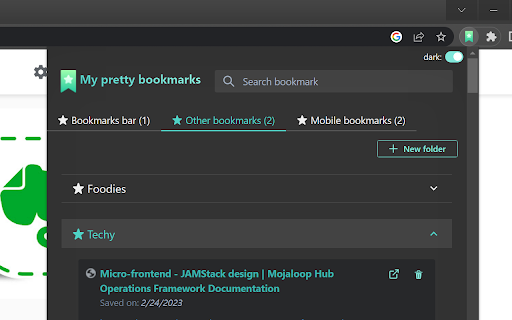
A pretty Google Chrome bookmark manager created with productivity with mind. - It's a more clean and usable alternative to chrome://bookmarks; Pin the extension and it's a one-click-open bookmark search and manager - Quickly search and navigate through your bookmarks - Avoid bookmarks bar mess and limitations by having access to all bookmarks in the same place - Avoid too many open tabs and don't loose your research while surfing the web - Easily categorize and manage items via folders - It's generally useful no matter the field - Quick search based on provided query that looks for matches against bookmarks' titles and URLs - Main bookmark folders (Bookmarks bar, Mobile bookmarks, Other bookmarks) are split in tabs for easy access - Allows quick creation of level one subfolders in each of the above mentioned global folders to serve as categories (deeper levels are not purposely not allowed to avoid mess) - Subfolders are presented on top - Bookmarks are ordered by date - Presents bookmark's saved date - Presents bookmark referral if available (the link that brought you there is of type do-follow) - Allows moving and deleting bookmarks - Allows deleting subfolders if they are empty - Allows toggling dark/light mode (initial is set by browser's current theme)

Bookmark Viewer
It shows a quick view of google chrome bookmarks sorted by folders and a special folder that shows all the bookmarks. It also implements a search engine to find the bookmark you are looking for faster and a link to access the bookmarks management page.

Searchable Bookmarks Manager
Easily search through your bookmarks, straight from your browser's address bar! Easily manage your bookmarks right from Chrome's address bar! Features: - Easy to use tree view! - Fast bookmarks search and filter feature! - Color code your folders! - Open your bookmarks in a single tab group! - Open all bookmarks inside a folder with just one click! - Dark mode and many other customization features! Your bookmarks will remain completely private. This extension does not collect any usage data. This collection does not store any usage data. This extension does not communicate with any third parties. This extension does not communicate with any external source.

Pinalist - Bookmark Manager
Pinalist is a cloud-based all-in-one bookmark manager that helps with managing, organizing and searching your bookmarks. Pinalist extension connects your Chrome browser with https://pinalist.com app so you can save your bookmarks with ease. Build your bookmark library in just a few clicks Pinalist is aimed at those who want to browse the internet more efficiently. It provides a fast and easy way to collect and organize your bookmarks while browsing. The best way to stay organized Pinalist is designed to make bookmark organization a seamless experience. The app provides a simple way to save and categorize bookmarks using advanced tag management. Quickly access hundreds of links for different resources, projects and for personal use. Capture your thoughts Leave notes along with your bookmarks so you can remember, understand and learn as you read. If you find a piece of text particularly interesting, just save it along with your bookmark. Searching, filtering and sorting Pinalist is designed to make the process of finding bookmarks as simple and intuitive as possible. Search through your bookmark library using keywords and tags as well as sort the results using a number of criteria. Pin your favorite bookmarks Use the dashboard to group and highlight the bookmarks you visit on a daily basis. Drag and drop the groups according to your needs. Share bookmarks with others Create a page with your personal bookmark collection and share it with friends and co-workers. Let others collect their thoughts and have an open discussion in the comments section.

Bookmarks quick view
view, delete, create, and sort bookmarks View, delete, create and sort bookmarks. Bookmarks quick view is a simple chrome extensions for use and manage simple tasks with your browser bookmarks. This extension is created for my own necessities. If you have some bugs or you need other utilities please contact me. Here is the repository of the code https://github.com/AxelArielSaravia/bookmarks-quick-view. Some of the usabilities are: - see all your bookmarks and bookmark folders. - delete a bookmark or a folder. - create folders. - add the current tab as bookmark in any folder. - open a complete folder in the current, new or private windows. - sort by name. - sort folders before bookmarks. - shortcut button to the bookmark manager Some user configurations: - You can set if the url opens in the current tab or in a new tab. - You can specify when a new tab is opens, go to it (focus it) or stay in your current tab. - You can decide if folders sort before bookmarks or not. - You can decide if the created bookmark or folder adds to the beginning of the parent folder. The icons used in the extension are from Feather Icons (https://feathericons.com/) and Lucide (https://lucide.dev/). The inspiration of this extension comes from the Edge Browser history extension (https://www.microsoft.com/en-us/edge).
