
lobocepnbcophfjgoplpkajajcmipmoh
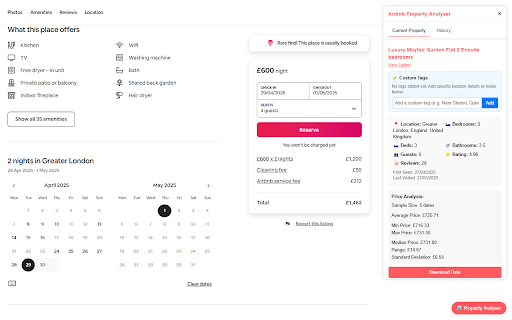


Analyze and track Airbnb property prices and details Airbnb Property Analyser is a powerful tool for travelers, hosts, and market researchers who want to understand Airbnb pricing patterns. This extension automatically collects and analyses property data as you browse Airbnb listings. Key Features: Real-time Price Analysis: See average, median, minimum, and maximum prices for properties as you browse Historical Price Tracking: Save price data over time to identify seasonal trends and price fluctuations Property Comparison: Easily compare multiple properties with filters for location, bedrooms, bathrooms, and more Bulk Export: Download property data in CSV format for further analysis in spreadsheets or other tools Smart Filtering: Find properties matching specific criteria from your browsing history How It Works: Browse Airbnb listings as usual The extension automatically collects property details and price information Click the floating analyser button to view current property statistics Access your browsing history to compare properties and download data Perfect For: Travelers planning trips and looking for the best value Hosts researching market rates to optimize their pricing Investors analysing market trends in specific locations Data enthusiasts interested in short-term rental patterns This extension works privately in your browser and stores all data locally. No data is sent to external servers, ensuring your browsing privacy. Privacy Policy This extension collects and stores property data from Airbnb listings you visit, including prices, locations, and property features. All data is stored locally in your browser using chrome.storage.local and is never transmitted to external servers. The extension only requires permissions to access and modify content on Airbnb websites.

BNB Toolbox Scraper for Airbnb
Extract & export Airbnb rental listings data with no code to a formatted CSV or Google Sheet. This extension extracts the most comprehensive data from Airbnb's listings with one click and no code. This extension is perfect for investors, Airbnb hosts and managers, data analysts, real estate agents. It helps provide information for market analysis, competitor analysis and more. You can download the data as a nicely formatted CSV file or Google Sheets file organized by price, beds, bedrooms, baths, fees, rating, number of ratings, city, latitude/longitude and more. It's a very simple extension that is easy to use and gets the job done. 🧪Core Features: ✔️Scrape unlimited Airbnb listings from the website - Search page results (https://airbnb.com/s/) - Individual listing pages (https://airbnb.com/rooms/) - Wishlists (https://www.airbnb.com/wishlists/...) ✔️Download data into a formatted CSV file or Google Sheets including: - Price - Occupancy rate data (calculated and raw data) - Rating - Number of reviews and review history - City - Latitude/Longitude - Name/title - # of beds, bedrooms, baths - Type of listing (ie entire home) - Listing URL - Search filter inputs (ie total nights, check-in/out dates, etc.) - Total charged based on search filter inputs - Early bird discounts - Discounted and original prices - "Superhost" status - "Rare find" status - Locale code - Listing ID - "About this space" description - Amenities list - Cleanliness, value, accuracy, communication, check-in, location sub-ratings - Host name, rating, number of reviews ✔️No coding or technical knowledge needed. It's super easy to use! NOTE: This extension only supports airbnb.com at this time. International versions of the website may not have full functionality. It also does not support extracting split stay listings. Please email support@proptierio.com for any feature requests. Heed help sending letters of intent in bulk to lead? Try Bulk LOI Sender for FREE: https://workspace.google.com/marketplace/app/bulk_loi_sender/313947552675 🔒Permissions: We understand there may be questions regarding the permissions needed to use the extension. We aim to be as transparent as possible hoping to inform you that we have absolutely no intent of using the access you grant to your browser maliciously. Follow the link below to read on: ⭐ How To Use: The extension popup has 3 buttons that control the entire functionality of the app. Each button is to scrape the webpage, clear the data to scrape from scratch, and download the CSV file or save to Google Sheets respectively. To extract data, follow these steps: 1. Go to Airbnb.com and choose your search inputs (ie location, dates, guests) 2. Open up the extension and click "Scrape". Don't close the app while it works. 3. Click "Download" when you're ready to download the data to CSV or Google Sheets 4. (Optional) Change settings for automation (i.e. automatically navigating the search results pages) For more info, please see the YouTube video above to learn how to use the extension. If there are any questions or other issues, please contact support@proptierio.com. Also, check the how-to page: https://proptierio.com/blog/bnb-toolbox-scraper-for-airbnb-chrome-extension or the support page: https://proptierio.com/blog/bnb-toolbox-scraper 🏷️Pricing: Upon installation of the extension, the user will be able to use the basic and free version of the extension indefinitely. This limits the scraped listings to the 50 listings per download (downloadable CSV file is available with the basic version). Upgrade to the premium version to enjoy scraping and downloading unlimited listings from Airbnb's website (and other awesome features). 📚Terms and Conditions: By using this extension, you agree to the terms here: https://proptierio.com/legal/bnb-toolbox-scraper-terms and https://proptierio.com/terms ✋Important: Read more about the extension and its usage here: https://proptierio.com/blog/bnb-toolbox-scraper-for-airbnb-chrome-extension 📘 Change log: 4/14/2026: Edge case bug fix and search results extraction 4/9/2026: Fix bugs, improve data extraction uiux with stop function 11/12/2025: Improve oauth flow, add exit survey, improve analytics 8/16/2025: Mitigate large extraction error 8/11/2025: Add host info and sub-rating extraction 8/7/2025: Fix search results extraction due to Airbnb website change 7/31/2025: Implement wishlist extraction 7/17/2025: Fix amenities extraction 7/10/2025: Update scraping function due to Airbnb website change 6/2/2025: Minor UIUX improvements 5/22/2025: Better handle download bug, improve error logging 5/19/2025: Fix minor search results extraction bug 5/12/2025: Better handle split stay results, improve UIUX, error logging 5/6/2025: Minor bug fix and update YouTube video 5/4/2025: Improve UIUX by introducing side panel 4/29/2025: Fix single page price extraction 4/25/2025: Improve purchase flow 4/21/2025: Improve extracting international formats, total nights, price 4/16/2025: Fix search results extraction for total price displays 4/11/2025: Fix search results extraction due to Airbnb website change 2/5/2025: Allow exporting of amenities list and occupancy rate raw data 1/30/2025: Fix price extraction from search results due to Airbnb website change 1/2/2025: Fix rating extraction from search results 11/20/2024: Add affiliate program link 11/07/2024: Update YouTube video 10/16/2024: Add ability to extract detailed listing description 9/16/2024: Fix data extraction bugs for various parameters, implement custom time delay functionality 2/22/2024: Fix scrape bug due to Airbnb change 1/10/2024: Save listings continuously as scrape is in progress. 12/15/2023: Improve pagination automation 10/22/2023: Fix minor scraping bug. 10/17/2023: Initial publish.

ROI Calculator
Use ROI Calculator to estimate your return on investment, whether yearly, monthly, or without a specific time period. How do you calculate roi effectively? Whether you're a seasoned investor, a business owner, or just starting out, our investment roi calculator provides the precision you need. Simplify your return on investment calculation with our simple roi calculator, designed for precision and ease of use. 🔢 Key features: ➤ Calculates investment returns using interconnected fields, with all computations updating automatically as input values are adjusted. ➤ Supports both positive and negative values where appropriate. ➤ Ensures precision when working with decimal values. ➤ Flexible options: calculate roi without a time period, or input specific dates or a number of days to calculate roi over time, whether monthly or yearly, depending on your selection. 📊 Supported computations: – Quickly determine basic roi calculation by entering your initial investment and the returned amount. – Use our tool as an annualized roi calculator by selecting a start and end date or providing the number of days / months / years. – Allows selecting roi calculations with compound interest to calculate roi percentage based on reinvested returns over a chosen period. – Use the monthly roi calculator to evaluate your gains over shorter periods if needed. 🔄 Additional features: → Smart locking system allowing users to lock any two fields for automatic computation of the remaining values. → Automatically saves all calculator states and restores previous entries upon reopening. 🔍 An example of how the calculator works: 1️⃣ Input your invested amount. 2️⃣ Enter your net return or profit. 3️⃣ Select date inputs or a number of days, or calculate without a specific period. 4️⃣ Review your results, including annualized roi, and more. Get precise insights into your returns with the percentage return on investment calculator. 🔧 Why choose this extension: • Intuitive design: simplify complex calculations with a clean and straightforward layout. • Comprehensive functionality: handle everything from basic roi calculation to advanced date-specific returns effortlessly or with compound interest. • On-the-go accessibility: use the extension anytime, anywhere, directly in your browser. 🏆 Benefits: 1. Save time: no more manual calculations or websites. Let our roi tool do the heavy lifting. 2. Increase accuracy: minimize errors with precise roi calculation formula built into the extension. 3. Make informed decisions: analyze detailed roi data to understand your financial performance and optimize your investment strategies. 📈 Use cases: ▸ Analyze your stock profits effectively with the investment and profit calculator, tailored for precise insights. ▸ Plan future funding by using tools to estimate rate of return ▸ Monitor monthly and yearly profits with custom period settings. ▸ Use our returns percentage calculator to quickly estimate rates of return. 📢 Perfect for: ➤ Anyone needing an online return on investment calculator for daily use to calculate annual return on investment. ➤ Investors calculating annual and monthly roi or using the investment return percentage calculator. ➤ Business owners assessing the profitability of their ventures with the business investment return calculator. 🔢 Example scenarios: 1. Casual investor: learn how to calculate roi on a capital investment using the percentage of return calculator to plan your portfolio 2. Small business owner: use the profit calculator to evaluate the success of your marketing campaigns. 3. Real estate investor: measure long-term gains with customized date inputs or by specifying a number of days. Try using the yearly roi calculator for detailed results. ❓ How do I use the roi calculator extension? 👉 Click the extension icon in your browser toolbar, and the calculator popup will appear. Enter your data, and the results will update instantly. ❓ How does the roi calculator work? 👉 The extension uses a simple roi formula: [(net profit / investment cost) x 100]. Input your data, and results update instantly without any extra clicks. ❓ Is the extension suitable for beginners? 👉 Absolutely. We provide guides on how to calculate return on investment, ensuring clarity for all users. Start using the average return on investment calculator today and make smarter financial decisions. Use the rate of return on investment calculator and estimated return on investment tools to plan your financial future. Install now and take the guesswork out of your investments. Empower your financial future with precise roi calc.

Property Market Intel: Property Insights
Boost property listing pages on all major UK property listing websites with our completely free no sign-up necessary chrome extension. We have the most advanced free to use property extension in the UK and helped 1000s of investors find the perfect investment property. Our extension gives you key information and is focused on investment statistics. - Accurate £/sqft data - Number of days on market - Average rent in the area for properties with the same number of bedrooms - Average Asking prices for properties with the same number of bedrooms - Estimated annual yield for the property based on local comparables - Number of recent planning applications in the local area - Stamp Duty calculations - Historical chart of asking prices for properties with the same number of bedrooms - Historical chart of rental prices for properties with the same number of bedrooms - HMO Data - Airbnb Data (12m ADR, 12m occupancy and local comps) This extension is perfect for anyone who invests or is looking to invest in the property market in the UK. The extension can also be useful for those looking to purchase a personal home.

Data Scraper for Airbnb
One click to scrape Airbnb data and export them to a CSV, JSON, and XLSX (Excel) file. Airbnb Scraper is a browser extension tool that helps users search for Airbnb listings efficiently. It can extract key information from listing pages within seconds and save the structured data in CSV, JSON, and XLSX (Excel) formats to spreadsheets, greatly simplifying the listing comparison and analysis process. The main features of this extension include: - One-click extraction of basic listing information such as titles and host names - Fetch nightly prices and associated qualifiers of listings - Collect star ratings and number of reviews for listings - Batch download photos of listings - Pinpoint exact addresses of listings - List check-in/out times of listings - And other important details With Airbnb Scraper, you no longer need to browse and click through hundreds of listing pages individually. All key data is clear at a glance, making it unprecedentedly easy and quick to search and compare listings. It can organize the details of hundreds of listings within minutes, saving tremendous time for finding ideal accommodations. In addition, this extension runs fast and securely, extracting data without leaking any privacy information. It will provide great convenience for your next trip. Whether planning a weekend getaway or researching the market for real estate investment, Airbnb Extractor greatly optimizes and simplifies your workflow. We sincerely recommend you try this product. It will be your best Airbnb assistant! Data Privacy Your data stays on your device and is not stored or transmitted to our servers. We prioritize keeping your information secure and confidential. Disclaimer This extension is an independently developed product by ExtensionsBox and has no association with Airbnb.com.
