
aglgekjeoncjfdddoeglnjomllloplcl

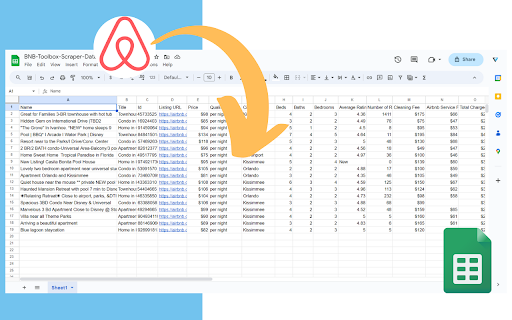
Extract & export Airbnb rental listings data with no code to a formatted CSV or Google Sheet. This extension extracts the most comprehensive data from Airbnb's listings with one click and no code. This extension is perfect for investors, Airbnb hosts and managers, data analysts, real estate agents. It helps provide information for market analysis, competitor analysis and more. You can download the data as a nicely formatted CSV file or Google Sheets file organized by price, beds, bedrooms, baths, fees, rating, number of ratings, city, latitude/longitude and more. It's a very simple extension that is easy to use and gets the job done. 🧪Core Features: ✔️Scrape unlimited Airbnb listings from the website - Search page results (https://airbnb.com/s/) - Individual listing pages (https://airbnb.com/rooms/) - Wishlists (https://www.airbnb.com/wishlists/...) ✔️Download data into a formatted CSV file or Google Sheets including: - Price - Occupancy rate data (calculated and raw data) - Rating - Number of reviews and review history - City - Latitude/Longitude - Name/title - # of beds, bedrooms, baths - Type of listing (ie entire home) - Listing URL - Search filter inputs (ie total nights, check-in/out dates, etc.) - Total charged based on search filter inputs - Early bird discounts - Discounted and original prices - "Superhost" status - "Rare find" status - Locale code - Listing ID - "About this space" description - Amenities list - Cleanliness, value, accuracy, communication, check-in, location sub-ratings - Host name, rating, number of reviews ✔️No coding or technical knowledge needed. It's super easy to use! NOTE: This extension only supports airbnb.com at this time. International versions of the website may not have full functionality. It also does not support extracting split stay listings. Please email support@proptierio.com for any feature requests. Heed help sending letters of intent in bulk to lead? Try Bulk LOI Sender for FREE: https://workspace.google.com/marketplace/app/bulk_loi_sender/313947552675 🔒Permissions: We understand there may be questions regarding the permissions needed to use the extension. We aim to be as transparent as possible hoping to inform you that we have absolutely no intent of using the access you grant to your browser maliciously. Follow the link below to read on: ⭐ How To Use: The extension popup has 3 buttons that control the entire functionality of the app. Each button is to scrape the webpage, clear the data to scrape from scratch, and download the CSV file or save to Google Sheets respectively. To extract data, follow these steps: 1. Go to Airbnb.com and choose your search inputs (ie location, dates, guests) 2. Open up the extension and click "Scrape". Don't close the app while it works. 3. Click "Download" when you're ready to download the data to CSV or Google Sheets 4. (Optional) Change settings for automation (i.e. automatically navigating the search results pages) For more info, please see the YouTube video above to learn how to use the extension. If there are any questions or other issues, please contact support@proptierio.com. Also, check the how-to page: https://proptierio.com/blog/bnb-toolbox-scraper-for-airbnb-chrome-extension or the support page: https://proptierio.com/blog/bnb-toolbox-scraper 🏷️Pricing: Upon installation of the extension, the user will be able to use the basic and free version of the extension indefinitely. This limits the scraped listings to the 50 listings per download (downloadable CSV file is available with the basic version). Upgrade to the premium version to enjoy scraping and downloading unlimited listings from Airbnb's website (and other awesome features). 📚Terms and Conditions: By using this extension, you agree to the terms here: https://proptierio.com/legal/bnb-toolbox-scraper-terms and https://proptierio.com/terms ✋Important: Read more about the extension and its usage here: https://proptierio.com/blog/bnb-toolbox-scraper-for-airbnb-chrome-extension 📘 Change log: 4/14/2026: Edge case bug fix and search results extraction 4/9/2026: Fix bugs, improve data extraction uiux with stop function 11/12/2025: Improve oauth flow, add exit survey, improve analytics 8/16/2025: Mitigate large extraction error 8/11/2025: Add host info and sub-rating extraction 8/7/2025: Fix search results extraction due to Airbnb website change 7/31/2025: Implement wishlist extraction 7/17/2025: Fix amenities extraction 7/10/2025: Update scraping function due to Airbnb website change 6/2/2025: Minor UIUX improvements 5/22/2025: Better handle download bug, improve error logging 5/19/2025: Fix minor search results extraction bug 5/12/2025: Better handle split stay results, improve UIUX, error logging 5/6/2025: Minor bug fix and update YouTube video 5/4/2025: Improve UIUX by introducing side panel 4/29/2025: Fix single page price extraction 4/25/2025: Improve purchase flow 4/21/2025: Improve extracting international formats, total nights, price 4/16/2025: Fix search results extraction for total price displays 4/11/2025: Fix search results extraction due to Airbnb website change 2/5/2025: Allow exporting of amenities list and occupancy rate raw data 1/30/2025: Fix price extraction from search results due to Airbnb website change 1/2/2025: Fix rating extraction from search results 11/20/2024: Add affiliate program link 11/07/2024: Update YouTube video 10/16/2024: Add ability to extract detailed listing description 9/16/2024: Fix data extraction bugs for various parameters, implement custom time delay functionality 2/22/2024: Fix scrape bug due to Airbnb change 1/10/2024: Save listings continuously as scrape is in progress. 12/15/2023: Improve pagination automation 10/22/2023: Fix minor scraping bug. 10/17/2023: Initial publish.

A-Stays Scraper: Export Listings, Reviews, Prices & More
Airbnb Scraper: Extract Airbnb availability, host details, property data & more. Export to CSV, JSON, XLSX with ease. Scrape and monitor rental listing data with this powerful browser extension built for Airbnb. Extract property details, guest reviews, host profiles, and calendar availability directly from search results and individual pages. All data processing happens locally in your browser, and built-in monitoring lets you track changes over time. Key Features ✓ Monitor listings for price, availability, or detail changes with scheduled checks ✓ All scraping and exports run locally in your browser ✓ Export to CSV, Excel (XLSX), JSON, HTML Table, and Raw JSON ✓ Automatic pagination across multi-page search results ✓ Batch processing for scraping multiple URLs in sequence ✓ Customizable field selection and conditional formatting What Data You Can Extract Listings: Title, property type, rating, review count, price per night, total price, coordinates, photos, guest favorite status, and cancellation policy. Property Details: Full description, guest capacity, bedrooms, beds, bathrooms, check-in/out times, amenities, safety devices, cancellation policy, host name, and superhost status. Reviews: Reviewer name, location, rating, date, full review text, host response, review highlights, collection tags, and associated photos. Availability: Calendar dates, check-in/out availability, bookable status, and minimum/maximum night requirements. Host Profiles: Host name, location, biography, verification status, languages, interests, total listings, average rating, and total reviews. Host Properties: Listing titles, property type, room type, bedrooms, beds, bathrooms, rating, review count, and superhost status. Monitoring & Alerts Use the Page Watcher add-on to track changes on any Airbnb page. Set conditions on specific fields, such as price drops or availability changes, and receive instant notifications via webhook or ntfy.sh when your criteria are met. Batch Processing The Batch URL Opener add-on lets you queue multiple Airbnb URLs for sequential scraping. Add URLs manually or auto-collect them from a search results page, then batch-process and export all results in one operation. Perfect For This tool is ideal for property researchers, hosts tracking competitor listings, and travelers monitoring price changes on Airbnb. It streamlines the collection of rental data across multiple markets without manual copying. Supported Regions This extension supports the global Airbnb domain and all regional subdomains, enabling data extraction across international markets. Privacy & Security All scraping and data exports are processed locally on your machine. General usage metrics are collected to improve the extension, but your scraped data is never sent to external servers. Usage Notice This extension provides tools for extracting publicly available data. Users are responsible for ensuring their use complies with applicable terms of service and local regulations. The developer provides the tool and is not liable for how it is used. Technical Support For assistance or questions, contact hello@nifty.codes. Trademark Airbnb is a registered trademark of Airbnb, Inc. This extension is an independent tool and is not affiliated with, endorsed by, authorized, maintained, or sponsored by Airbnb, Inc.

Apache KIE™ Serverless Workflow Editor for GitHub
Visualize and edit Serverless Workflow files using a graphical editor on GitHub Visualize and edit Serverless Workflow files using a graphical viewer and a custom Monaco editor on GitHub. This Chrome Extension augments GitHub and provides a brand new way to handle your Serverless Workflow files directly on the GitHub interface. With the extension installed, you visualize your workflow with a graphical viewer, helping you to have a better experience and edit your Serverless Workflow files with an enhanced editor with powerful features, which will boost your productivity. The same applies to visualizing your assets on Pull Request reviews! Some Open Source projects were vital for the development of this extension, and we would like to thank all of them, with highlights to: - CNCF Serverless Workflow SDK Typescript: for workflow parsing; - Mermaid: for workflow rendering and visualization; - Apicurio: for our service catalog integration; Apache KIE (incubating) is an effort undergoing incubation at The Apache Software Foundation (ASF), sponsored by the name of Apache Incubator. Incubation is required of all newly accepted projects until a further review indicates that the infrastructure, communications, and decision making process have stabilized in a manner consistent with other successful ASF projects. While incubation status is not necessarily a reflection of the completeness or stability of the code, it does indicate that the project has yet to be fully endorsed by the ASF. Some of the incubating project’s releases may not be fully compliant with ASF policy. For example, releases may have incomplete or un-reviewed licensing conditions. What follows is a list of known issues the project is currently aware of (note that this list, by definition, is likely to be incomplete): - Hibernate, an LGPL project, is being used. Hibernate is in the process of relicensing to ASL v2 - Some files, particularly test files, and those not supporting comments, may be missing the ASF Licensing Header - - Hibernate, an LGPL project, is being used. Hibernate is in the process of relicensing to ASL v2 - Some files, particularly test files, and those not supporting comments, may be missing the ASF Licensing Header If you are planning to incorporate this work into your product/project, please be aware that you will need to conduct a thorough licensing review to determine the overall implications of including this work. For the current status of this project through the Apache Incubator visit: https://incubator.apache.org/projects/kie.html

Bnb Pro Report
Bnb Pro Report ti aiuta ad effettuare la tua ricerca di mercato. Se operi nel settore degli affitti brevi non puoi farne a meno! Bnb Pro Report è uno strumento indispensabile i professionisti che operano nel settore degli affitti brevi tramite AirBnb. Aiuta ad effettuare delle ricerche di mercato grazie a metriche come: - la media dei prezzi per notte - il numero medio di recensioni Offre la possibilità di esportare i parametri in un file Excel. Bnb Pro Report inoltre ti permette di fare un calcolo di profittabilità così da sapere in anticipo se il tuo investimento possa risultare profittevole ed in quanto tempo.Tutto ciò sarà tuo grazie ad un acquisto una tantum. Gli sviluppatori si impegnano quotidianamente a migliorare il software ed aggiungere nuove features. Cosa aspetti?

Thymeline
Add events to your timeline the easy way Keep track of everything important about your projects all in one place. Meet Thymeline, the free Chrome extension that will magically transform your project chaos into an organized masterpiece. Created for Project Managers. Here is how Thymeline saves you time. No APIs. No integrations. As simple as copy & paste. Easily copy relevant information from any of your existing tools or apps without any hassle. Once you download the chrome extension... Step 1: Visit any website. Step 2: Highlight any text. Step 3: Click on the Thymeline Chrome extension Step 4: Add to existing Thymelines. That’s it! Thymeline can handle as many projects as you’re juggling. Create as many Thymelines as you need! Multiple projects, multiple Thymelines, we can handle it. Keep track of it all in a simple interface. Share with others Share your Thymelines with others on your team with view or edit privileges, keeping everyone on the same page. Want to keep it private? You can do that too.
