
lobkhfpaoaonbpgaakbdonkpilldgmib
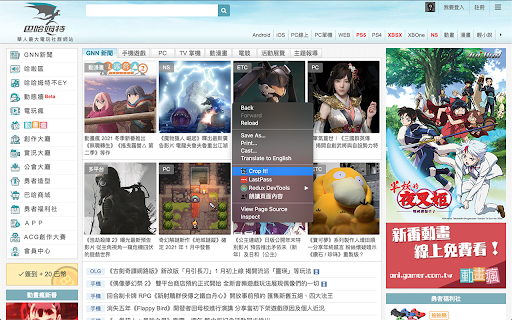
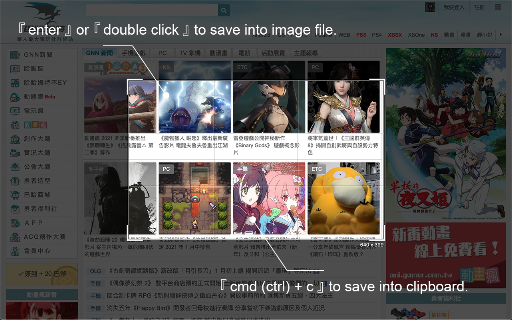


Crop It! Provide users crop current web page's screenshot feature. Users could use it to capture images they need. Use 「Crop It!」 to crop the exactly screenshot you need. Users could choose to save the screenshot into a file or clipboard. - Usage instructions: 1. Turn on 「Crop It!」. 2. Adjust the selection size & position you need. (Users could press keyboard 「Esc」or click overlay to turn off 「Crop It!」) 3. Right-click on selection, there will be many aspect-ratio to choose. 4. Double click the selection or press keyboard 「Enter」 to save screenshot into a image file. Or press 「Cmd (Ctrl) + c」to save screenshot into clipboard. 1.0.5 a. Add keyboard shortcut >「 Shift 」when resize selection for fix its aspect-ratio. b. Unify system UI & dark mode support. c. Unfreeze scroll-lock when 「Crop It!」turn on. d. Minor bug fixed & performance enhance. 1.0.4 a. Add aspect-ratio picker for different usages. b. Add keyboard shortcut >「 f 」for quick expand / shrink selection to fullscreen.

Screenshot Tool - Screen Capture & Editor
Innovative screenshot tool lets users screen capture and edit screenshot. Full page screen capture. Take stunning screenshots of entire websites and capture page elements. Offline. No registration. Screenshot tool - captures entire websites and user areas. Ready-made screenshots can be quickly edited (crop, paint over, add arrows, captions or text). Screen Capture tool for making a full page or partial capture with further editing, download, or text adding. Make a full webpage screen capture or just any part of it with an opportunity to edit, save and download screen capture to your PC. The app is launched from a browser that totally saves your time. Simply click the extension icon to choose from options whole page capture or a selected part. You will not see any additional windows with websites here. Why waste time if you just want a screenshot? Want to share your screen for cases like reporting technical issues, making product demos or how-to tutorials? Here are reasons to choose Screenshot and Screen Capture: ✔️ Screenshot of the full page, not just the visible area or selected area; ✔️ Screenshot on One-Click; ✔️ Storage and processing without a server; ✔️ Save PNG files or Copy it to the clipboard with One-Click; ✔️ No login or registration required; ✔️ There are no restrictions on the size or size of the file; ✔️ Edit and discard changes your screenshot; ✔️ Add graphic and text elements such as pointer, arrow, square and other shapes; Click on the extension icon (in the upper right corner of the browser) then choose one of the options capture and watch the Screenshot Tool capture each part of the page and then transfer the finished screenshot to a new tab, where you can edit the image and upload it as a file to your PC. Notes Remember to reload the page after you install extension before trying to take a screenshot of it (Chrome should initialize the extension for each page). The extension Screenshot tool is completely free and easy to manage for users. If our extension is useful to you, please give us 5 stars!

Paint - Drawings Easy
Use the paint extension for easy drawings. This drawings tool allows Illustrate on-screen and capture with the screenshot feature. Paint is lite weight and a free app that can be used for educational purposes and introduce anyone to drawing right from your browser. Use it to make drawings easy and intuitive right on your screen! Take a screenshot and showcase your creations to friends. Sketch playful drawings or jot down ideas on web pages. Easily illustrate your screen and capture it with a quick screenshot. Paint extension has a simple and easy-to-use design. It is not confusing, and easily recognizable icons are used in the app, which makes it easy for everyone to use. Draw on any website, add text, add lines, and highlight! Use your mouse or touchscreen to draw on the web or PDFs and save it to your computer. It is just a fun extension, and you can get some laughs using this extension by creating funny faces, etc., on web pages.

Image Resizer
🖼️ Resize images, crop images, and compress photos online using Image Resizer. Perfect for social media, web, and bulk resizing. 🤔 Are you tired of struggling with complex software to resize images? Discover Image Resizer, a versatile and user-friendly Chrome extension for all your image editing needs. Whether you're a social media enthusiast, web developer, or someone who needs to quickly adjust photo sizes, our tool is designed to simplify your tasks. 🔑 Key Features: 1️⃣ Image Resizing: Use predefined presets or custom dimensions to resize images and resize photos effortlessly (to pixels, to percents, to MBs). 2️⃣ Image Cropper: Enjoy adjustable cropping dimensions for precise editing. 3️⃣ Batch Processing: Apply multiple resize image presets with just one click. 4️⃣ Auto-Resize and Auto-Download: Automatically resize and download images upon upload. 5️⃣ Customizable Output: Set custom file name prefixes for your processed images. 6️⃣ Aspect Ratio Lock: Maintain aspect ratios during resizing for consistent results. 7️⃣ Preview Functionality: View original image details, including file name, extension, dimensions, and size. 8️⃣ Download Options: Easily download the original image and all resized versions separately. 🚀 Effortless image resizing and more With Image Resizer, enjoy an intuitive interface that lets you resize images, crop images, and compress photos with ease. Forget complex software and endless searches for "how to resize an image" online. Our extension brings professional-grade image manipulation right to your browser. 📏 Flexible resizing options Whether you need to enlarge an image or craft a thumbnail, Image Resizer has you covered: ➤ Resize by Exact Dimensions: Customize to your needs. ➤ Resize by Percents. ➤ Resize to be under desired size in MB. ➤ Maintain Aspect Ratio: Keep your images proportional. ➤ Preset Sizes Available: Use our saved presets for consistency. 📊 Simplified bulk operations Handle large batches of images effortlessly with our bulk image resizer: ➤ Multi-Dimensional Resizing: Resize image using multiple custom dimensions at once. ➤ Uniform Cropping: Apply the same crop across several photos. ➤ Batch Compression and Renaming: Compress photos to zip and rename files in one step. 🌐 Convenient browser-based resizing Resize images directly in your browser, online or offline. No need for extra downloads or sketchy websites: ▸ Quick Image Size Changes: Setup default size presets and Auto options to resize images in one click. ▸ Simple Cropping: Crop images in seconds. ▸ Versatile Photo Resizing: Perfect for any purpose. ▸ Fast Compression: Speed up your workflow. 📚 How to use image resizer 1. Click the Extension Icon in Chrome: Access the tool easily from your browser. 2. Upload Images: Drag and drop or select files (supports PNG, JPEG, WebP, BMP, and TIFF). 3. Choose Your Desired Options: Select resize, crop, or compression settings. 4. Click 'Resize': Download your images one by one or all in a ZIP archive. 🔥 Pro use-case for our resizer 1. Set Image Resize Dimensions as Local Presets: Easily configure and save your preferred image dimensions as presets. 📏 2. Customize Output File Names: Set custom file names for your output files effortlessly. ✍️ 3. Enable "Auto Resize" and "Auto Download": Simply check these options for seamless automatic resizing and downloading. 🔄 4. Enjoy Hassle-Free Image Resizing: Experience the convenience of resizing images with just a single drag-and-drop action! 🚀 ❓ Questions and Answers 📌 Why is image resizing important? 🔹 Image resizing is crucial for several reasons. It enables you to resize photos for various uses, such as web or print applications. Resizing can significantly reduce image file size, improving page load times and reducing data usage. It can also enhance the visual quality of an image by adjusting the resolution or aspect ratio, making it more suitable for specific displays or purposes. 📌 Will resizing affect image quality? 🔹 No, when you resize an image using our tool, the quality remains unchanged. Our image resizer ensures that the original quality is preserved, allowing you to resize images without worrying about any loss in clarity or detail. 📌 What are the common use cases for photo resizing? 🔹 Using an image resizer helps you efficiently change the size of an image for specific platforms and purposes, ensuring optimal quality and dimensions. Resizing images is essential for various applications, such as: ▸ Resize photos for web or mobile apps ▸ Social media sharing: Facebook cover photo size, Instagram photo size ▸ Printing and official documents ▸ Graphic design projects and advertising ▸ YouTube thumbnail size 📌 What image formats are supported? 🔹 Our image resizer currently supports the following image formats: PNG, JPEG, WebP, BMP, and TIFF. These formats cover a wide range of uses, ensuring flexibility and compatibility for your image editing needs. 📌 Can the app work offline and is it secure? 🔹 Yes, our image resizer can work completely offline, ensuring your images are processed securely on your device without the need for an internet connection. This offline capability means that your images remain private and secure, with no data being uploaded to external servers. You can resize images confidently, knowing your personal data is protected. 🔒 🌟 Download Image Resizer today and join thousands of satisfied users who have simplified their image editing process. Whether resizing one photo or processing hundreds, our tool is ready to assist.

Amazing Screenshot and Annotate Tool
Capture screenshot of web page easily and conveniently, and the powerful graffiti allows you to edit screenshot as you like Amazing Screenshot screenshot and annotation tool is a simple, free screenshot capture extension that allows you to easily implement screenshots and annotation functions with just one click. Meet the requirements of high-quality, high-resolution screenshots, support PNG, JPG, PDF formats, built-in rich annotation tools, allowing you to easily edit screenshots, and you can also use it as a graffiti tool to edit web content at will . ✍Screenshot function: ☑︎ Screenshots of some areas ☑︎ Screenshot of the entire page ☑︎ Screenshot of the visible area ☑︎ Support saving screenshots in PNG, JPG, and PDF formats. ☑︎ Screen capture keyboard shortcuts ✍Screen shot annotation function: ☑︎ write text ☑︎ Obfuscate sensitive information ☑︎ Use arrows and stickers ☑︎ Include rectangular boxes or lines ☑︎ Picture cropping ☑︎ Insert picture ☑︎ Support saving screenshots in PNG, JPG, and PDF formats. privacy: We will not collect, store, use, transfer or sell your personal privacy information.
