
lnmokijgbdnpgliddjcnkebbjabimkjo

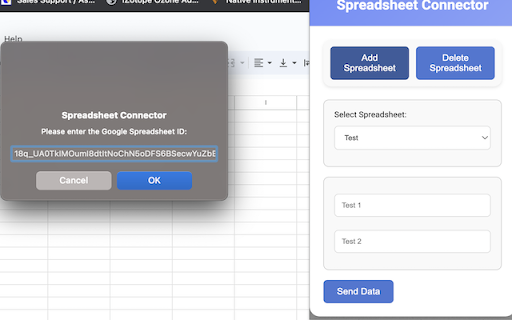

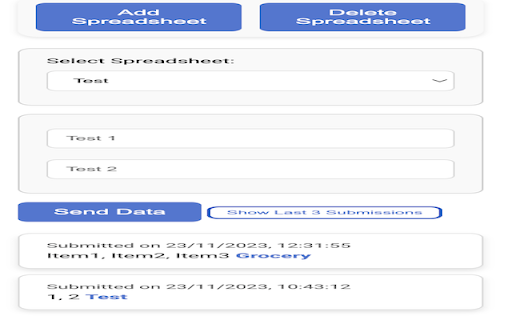
"Spreadsheet Connector" is a Chrome extension tailored for efficiency, offering a streamlined approach to managing and updating… "Spreadsheet Connector" is a Chrome extension tailored for efficiency, offering a streamlined approach to managing and updating Google Spreadsheets. Ideal for professionals and casual users alike, it integrates directly into your browser, delivering a convenient and accessible tool for spreadsheet management. Add and Manage Spreadsheets: Easily add new spreadsheets or select from existing ones within your Google account, all from a user-friendly interface. Intuitive Data Input: Enter and submit data to any chosen spreadsheet without the need to navigate away from the extension's pop-up window. Customizable Columns: Adapt your spreadsheets to your data needs by customizing the number and names of columns. Dynamic Spreadsheet Interaction: Engage with your spreadsheets in real-time, adding columns, inputting data, and deleting spreadsheets as necessary. Simple, Clear Interface: The minimalistic and straightforward design of "Spreadsheet Connector" ensures that your focus stays on your data, not on navigating complex software. Secure and Seamless Google Integration: Utilizing Google's robust OAuth 2.0 authentication, the extension guarantees secure access to your spreadsheets while providing ease of use. Last Submissions Tracking: Keep tabs on your recent activity with a display of the last three submissions, including detailed timestamps and the specific spreadsheets updated, presented in a visually appealing and interactive manner. How to find the spreadsheet ID: https://github.com/Atk1589/Find_SpreadsheetID/blob/main/README.md

Quick spreadsheet
Allow you quickly do any calculation using a well-known spreadsheet inside your browser. This extension is not a replacement for standalone spreadsheet applications (such as Microsoft Excel or Google Spreadsheets). But it's a fast way to do any calculations or research without leaving your tab. Quick spreadsheet - is your calculator on "steroids". Version: 1.0.5 - Update manifest for New Chrome Web Store rules Version: 1.0.4 - Added GBP(Pound sterling) currency to format at the toolbar

Table Capture - Tabular Data to Spreadsheet
Table Capture is a powerful and versatile chrome extension that empowers you to interact with Tabular Data on websites. You can effortlessly select, and export Tabular Data to various formats, including Microsoft Excel, CSV, Google Sheets. Whether you need to analyze data, share it with colleagues, or keep a local backup, this extension provides a seamless and user-friendly experience. Hot To Use: 1.Open our plugin and select the table section on the webpage 2.Export table data to csv, google sheets, Excel Key Features of Table Capture: -Recognize Tabular Data with ease and efficiency -Export Tabular Data content to Google Sheets -Download tables directly as Excel spreadsheets or CSV files -Extract tables from PDF files/Images, both local and from the web By design, your data stays at all times on your Google account, never saved in our database. Your data aren’t shared with anyone, including the add-on owner. We complies with privacy laws (especially GDPR & California Privacy Act) to protect your data.

Google Sheet Search
This extension adding search for google docs sheets Usage 1. Install 2. Reload google sheet page 3. Click search button 4. Enjoy

Sheetgo | Connect, Filter, Merge, Excel, CSV
Connect Google Sheets, Excel, CSV, BigQuery, Google Docs and Gmail to import, export, merge, split and filter data automatically. Welcome to Sheetgo! The simple way to automate your data management directly within your spreadsheet. Sheetgo is an all-in-one data management tool that allows you to build custom workflows to automate entire business processes. Connect, transfer, merge, split or filter your spreadsheet data and use intelligent integrations such as Google Sheets™, Google Docs™, Gmail™, Excel and CSV files to build powerful workflows that streamline your data management. With Sheetgo you can: Connect Google Sheets™ to Google Sheets™, Excel and CSV files ► Transfer data between different files automatically, consolidate spreadsheets by combining multiple sheets into one central file and build an automated workflow that moves and manages your data for you. A more reliable and scalable Importrange alternative ► Sheetgo is a quick and easy-to-use tool which is a great alternative to the Importrange function. It's more reliable, less prone to errors and easier to use because it doesn't require complex formulas or any advanced knowledge of spreadsheets. In addition, Sheetgo retains the formatting of the original data. Control data privacy with custom workflows ► Share data without sharing your entire spreadsheet and send selected information to multiple sheets. Better business intelligence ► Create custom solutions that provide accurate data through automated reports and dashboards for any business process. Merge data from multiple sheets into one ► Merge data from many spreadsheets into one automatically, pulling data into one master sheet for analysis, reporting and dashboards. Automate Google Sheets™ and save time on your spreadsheet work ► Schedule automatic updates (hourly, daily, weekly or monthly) to move data between spreadsheets without any manual work. Expert automation support ► Get support through access to tutorials and 1-1 video calls. For more information on Sheetgo plans, head to www.sheetgo.com/pricing Google Sheets™, Google Docs™ and Gmail™ are a trademark of Google LLC.
