
lnlfckdcdjkbhaaihnhehinbgiaoggfa
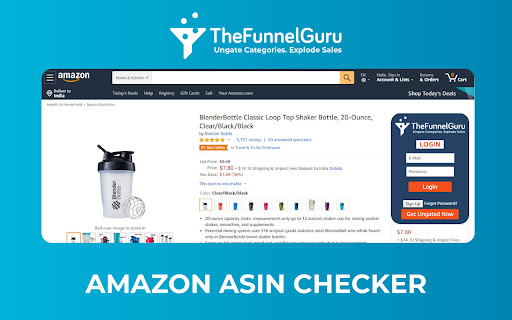
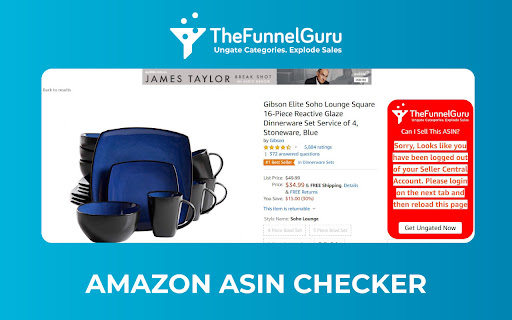
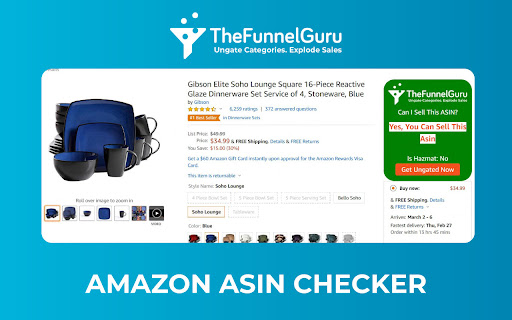

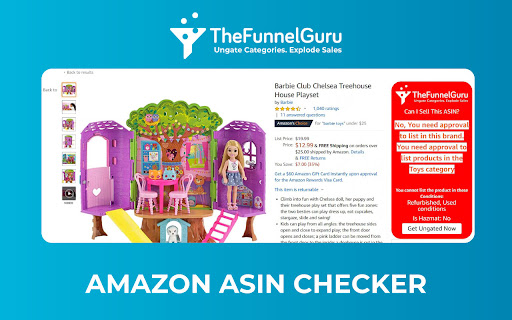
Are You eligible to sell a particular product on Amazon? Our ASIN Checker will help you make the best business decision. Are you an Amazon seller looking for a hassle-free way to check product restrictions? Look no further! Our ASIN Checker Chrome Extension has been supercharged with exciting new features to make your selling journey even smoother. How to Use: 1. Click "Add To Chrome" to seamlessly integrate the extension into your browser. 2. Visit any Amazon Product Listing Page, and the extension will automatically appear on the Right Hand Side. 3. Log in to your Seller Central account on a new tab and refresh the Amazon Listing Page. 4. The extension will display whether the particular ASIN/Product is Brand Restricted, Category Restricted, or Not. 1. Bulk ASIN Checker: • No more tedious one-by-one checks! With our latest update, you can now check the restriction status of multiple ASINs at once. • Search Page Integration: Check restrictions directly from Amazon's search page, allowing you to quickly assess product viability without navigating to individual product pages. • Seller Storefront Page: Easily check restrictions for a range of products in your storefront or other seller's storefront. Streamline your operations by accessing restriction data where it matters most. 2. Seamless Integration: • The extension seamlessly integrates with your Chrome browser. Just click "Add to Chrome" to empower your browser with this invaluable tool. 3. Real-Time Updates: • Get instant feedback on whether a specific ASIN or product is Brand Restricted or Category Restricted. • Stay informed about the constantly evolving Amazon landscape with our real-time data updates. 4. Application Assistance: • If a category or brand is restricted, fear not! Contact our dedicated team at contact@thefunnelguru.com. We specialize in obtaining approvals for selling under restricted categories and brands. Some of the Important Restricted Categories in which the Extension would display the data are: Beauty & Personal Care Topicals Grocery & Gourmet Foods Dietary Supplements Sports & Nutrition OTC Medication Lighting Pet Care Pet Food Pet Supplies Music Gardening & Watering Home & Kitchen and many more. Stay ahead of the competition, make informed decisions, and supercharge your Amazon selling experience with our Enhanced ASIN Checker Chrome Extension!

Amazon Sort by Review Count
Sort By Review Count for Amazon allows you to sort Amazon search results by their number of reviews Sort By Review Count for amazon extension lets you sort items by their number of reviews & ratings. Most reviewed are now on top of amazon search To sort by number of reviews, click on the "Sort by Review Count" button. UPDATE: Folks, you don't need to pick a specific department anymore !!

Amazon Quick View by AMZScout
See Margin, BSR, ASIN, Size, etc. on an Amazon search page! All crucial data available right as you search for or browse products. With Quick View Extension by AMZScout, you can easily compare the products right on the Amazon pages. You now can choose the best item to sell with all the data right in front of you. There is no need to pull up extensions anymore. Simply type in a niche and enjoy viewing the full information. Quick View will show you: + BSR and its history + Price history + The best Keywords + Which sellers sell the product - FBA (and their number) - FBM (and their number) - Amazon itself sells it - Amazon Warehouse deals + The product’s FBA fees + The date it became available + Profit margin + Listing quality + ASIN + Size + Weight

Amazon ASIN Keyword Rank & Index Checker
Amazon ASIN Keyword Rank & Index Checker enhances sellers and marketers tracking of product ranking and indexing. Amazon ASIN Keyword Rank & Index Checker enhances sellers and marketers'tracking of product ranking and indexing. Do you need help getting the product index in search results? Extfy Offers an ASIN-based keyword ranking and indexing checker tool. This free ASIN-based keyword ranking and indexing checker extension shows your product's current position when searching for relevant keywords and tracks its position changes over time. This extension also checks the sponsor product listing. If you select the sponsor list, it provides you with the relevant data. Use this extension to monitor the impact of your advertising campaigns and listing optimizations on your organic ranking and consistently improve it. This extension offers three convenient methods: Single ASIN, Multiple ASIN, and Batch File Upload: Single ASIN: Using a single ASIN feature, users can easily track a specific product's keyword ranking and indexing status by entering a single ASIN. Ideal for focused insights and optimizing individual listings. Multiple ASINs: Input multiple ASINs to monitor keyword rankings across several products simultaneously. Gain accurate insights to manage and optimize various listings efficiently. Batch File Upload: For bulk keyword tracking, upload a CSV file containing multiple ASINs. A sample CSV format is provided for convenience. These features allow you to check keyword rankings in bulk quickly. Export your ranking and indexing results to Excel or CSV for further analysis and reporting. If you're worried about whether your listed product is indexed and which keywords it ranks highest for, this extension is made for you. Select your marketplace location, input the product ASIN number, and enter your desired keywords for ranking insights. That's it! This extension will provide valuable data, including the percentage indexed, average page rank, average product rank, and average competing products. Higher search results will lead to increased sales through organic, unpaid traffic. As your products increase in the search rankings, you'll attract more and better potential customers, resulting in increased traffic and higher sales figures. Explore the features of our Chrome Extension: - Multi-Marketplace Support - Track Keyword Rankings - Check Multiple keywords - Index Checker - Real-Time Updates - Sponsored Product Listing Tracking - Effortless Listing Optimization - Export Results - User-Friendly Interface Don't wait! Experience the power of data-driven success today. Try it today and unlock the potential of data-driven success. Add this extension to Chrome to your PC now. Our support team is here to help if you have any questions. You can easily reach out to our developers for guidance or clarifications. Remember to explore our comprehensive help page section for additional resources and advice.

Amazon Sort by Review Count & Ratings - Shop Smarter!
Amazon Sort by Review Count & Ratings lets you sort results by review count and rating breakdown to find trusted products faster ⭐ Leave a Review! ------------------------- If you like the extension, leave us a review! (Hopefully 5 star!). If you don't like the extension or it doesn't work, drop us an email and we'll try and resolve the problem! Don't get caught out by the obvious clones of this extension that can't even write their own descriptions! ℹ️ How do you use the extension? ------------------------- 1️⃣ Search for a product on Amazon 2️⃣ Choose a department 3️⃣ Click on "Sort by Reviews" (Or Press Alt + S) 4️⃣ Optionally, filter out products based on minimum quantity of reviews 5️⃣ Enjoy! 🆓 This extension will always be free! If you want to say thanks and buy me a drink 🍻 then feel free to donate! 🙏 🚀 Features ------------------------- ⭐️ An easy to use 1 click solution to be able to sort by review count without needing to select a department! ⭐️ Global compatibility with all known Amazon stores! Be that Amazon.ca, Amazon.com, Amazon.co.uk... etc ⭐ Displays review score and high / low rating percentages on individual product pages ⭐ Shows high and low rating percentages directly in Amazon search results ⭐️ Multi-browser compatibility, works with all Chromium based browsers! ⭐️ Ability to show the user that it is faster to sort by reviews by selecting a department before sorting! ⭐️ Ability to show the user when the search results are already sorted. ⭐️ Easy to use hotkey to view the extensions instructions, simply navigate to Amazon and press ALT + A (A as in Amazon) ⭐️ Easy to use hotkey to sort the product search results, simply navigate to Amazon and press ALT + S (S as in Sort) ⭐️ Easy to use hotkey to access the extensions settings, simply navigate to Amazon and press ALT + C (C as in Configuration) 📝 Changelog ------------------------- ➤ 1.0 - ➤ The ability to sort by review count ➤ 1.1 - ➤ Prevented sorting pages that cannot be sorted to avoid confusion. (An Amazon restriction) - ➤ Added tooltips to help users see why the sort button is disabled - ➤ Added the ability for users to left click the pinned extension to see instructions with screenshots on how to use the extension. - ➤ Added a donation button inside the instructions popup and as a context menu option when right clicking in an Amazon website. ➤ 1.2 - ➤ Prevented already sorted pages from being sorted again to avoid confusion. - ➤ Added tooltips to help users see why the sort button is disabled because the page is already sorted. - ➤ Improved the speed in which the sort functionality becomes available. - ➤ Added the hotkey of Alt + A, so when you are on Amazon you can simply press the hotkey to see the instructions. - ➤ Added the hotkey of Alt + S, so when you are on Amazon you can simply press the hotkey to sort by reviews. ➤ 1.3 - ➤ Updated the name of the extension to "Sort by Reviews for Amazon" for consistency and simplicity. ➤ 1.4 - ➤ Added support for India, Egypt, European Union and Czech Republic - ➤ Improved support for Saudi Arabia & Singapore' alternative domains ➤ 1.5 - ➤ 🔥 Added support for Amazons new results page design/layout (currently only rolled out to Amazon.com) - ➤ 🔥 Added minimum number of reviews slider, to allow you to hide reviews that have only a few 5 star reviews. - ➤ 🔥 Added the overall rating to be visible immediately on the product search results, rather than requiring you to hover over the rating / view the individual products page. - ➤ 🔥 Added the 5 star reviews and 1 star review percentages to be visible immediately on the product search results, rather than requiring you to hover over the rating / view the individual products page. - ➤ Added support for Belgium, Poland & South Africa; If your localisation isn't supported please leave us some feedback and we'll add it! ➤ 1.6 - ➤ 🔥 Added support for Amazons latest results page design/layout. - ➤ 🔥 Added support for displaying the review score as well as high and low review percentages in an individual product page. - ➤ Replaced Amazons unattractive review score average with the one from this extension. (Thanks Amazon for agreeing that this is a great feature. 😉) - ➤ Improved the processing of products to reduce network usage, browser performance impact and overall speed. - ➤ Added temporary review data caching to improve performance and responsiveness. - ➤ Improved the handling of international amazon domains. ➤ 1.7 - ➤ Updated extension name, description, icon and promo title. - ➤ Added support for international delimitation. - ➤ Optimised performance to improve speed of processing review data. - ➤ Improved JavaScript safety to reduce potential issues when Amazon inevitably updates their designs again. ➤ 1.8 - ➤ Fixed the review handling for sponsored products. - ➤ Added an option to "Hide Sponsored" in the search results. - ➤ Updated the style of "Sponsored" badges to make it more obvious to consumers. ➤ 1.9 - ➤ 🔥 Added support for Sorting by Reviews without a Department/Category needing to be selected. - ➤ 🔥 Added gentle background processing to improve performance of sorting. - ➤ Improved mobile / low resolution responsiveness of the UI changes. - ➤ Improved the layout of sponsored review data. - ➤ Improved the retrieval of review data to prevent rare situations were review data is not collected and shown. - ➤ Optimised performance to improve speed of processing review data. ➤ 2.0 - ➤ 🔥 Added a "What's new?" popup on first visit to Amazon to introduce you to the new feature! 📢 - ➤ 🔥 Added the ability to hide toolbar elements (moves them to a discrete hover panel) - ➤ 🔥 Added auto-sorting for when department or category pages - ➤ 🔥 Added auto-sorting for when non-department/category pages with 3 different options: - ➤ ⚙️ Auto-Sort Prompt Mode - Notifies you when sorting is ready via a popup - ➤ ⚙️ Auto-Sort Discreet Mode - Notifies you when sorting is ready via a notification + change to button - ➤ ⚙️ Auto-Sort Instant Mode - Instantly sorts the page when sorting is ready - ➤ Added a full settings panel to the extension popover and via a settings cog. - ➤ Completed a major overhaul to improve performance ➤ 2.1 🆕 - ➤ Adjusted default option values for better support for new users. - ➤ Adjusted delays for better compatibility. - ➤ Improved background processing to use a service worker rate limiter for better compatibility. 🔏 Your privacy ------------------------- We respect our users privacy, this extension does not in any way, shape or forms track, collect, sell or do anything with your personal data, the extension has no connection to any website, service or server. 🔏 Legal ------------------------- "Sort By Reviews for Amazon" is not affiliated, partnered with, endorsed by, or connected to Amazon or its partners in any way, shape, or form. This extension is simply a user made quality of life improvement to help other users find the most reviewed products that they're searching for.
