
lnfhnhfnlkjemkgdcppdlijpdjdmnnjd
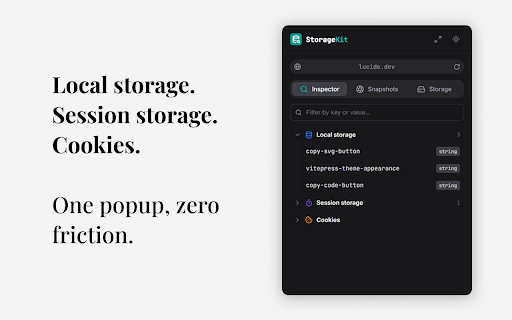


Inspect, edit, and manage Local storage, Session storage, and Cookies in one clean, powerful Chrome DevTools panel. StorageKit is the DevTools panel your browser storage deserves. • View and edit Local Storage, Session Storage, and Cookies in a clean, organized interface • Save snapshots of your entire storage state with a single click • Restore snapshots to instantly recreate any previous application state • View snapshots from all domains in one place, or filter by the current site • Automatically detects and decodes JSON, Base64, JWT, and URL-encoded values • JWT metadata shows expiry and algorithm without leaving the browser • Import and export snapshots as JSON files to share with your team Debugging storage shouldn't slow you down. Stop manually clearing Local Storage, editing cookies one by one, or copying values to external sites to decode JWTs. StorageKit eliminates the friction so you can focus on building. → Switch between user roles: save a snapshot for each role (admin, editor, viewer) and restore instantly without logging out → Reproduce bugs reliably: capture the exact storage state when a bug occurs, share the snapshot so anyone can reproduce it in one click → Share configurations: export storage snapshots as JSON to onboard teammates with the exact setup they need → Debug tokens inline: inspect JWT payloads, check expiry dates, and view decoded Base64 values without switching tools BUILT FOR DEVELOPERS • Works on any website • Two layouts: compact popup or full dashboard • Automatic theme detection with manual toggle (system / light / dark) • Privacy first: all data stays in your browser, no analytics, no tracking, no external servers • Fast, lightweight, and built with React Perfect for frontend developers, QA engineers, and anyone who works with browser storage daily.

StorageAce
Easily manage Cookies, Local Storage and Session Storage for the selected tab. StorageAce provides ability to easily manage Cookies, Local Storage and Session Storage. ★ Add Cookie ★ Import Cookies in JSON format ★ Edit Cookies using form ★ Edit Cookies using JSON Editor ★ Delete Cookies ★ Search Cookies by cookie name or cookie value ★ Sort Cookies by cookie domain, cookie name, cookie path and cookie value by clicking table column headers. ★ Protect Cookies (Set cookies as read-only) ★ Block cookies by domain, name and value filters ★ Export cookies in JSON, Netscape HTTP Cookie File, Semicolon separated name=value pairs, Perl::LWP formats. Also, you can export cookies in JSON format that can be imported by Puppeteer. ★ Backup Cookies ★ Select multiple Cookies and do actions like view, edit in JSON editor, delete, protect, unprotect, block, save etc. ★ Limit Max Age of Cookies. ★ Quick Filters available for filtering cookies in one click. ★ Add item in local storage ★ Import items in local storage in JSON format ★ Edit item in local storage using form ★ Edit item in local storage using JSON Editor ★ Delete items in local storage ★ Search items in local storage by key or value ★ Sort items in local storage by key/value by clicking table column headers. ★ Export local storage items in JSON format ★ Select multiple items of local storage and do actions like view, edit in JSON editor, delete etc. ★ Add item in session storage ★ Import items in session storage in JSON format ★ Edit item in session storage using form ★ Edit item in session storage using JSON Editor ★ Delete items in session storage ★ Search items in session storage by key or value ★ Sort items in session storage by key/value by clicking table column headers. ★ Export session storage items in JSON format ★ Select multiple items of session storage and do actions like view, edit in JSON editor, delete etc. ★ Right-click and select "StorageAce" via Context menu ★ Incognito mode Supported and settings are synced in incognito and normal modes. ★ Beautified JSON View for storage items ★ Choose path for download. ★ Ability to Remember last download path. ★ Extra feature to allow copying JWT using "Copy JWT" button. It will copy the JWT in the selected storage type. ❚█══ Privacy ══█❚ StorageAce respects your privacy and all your data is safe. If browser syncing is enabled, then the settings of the extension is synced to any Chrome browser that the user is logged into. All your localStorage, sessionStorage and cookies remains offline.

TabBud - Smart Tab Manager & Workspace
Save memory, organize tabs into spaces, and sync devices. The professional workspace manager for Chrome. Stop drowning in tabs. TabBud reduces memory usage and organizes your browser chaos into clean, synced workspaces. 🚀 Save 95% Memory by decluttering active windows 📂 Organize Tabs into dedicated Project Spaces 🔄 Sync Instantly across all your computers Meet TabBud, the intelligent workspace manager that turns browser chaos into calm, organized focus. Whether you are researching a project, planning a trip, or just have too many tabs open, TabBud keeps everything neatly sorted and instantly accessible. 🌟 WHY TABBUD? TabBud is the modern, privacy-first alternative to clutter. No more juggling windows—just clean, structured Spaces and Collections built for high-performance productivity. 🧩 Spaces & Collections Organize tabs by project, topic, or goal. Create a hierarchy that works for you. Drag & Drop: Reorder Spaces, Collections, and Cards instantly. Quick Launch: Open a single card or launch an entire Collection as a Tab Group with one click. 💾 One-Click Save Save your current tab or "Save All Open Tabs" instantly to clear your memory. No more copy-pasting URLs. 💻 Sync Across Devices Your workspace follows you. Access your organized Spaces on any computer with secure, real-time cloud sync. 📝 Smart Context Notes Don't just save a link. remember "why" you saved it. Add rich notes to any saved tab. (Toggle notes off for a minimalist view). 🔗 Share & Collaborate Share Spaces with colleagues or friends. Control access with Read-Only or Edit permissions - perfect for team research or shared projects. 🔖 Access existing browser Bookmarks in to the TabBud! ⚡ New Tab Dashboard Transform your "New Tab" page into a clean productivity hub showing your Spaces and Notes exactly where you need them. 📊 Widgets & Insights Visualize your browsing habits and resource usage with clean analytics widgets. 🌐 Secure & Private Your data belongs to you. We use enterprise-grade encryption and never sell your data. 🧠 PERFECT FOR Everyday Users: If you have more than 10 tabs open right now, TabBud helps you declutter without losing anything. Students: Organize thesis research and study materials. Developers: Manage documentation, GitHub repos, and staging links. Freelancers: Keep client projects separate and switch contexts instantly. Content Creators: Collect inspiration and assets without browser lag. ✅ 100% Free: No credit card required. ✅ Login Your Way: Google or Email login. ✅ Intuitive: Minimalist interface that feels native to Chrome. ✅ Safe: Cloud sync with local backup options. AI Smart Insights: Auto-organization tips and summaries. Team Plan: Enhanced collaboration features. More Themes: Expanded visual customization. COMPARISON & COMPATIBILITY TabBud functions as a comprehensive session manager and workspace organizer. It is designed as a modern, cloud-synced alternative to Toby, Tabextend, Onetab, Tab Manager Plus, Tablerone, Tabbs, Toast, Workona, Session buddy and Browser bookmarks. If you are looking to reduce Chrome memory usage, manage bookmarks effectively, or simply speed up your browser, TabBud is the ideal productivity extension for your workflow.

Save Tabs Chrome
Organize browser with Save Tabs chrome extension. Restore chrome session in one click. Save tab groups, manage and export tabs The Save Tabs Chrome app will help you never lose your research again. This powerful tab extension protects your work, organizes research sessions, and lets you switch between different contexts instantly. Your pages are stored locally, organized into named groups, and ready to restore anytime. 🔷 Why You Need This Extension 💡 Ever lost hours of research to a browser session crash? Need to reopen chrome tabs after an unexpected restart? Our tool solves these problems and more. Whether you're managing multiple projects, conducting deep research, or simply need better organization, this tool transforms how you work with browser. 🔷 Core Features 1️⃣ Instant Saving. Click once and your entire browser session is captured – titles, URLs, and exact order preserved in milliseconds. The save tabs chrome extension works faster than bookmarking and keeps everything organized. 2️⃣ Smart Organization. Create unlimited collections for different contexts. Group tabs chrome by project, topic, or purpose. Keep "Monday Research," "Client Work," and "Weekend Reading" separate and accessible. 3️⃣ Quick Restore. Our chrome session saver lets you restore browsing session with a single click. Open entire groups or cherry-pick individual pages. Everything reopens in the original order, so you pick up exactly where you stopped. 4️⃣ Powerful Search. Search tabs across all collections instantly. Find anything by title, URL, or group name, even if you forgot where you stored it. 5️⃣ Selective Control. Don't want to save all tabs chrome? Select specific pages and capture only what matters. You control what stored and what doesn't. 6️⃣ Multi-Window Support. Working across multiple browser windows? No problem. This Save Tabs Chrome tool opens across all windows and keeps your multi-window workflows organized effortlessly. 7️⃣ Export & Backup. Export any collection to CSV format. Save tab groups to cloud storage, email to colleagues, or transfer between computers. Your data stays portable and shareable. 8️⃣ Offline Ready. Full functionality without internet. The extension Save tabs chrome locally uses storage API. Lightweight design won't slow your browser down. 🔷 How It Works ✓ Saving Process: Click the toolbar icon. Done – everything is stored and searchable ✓ Restoring Process: Browse your collections. Click to restore chrome session instantly Continue from exactly where you left off 🔷 Real-World Solutions ▶️ Research Management. Collecting information over days or weeks? Save tabs in chrome as you find them. Add more tomorrow. Your research survives crashes, restarts, and accidental closures. ▶️ Context Switching Made Easy. Stop manually reopening everything when switching between work and personal projects. The save tabs chrome app lets you transition instantly. Each workspace stays preserved and ready. ▶️ Crash Protection Computer froze? Unexpected update? Battery died during presentation? Your collections remain safe. Tab save functionality ensures nothing is ever truly lost. ▶️ Shared Computer Solution. Family needs the computer? Save and close tabs - Chrome makes it easy with our extension, let others use the browser, then restore everything when you return. Your workspace stays private and recoverable. ▶️ Reading List Control. Stop keeping 20+ "read later" pages open forever. Keep articles in collections, read when ready, keep your browser running smoothly. ▶️ Long-Term Projects. Managing multiple topics simultaneously? This Chrome save tabs tool keeps everything organized by purpose. "Client Meeting Prep," "Q4 Report Research," "Technical Documentation" – each context preserved separately. 🔷 Privacy Commitment Your data stays on your device. We use local storage only. No external servers, no tracking, no analytics, no data selling. When you save browser session data, it stays yours completely. 🔷 How to save tabs in chrome Getting started is simple. Install the extension, click the icon, and your first collection is created. Name it something memorable. From there, you can create unlimited collections for different purposes. 🔷 Coming Soon ⭐ Auto-Backup. Scheduled automatic exports protect against data loss. Set it once, forget about it forever. ⭐ Cross-Device Sync. Access collections from any computer. Seamless synchronization across all devices makes the save tabs chrome app even more powerful. ⭐ Share via Link. Generate shareable links for collections. Send resources to teammates without file attachments. Perfect for collaborative research. 🔷 Why Not Regular Bookmarks? Bookmarks pile up endlessly without context. They lose their original purpose. This tool organizes by intent and preserves your complete working environment. You restore entire workspaces, not just individual pages. 🔷 Get Started Today Your browser deserves better management. Download the chrome tab saver extension today and transform how you handle work forever.

Super Session Manager - Tab Manager & Bookmark Manager
Session manager for Chrome that helps you save, organize, restore, and share browser tab sessions. Super Session Manager – Save, organize, and restore browser tab sessions with Super Session Tab Manager and Bookmark Manager. Optional cloud sync when you sign in. Manifest V3. Export/import JSON. Easily save, organize, restore, and share browser tab sessions in one click. ✅ Whether you're researching, working across projects, or just want a cleaner browser, Super Session Manager keeps your workflow fast, organized without any clutter. 🔥 ➡️ Latest Major v5.0 - v5.3.0 Updates (May 2026) 1. Pro Sync Toolkit – Unlimited cloud sync for named sessions (Pro). 2. Auto-Sync on Change – Sessions stay updated across devices automatically. 3. Bigger Recovery Window – Up to 100 rolling auto snapshots (Pro). 4. Deleted Session Recovery – Extra safety net for Pro users. 5. Session Lock Feature + Major UI/UX Enhancements + Bug Fixes ✅ Save Tabs Instantly – Save your current window(s) as a session ✅ One-Click Restore – Reopen sessions anytime in a new window ✅ Smart Hover Info – View session details, dates, and quick actions ✅ Organize Workflows – Keep projects, research, and reading lists structured ✅ Session Tab Info – Preview & open individual tabs inside saved sessions. ✅ Favorite Pinning – Pin your most-used sessions to the top. ⭐ ✅ Export & Import (JSON) – Backup or transfer sessions easily ✅ MV3 Optimized – Fast, secure, and future-ready ✅ Lightweight & Fast – No lag, no clutter Unlike most tab managers, this extension is lightweight, privacy-first, and built for speed. No unnecessary bloat—just a powerful tool to keep your browsing organized and instantly accessible. ⚡ Perfect for students, developers, researchers, and power users managing multiple sessions daily. Your data stays local by default (stored in your browser). • Cloud Sync is optional (only when you sign in and enable it) • Only selected named sessions are synced to your account • Auto-saved snapshots always stay on your device • You can disable Cloud Sync anytime • tabs — Save and restore sessions • storage — Store sessions/settings locally • windows — Reopen sessions in browser windows • alarms — Optional auto-snapshots 🚫 No unnecessary permissions like contextMenus or downloads 👉 Take control of your tabs and supercharge your productivity today! 🧠✨
