
lmhfkgiojkhilfjcfnfakecpepdbfehb
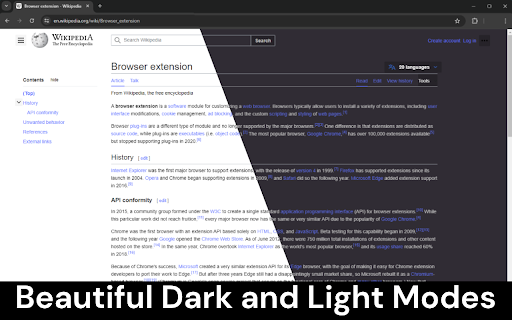
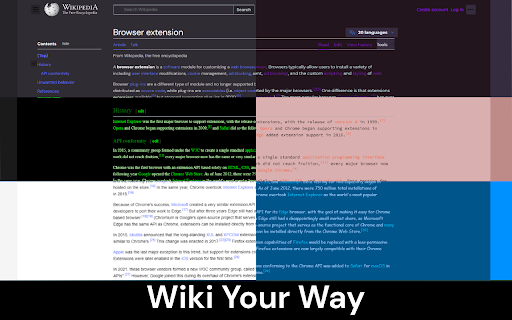
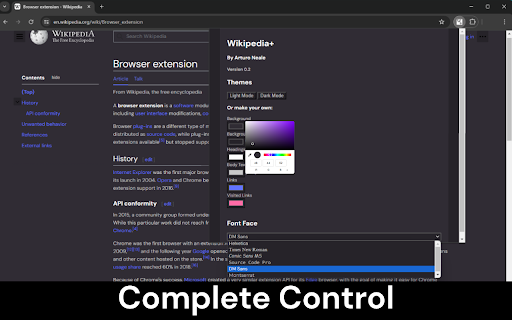
Improves the aesthetics of Wikipedia, with a focus on usability and customisability. This extension improves the aesthetics of Wikipedia, with a focus on usability and customisability, better than any other has before. FEATURES: • Fully customisable Wikipedia theme creator and visualiser • Beautiful dark mode and light mode presets • Six available fonts for Wikipedia • Intelligent transparent diagram contrasting to ensure readability • More to come! CHANGELOG: 0.2.1 - Added compatibility for a Wikipedia update which broke the extension. 0.2 - Added Font Selector. Added Helvetica, Times New Roman, Comic Sans MS, Source Code Pro, DM Sans and Montserrat fonts. Fixed styling edge cases across Wikipedia pages. Added Wikipedia reload when theme is changed. 0.1 - Added Dark Mode and Light Mode. Added Theme Creator. Added Intelligent Diagram Contrasting.

Wikipedia Time Travel
Wikipedia Time Travel is a browser extension that lets you check how the text and images of Wikipedia pages have changed over time. It retrieves the version of a Wikipedia page that was most recent at the end of any date of your choice. Additionally, it tells you when the page was created. 1. Navigate to a Wikipedia page. 2. Click on the extension icon in the browser toolbar. 3. Enter the date you want to check the page for and click Go. The page will be reloaded with the version of the page that was most recent at the end of the date you entered.

Language Comparer for Wikipedia
Compare amount of information across the languages of a Wikipedia article. This extension quickly and easily shows how large an article is for every language that it is written in. This allows users to efficiently see if it is worth looking at an article in a different language (using Google Translate, probably). Also, it is fun to see articles that have have been written about extensively in languages that you might not have expected. How to use the extension: 1. Open the extension while looking at a Wikipedia article. 2. Click on the languages that interest you.

Tab Search Pro
Search active tabs, highlight results, save search history, switch between the last two active tabs, navigate tabs chronologically. Introducing Tab Search Pro, the ultimate browser extension designed to revolutionize your web searching experience. Tired of juggling multiple tabs just to find the information you need? Tab Search Pro is here to make your browsing efficient, organized, and productive. *Now, with the new feature to duplicate the current tab, you can effortlessly create a copy of any tab you're working on, enhancing your browsing efficiency even further.* Now you can easily switch between the last two active tabs, and navigate tabs chronologically for efficient browsing. At its core, Tab Search Pro is all about simplifying the way you search for content within your open tabs. Say goodbye to the hassle of switching between tabs, wasting precious time in endless clicks. With Tab Search Pro, you can effortlessly search for text across all your active tabs without losing focus on your current page. Using Tab Search Pro is a breeze. Just highlight any text that you want to look up, and a world of possibilities opens up. Activate the search through convenient context menu options or by utilizing customizable keyboard shortcuts. Tab Search Pro will quickly scan your open tabs, seeking out the first tab where your desired content is found. Not only that, it will highlight all occurrences of the text throughout your open tabs, making it easy to locate the information you need at a glance. Available Shortcuts: Duplicate Current Tab and Activate It Alt+Shift+D (Mac) Alt+Shift+D (Windows/Linux) Switch between the last two active tabs Command+Q (Mac) Ctrl+Q (Windows/Linux) Switch to the previous tab in the order they were activated, maintaining the chronological sequence of tab activations Ctrl+Shift+Space (Mac) Command+Space (Windows/Linux) But what sets Tab Search Pro apart is its versatility. If Tab Search Pro doesn't find a match within your tabs, it has your back. Instead of leaving you empty-handed, the extension prompts you to conduct a Google search directly, ensuring that you never miss out on any relevant information. With this dynamic feature, you're never left without answers. We value your privacy and security, which is why Tab Search Pro is designed with minimal permissions, including activeTab, contextMenus, scripting, and tabs. Rest assured, your data stays within your browser, and you remain in complete control. Tab Search Pro is not just a simple search tool; it's a productivity powerhouse. Imagine the time and effort you'll save as you seamlessly navigate through your tabs, instantly finding the information you need. No more distractions, no more wasted clicks – just pure efficiency. Whether you're a researcher, student, or a professional seeking the latest news, Tab Search Pro empowers you to be in charge of your browsing. No more losing focus, no more disruptions – only smooth and targeted searches. With Tab Search Pro as your trusted companion, you can create an organized browsing environment, keeping track of your searches and creating a history for later usage. No more digging through browser history or bookmarks; your sought-after content is always just a click away. Don't settle for inefficient browsing. Upgrade to Tab Search Pro and unlock the full potential of your web searching capabilities. Embrace a new level of productivity, save time, and access information faster than ever before. Tab Search Pro is your ticket to a more streamlined, effortless, and enjoyable browsing experience. Install Tab Search Pro today and take the first step towards a smarter, more efficient web journey.

Wikipedia Page Popularity Meter
See the relative popularity of pages on Wikipedia. This is a simple extension that displays a meter that shows how popular a page is on Wikipedia. I made this extension because I personally find it useful to know how popular a page is. On Wikipedia it's quite easy to suddenly realize you're studying some esoteric subfield that's probably not even worth reading about if you're not an expert. This extension is like a barometer that tells you how far down the rabbit hole you've gone, and at what point you should probably resurface. Plus, it's just kind of fun to see how popular a page is compared to others. The popularity is measured by comparing the approximate number of page views for an article over the past 30 days to that of the 10th most popular article. The meter also has mouseover text which tells you additional information about the article's view statistics. The storage permission is used so that the extension doesn't have to fetch page statistics as frequently, but can instead cache them for a while. I used a square root scale to represent the great variation in page views between pages in a way that feels natural. You can also find the source code here: https://github.com/KDJDEV/wikipediaPagePopularityMeter This extension is also available on Firefox Addons here: https://addons.mozilla.org/en-US/firefox/addon/wikipedia-popularity-meter/
