
fibnhbiiflnnpjamjjdlcdmhljibkpbp
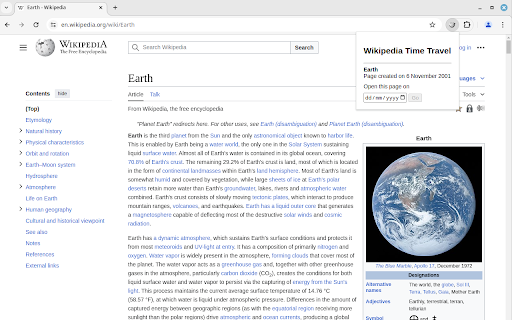
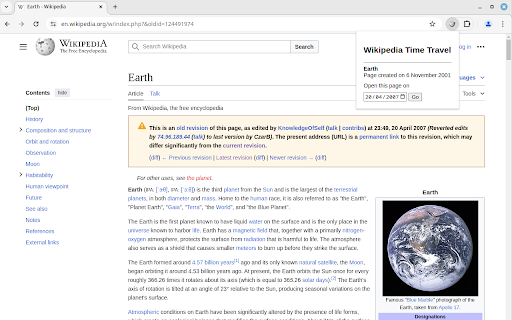
Wikipedia Time Travel is a browser extension that lets you check how the text and images of Wikipedia pages have changed over time. It retrieves the version of a Wikipedia page that was most recent at the end of any date of your choice. Additionally, it tells you when the page was created. 1. Navigate to a Wikipedia page. 2. Click on the extension icon in the browser toolbar. 3. Enter the date you want to check the page for and click Go. The page will be reloaded with the version of the page that was most recent at the end of the date you entered.

Language Comparer for Wikipedia
Compare amount of information across the languages of a Wikipedia article. This extension quickly and easily shows how large an article is for every language that it is written in. This allows users to efficiently see if it is worth looking at an article in a different language (using Google Translate, probably). Also, it is fun to see articles that have have been written about extensively in languages that you might not have expected. How to use the extension: 1. Open the extension while looking at a Wikipedia article. 2. Click on the languages that interest you.

YouTube Time Traveler
Go to any time in currently playing Youtube or Vimeo video (may work on other platforms) by pressing configured hotkey (Ctrl+Shift+Y by default), entering time in prompt window (e.g. 1:01 to go set current video time to 1 minute 1 seconds video) and pressing OK

Visual Time Travel
Capture and organize a visual timeline of your browsing history Visual Time Travel is a browser extension that captures and organizes a visual timeline of your browsing history. As you navigate the web, the extension automatically takes screenshots of the pages you visit, creating a visual record that makes it easy to find and revisit important information. Unlike traditional text-based history, Visual Time Travel gives you a visual snapshot of each page, making it easier to recognize and recall the content you've seen before. It's like having a photographic memory for your web browsing!

Time Travel Extension
Travel back in time and experience the web as it was in the 19th century with our immersive Sepia Time Travel Extension. Time Travel Extension: Experience the Web Like Never Before! Step into a time machine and travel back to the 19th century with our immersive Sepia Time Travel Extension! This fun and engaging Chrome extension transforms your modern web browsing experience into a nostalgic journey through time, giving every website a vintage sepia tone that mimics the look and feel of old photographs. Why Time Travel Extension? Unique Browsing Experience Ever wondered what it would be like to surf the web in the 1800s? Our extension gives you a taste of history by applying a sepia filter to all your favorite websites, making them look like they belong in a bygone era. Easy to Use With a simple toggle button, you can easily switch the sepia effect on and off. Whether you want to immerse yourself in the past or return to the present, it's just a click away. Customizable Settings We understand that everyone has different preferences. That's why we've included user preferences that allow you to save your settings. The extension remembers your choice, so you don't have to toggle the effect every time you open your browser. Support Further Development Love the extension? Consider making a small donation through our integrated PayPal link to support further development and improvements. How to Use Time Travel Extension 1. Install the Time Travel Extension from the Chrome Web Store. 2. Click on the extension icon in your browser toolbar. 3. Use the toggle button to enable or disable the sepia effect. 4. Enjoy browsing the web with a vintage twist! Join the Time Travel Community! Don't miss out on this unique and fun browsing experience. Install the Time Travel Extension today and take a trip back in time every time you go online. Share your experience with friends and family, and let them join in on the fun too! Click the "Add to Chrome" button and start your journey through time. Experience the web like never before with the Time Travel Extension! Note: This extension is purely for fun and aesthetic purposes. It does not alter the functionality of websites or collect any personal data. Install the Time Travel Extension now and transform your web browsing into a delightful historical adventure!
