
lmgpbjkhbbncmgolahogmnkidcocghmm

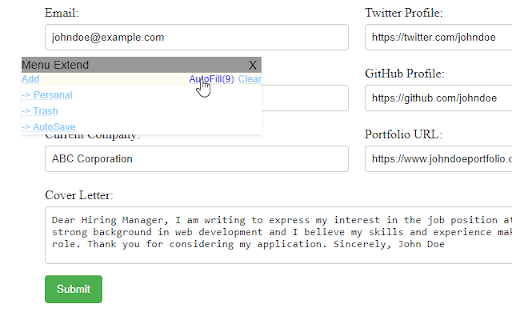
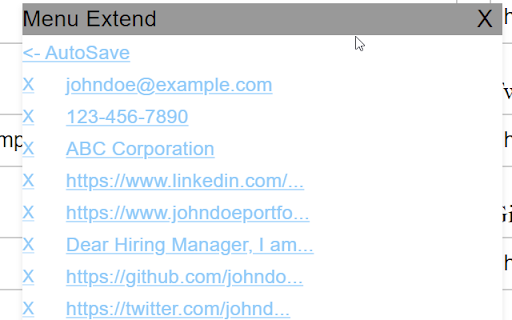
Save input text values for easy retrieval, eliminating rewriting. Quickly access and reuse saved values. This simple yet powerful extension provides a fast and easy way to add values or save your inputs on any website or application for future use. When the extension is active and you one-click on an input field, or active autofil option, a popup menu appears with all the entries you have added before. This allows you to select and insert them into the text field quickly and in a simple way. This extension is compatible with a wide range of websites and applications, and can be used with any input text field on your pc. Typical scenarios where this extension can be useful include: - Testing activities with large forms to fill - Repetitive data that you need to reinsert - Keeping data that you commonly use - Save your inputs and save prompts to obtain more speed and productivity With a single click, you can quickly select and input the value you need, whether it's numbers, letters, or pre-defined values. Plus, the extension is fully customizable with options to adjust the appearance and behavior to your liking. Try it out today and see how it can enhance your productivity!

Save Your Type
Save your almost all typed text to local storage. Save Your Type preserves your form inputs and pasted content, helping you recover lost data after accidental browser reloads or closures. - Your texts are saved in your chrome local storage. - You can search or filter saved values.

Rescue Textarea
Rescue Textarea - Never Lose Your Work Again! Have you ever accidentally closed a tab and lost everything you were typing? Rescue Textarea is here to save the day! This lightweight yet powerful extension automatically saves your input from textareas as you type, ensuring that no important text is lost – even if you mistakenly close or refresh the tab. Key Features: - Auto-Save as You Type: Every character you type is saved instantly without needing to press any buttons. - One-Click Restore: Quickly recover lost input by reopening the page – your text will be right where you left it. - Easy Copy & Manage History: Access saved inputs from the extension popup. With a simple click, copy your text or delete entries you no longer need. - Sleek and Minimalistic: Works in the background without disrupting your workflow. No unnecessary settings – just install and let it do its job. Why You Need Rescue Textarea: - Prevents Accidental Data Loss: Ideal for long forms, blog posts, or online chat tools. - Saves Time and Effort: No need to rewrite lost content – spend more time being productive. - Peace of Mind: Focus on your writing without worrying about losing progress. Install Rescue Textarea today and ensure your hard work is never lost to accidental tab closures!

Form Recovery
Form Recovery — Save and Restore Form Text Automatically Form Recovery saves you a huge amount of time that would otherwise be spent retyping text into form fields. It automatically saves the text you enter into form fields (input, textarea, and contenteditable) and allows you to restore it at any time via the context menu. This convenient Chrome extension ensures you never lose important text due to accidental page reloads, form resets, or browser crashes. Easily access your previous entries through the “Restore text from history” option in the right-click menu. You can also fill all form fields on the page with the most recently saved values or remove any outdated entries from history. 🔑 Key Features: • Automatic text saving in input fields, textareas, and contenteditable elements • Restore any of the last 10 unique values per field • Stylish, easy-to-use popup history window • Fill all fields on the page with the latest saved data • Delete individual saved entries from history 🔒 Privacy-Focused Your data stays safe — everything is stored locally in your browser using chrome.storage.local. Form Recovery does not collect, store, or transmit your personal data to any servers or third parties.

Tag Recovery
Save and recover your tags, form data, for each username in all of your Dreamwidth role play communities. Please leave a review, boost it on Plurk, and send questions/concerns/feedback to tagrecoveryext@gmail.com, or leave an issue on the GitHub repo. ============ VERSION 1.3.0 ============ Ensures Tag Recovery is now accessible on new entry, preview, and other reply pages. ============ VERSION 1.0.1 ============ Saved records now display properly on thread pages in textareas on mouse over and revert to previous textarea value on mouse out.
