
pndobcmiekagakecokaakanabdifnhok


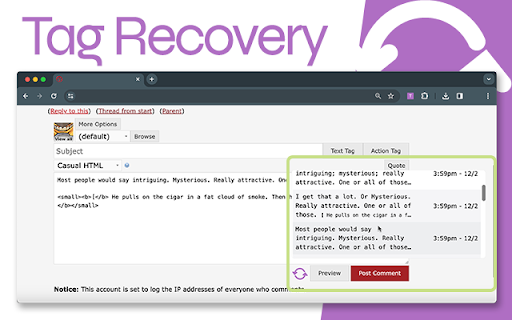
Save and recover your tags, form data, for each username in all of your Dreamwidth role play communities. Please leave a review, boost it on Plurk, and send questions/concerns/feedback to tagrecoveryext@gmail.com, or leave an issue on the GitHub repo. ============ VERSION 1.3.0 ============ Ensures Tag Recovery is now accessible on new entry, preview, and other reply pages. ============ VERSION 1.0.1 ============ Saved records now display properly on thread pages in textareas on mouse over and revert to previous textarea value on mouse out.

Helper Extension for Gridiron Dynasty
This extension is for coaches who play Gridiron Dynasty on Whatifsports.com (WIS). When you search for recruits, the web page displays the recruits hometown (City, ST). This extension modifies the hometown to be a URL that opens the The Next Guess website (www.thenextguess.com) and leverages its mapping capability to show you where the recruit is located compared to all human coaches in that world and division. The extension will also highlight a recruit's row BLUE if you are watching the recruit, YELLOW if you are in a battle for the recruit with other schools, and GREEN if the recruit is considering only your school. In addition, in the active team's schedule page, as well as the team's profile schedule tab, the extension will insert a link to the active team's schedule/game analysis page on The Next Guess website. Finally, next to each boxscore link, the extension will insert a small green plus icon that is hyperlinked to The Next Guess game analysis. Clicking the green plus icon will open The Next Guess in a new tab and instantly analyze the boxscore. Release Notes: v2.0.0.3 Fixed broken location link in recruit profile page due to space between city and state. v2.0.0.0 Migrated all of the links to use The Next Guess website as the full replacement for the GDAnalyst website which will be deprecated soon. v1.0.0.2 Fixes a minor issue that may or may not appear depending on the browser. v1.0.0.1 Fixes issue where links were not getting inserted for the upcoming scheduled game. Adds GDAnalyst Schedule page and GUESS page links for the previous game's opponent. v1.0.0.0 Added links to GDAnalyst Schedule Page and GUESS page for the Active Team. Added GDAnalyst Analyze link for the previous game's box score. Added GDAnalyst Schedule Page and GUESS page links for the current game's Home and Away teams. Added GDAnalyst Analyze link for the current game's box score. (Only visible at half-time of current game). On the Recruit Profile page, GDAnalyst link to the recruit's Hometown will now show on every tab of the Recruit Profile page. v0.0.2.3 Fixed an issue with 8-digit gameId's. v0.0.2.2 Renamed the extension to Helper Extension for Gridiron Dynasty. Release Notes: v0.0.2.1 Corrects GDAnalyst link on the Team Profile page's Schedule tab. v0.0.2.0 1. In the active team's schedule page, as well as the team's profile schedule tab, the extension will insert a link to the active team's schedule/game analysis page on GDAnalyst website. 2. Next to each boxscore link, the extension will insert a small green plus icon that is hyperlinked to GDAnalyst game analysis. Clicking the green plus icon will open GDAnalyst in a new tab and analyze the boxscore. v0.0.1.2 Resolves an issue where the page updates made by the extension may disappear if certain actions are taken on the page (e.g. clicking check box to add a recruit to your watchlist or changing some of the search filter options at the top).

Twitter Reaction Counter
This extension get list of Like/Retweet on a tweet You can display the user list of Like/Retweet/Quote/Reply on a tweet into table format. Click Likes, or Retweets on a tweet, then click "Getting Engagements" button on its popup, you can get the list. You can see what number of the user list you got, on its icon. This extension get the list only you display on your browser. so if you wanna get more Like/Retweet list, scroll down the list of Like/Retweet on the tweet page. Finally, click "View Results" button on its popup, then another tab will be opened. You can see the user list, and Name, DisplayName, Follow you and Bio of the user. Please use this for Giveaway or so.

Costbot Price Tracker
Easily view historical pricing data from costbot.net. Get free price alerts when the price drops and save money! Elevate your online shopping experience with the enhanced Costbot Price Tracker, the indispensable Chrome extension for savvy shoppers. Stay ahead with precise price history tracking, instant price drop alerts, personalized savings, and now, new features - 'My Profile' and 'Related Products' to make your shopping journey even more rewarding. Find. 🧐 Discover the best deals by tracking price history across supported websites. With the new 'Related Products' feature, explore similar items and make more informed decisions. Follow. 🔔 Set your target price and get notified when the product price drops. Manage your followed products effortlessly with the 'My Profile' feature. Save. 💰 Shop with confidence knowing you're getting the best deal possible. 🔍 Optimize your search results for shopping and price tracker extensions with Costbot Price Tracker. Our sophisticated platform ensures you never miss out on the best deals from your favorite retailers. Set it up once and let Costbot do the work for you! 📈 Detailed Price History: Gain insights into the price trends of the products you're interested in. Make informed decisions with our easy-to-read price charts and comprehensive price history. 🔔 Real-time Price Drop Alerts: Set your target price and let Costbot notify you when the item reaches your desired price. No more manual price checks or missed opportunities. 👥 My Profile: Sign in with your email and manage all your followed products and user settings in one place. A personalized shopping experience is just a click away. 🔎 Related Products: Discover similar items directly on the product page, making it easier than ever to compare across stores and choose the best deal. 📱 Seamless Integration: Costbot Price Tracker works flawlessly with our Costbot website, providing a seamless shopping experience across platforms. 💼 Supported Retailers: Track prices from popular online stores like Amazon, Walmart, Target, Home Depot, and more. We're always expanding our list of supported websites to help you save even more! 🔐 Privacy Focused: We value your privacy and never share or sell your personal data. Shop with confidence knowing your information is safe with us. Level up your online shopping game with Costbot Price Tracker - the ultimate Chrome extension for finding, following, and saving on your favorite products. Download now and start saving today! For support, email support@costbot.net

Microbots AI Platform
This extention allows to build automations using plain language. It is powered by GTP-3.5 and GPT4 models. Introducing the pioneering Microbots AI Platform Extension, a tool designed to revolutionize automation development by leveraging the power of AI, Open Source, and pro-code technologies. This extension was developed to extend the benefits of ChatGPT to automation developers. Microbots AI Platform is a non-commercial initiative aiming to be an AI experiment showing how automation development may look like in the future. The Microbots AI Platform Extension is an innovative browser add-on for Chrome and Edge. It works by streamlining the HTML code of a webpage, omitting information irrelevant to automation, and building precise prompts sent to GPT model. The AI subsequently returns a fully functional automation that typically functions right out of the box. By default, the extension generates solutions in Puppeteer, but the programming language can be adjusted in the prefix for Python Selenium or others as desired. Additionally, the extension incorporates a "Fix the Code" feature, allowing users to input new commands or error codes to facilitate code correction. It also offers a Code Notepad for the input of intermediate code when necessary. An important note: To operate the extension, users will need an OpenAI API key. This can be acquired by creating an account on the OpenAI portal (https://platform.openai.com/) and registering a credit card. Although ChatGPT 4 requires users to join a waiting list, the ChatGPT 3.5 model is immediately available, faster, cheaper, and perfectly adequate for this purpose. A single query generated by the extension may incur a cost ranging from $0.01 to $0.10 USD for the GPT 3.5 model and between $0.1 to $1 USD for a query to the GPT 4 model, so please mind these cost while using the tool. By default, the extension generates solutions in Puppeteer, but the programming language can be adjusted in the prefix for Python Selenium or others as desired. Additionally, the extension incorporates a "Fix the Code" feature, allowing users to input new commands or error codes to facilitate code correction. It also offers a Code Notepad for the input of intermediate code when necessary. The Microbots AI Platform Extension empowers users to automate processes up to ten times faster, based merely on a list of steps or process description. Through this extension, we envisage a future where the role of the developer might be drastically minimized or eliminated, accelerating the process of automation. Join us in this journey and let the AI revolution begin. Your feedback and experience with the tool are invaluable, so we encourage you to share your thoughts. The download link is available in the description. Terms of Use: By initiating the installation of this tool, you hereby consent to the ensuing terms and conditions of use. The "Microbots AI Platform Extension", hereinafter referred to as the "Extenstion" is provided to users free of charge, but it requires OpenAI API key, which can be aquired from the OpenAI platform https://platform.openai.com/. Please note that the OpenAI API key is not bundled with this tool and therefore expected to be provided by the user. Any expenses incurred in relation to OpenAI are the sole responsibility of the user of the extension. OpenAI API Key will be stored in the Local Storage of the browser. Will not be transferred outside of the browser or your local machine and will be used solely to send requests to OpenAI servers. The Microbots AI Platform Extension is delivered to you on an "as is" basis and carries no warranties or guarantees of any kind. By proceeding with the installation, you acknowledge and accept these terms in full.
