
lmebpjghkkjocfmlhggapendhfagdnhe


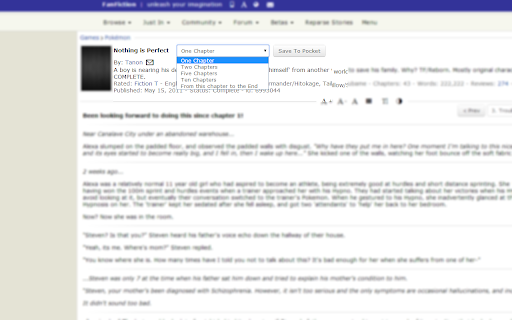
Improves the Fanfiction.net and Fictionpress.com Storylist by adding Filter Options. (+ Many more) A Userscript for www.fanfiction.net that allowes keyword based marking. ---- If you want to send me a Feedback, please do so on GitHub! --- - GUI - Customization (change colors, site width, hide story images, disable image hover effect) - Build filter to search for specific keywords. You can use those filter to: - Hide specific stories - Change Background / Hover / Info Text Color - Mark Chapters (Add a Tag to the name of the Story) - List Stories (Add a list of matching stories on the top of the story list) - Mention in Headline (Add a notification to the headline, how many elements of one filter has been found) - Search with filters within the story (You can define the max depth for search) - Add Config Options for specific Stories (set Marker or Hide Story) - Pocket Feature: Save an entire story to your Pocket (formally Read It Later) Account - Color Picker for easy Color selection - Switch pages with the cursor Keys - Allow text selection - Allows endless scrolling - Allows the sorting of Stories - Display only mode (Select a filter, only matching stories will be displayed) - Synchronization via Github

AO3 Enhancements
Various tweaks and enhancements for ArchiveOfOurOwn.org Adds various configurable tweaks and enhancements to the fanfiction website ArchiveOfOurOwn.org. - Improves blurb (work) stats: - Shows Reading time and Finish reading at - Shows Kudos/Hits ratio, making it easier to find the amazing works. - Adds whole new Chapter stats to each chapter - Shows Reading time and Finish reading at - Shows Published date for each chapter - Allows hiding works when searching/browsing, based on: - The language of the work, and/or - How many fandoms the work is in (is it a crossover?), and/or - The works author and pseud, and/or - The works' tags (optionally using regular expressions, or contrained to a single tag type) - Various style customizations: (only the 1 for now) - Adjust the width of a work, making reading on large displays easier - Show stats as columns to make them easier to read at a glance - Force alignment of work text Furthermore i strive to make the addon at least as accessible as AO3 itself. Please do report an issue if that is not the case. Most of these features are disabled by default. After installation go to ArchiveOfOurOwn.org and click the new menu button “AO3 Enhancements Options” to go to the options screen. No data is ever sent to any servers except AO3, everything is stored in your browser.

AO3 Random Fanfic
Open a random fanfic from the search results on AO3 This is a browser extension that allows you to randomly select and open a fanfiction from the website Archive of Our Own (AO3) in a new tab. It works on any search or bookmark page on AO3, and it considers all pages of the website with any filters. Essentially, it allows you to discover new fanfictions that you may not have come across otherwise, adding an element of surprise and randomness to your reading experience on AO3.

AO3 Prompt Scanner
This extension will help you browse prompts in an AO3 (ArchiveOfOurOwn) fest more easily. It will create one simple overview of all prompts in the fest that you can search though, after which you can save prompts to look over them later. No more clicking and scrolling though many pages! You will be able to narrow your prompt search down to seconds with the provided filters for: - Claimed/unclaimed status - Relationship - Rating - Text search for title, tags, prompter name (if provided) and summary Instructions 1. Go to the "Prompts" page of the fest you want to browse prompts of. 2. Open this extension again on that page and click "Scan prompts" above. 3. Wait for it to finish reading prompts on all the pages. 4. The extension can't open again automatically once it's done, so please open it again yourself to see the result (tip: enable "Pin to toolbar" in the settings of the extension for easy access). 5. Now you should see all the prompts of the fest! You can use the filters for finding that one prompt that tickles your fancy without having to click through a ton of pages!

WebToEpub
Extension that converts Web Novels (and other web pages) into an EPUB for offline reading. Works with many sites, including: 1.… Extension that converts Web Novels (and other web pages) into an EPUB for offline reading. Works with many sites, including: 1. Baka-Tsuki.org 2. ArchiveOfOurOwn.org 3. FanFiction.net. 4. royalroad.com 5. www.readlightnovel.com (partial support) 6. Numerous other light novel sites To use with Baka-Tsuki: 1. Browse to a Baka-Tsuki web page that has the full text of a story. 2. Click on the WebToEpub icon on top right of the Chrome window. 3. Check story details are correct. 4. Select image to use for cover. 5. Click the "Pack EPUB" button. 6. Wait for progress bar to finish (indicating the images being downloaded) and the generated EPUB to be placed in your downloads directory. To use with Archive Of Our Own: 1. Browse to first chapter of story you want. 2. Click on the WebToEpub icon on top right of the Chrome window. 3. Check story details are correct. 5. Click the "Pack EPUB" button. 6. Wait for progress bar to finish (indicating the additional chapters are being downloaded) and the generated EPUB to be placed in your downloads directory. To use with Royal Road/Readlightnovel 1. Browse to web page that has list of chapters of story you want. 2. Click on the WebToEpub icon on top right of the Chrome window. 3. Check story details are correct. 5. Click the "Pack EPUB" button. 6. Wait for progress bar to finish (indicating the additional chapters are being downloaded) and the generated EPUB to be placed in your downloads directory. Source code can be found at https://github.com/dteviot/WebToEpub. Or you can just unzip the chrome extension, as the code is javascript. If you'd like to help with testing the latest Beta version, the latest version and instructions for loading it can be found at https://github.com/dteviot/WebToEpub/tree/ExperimentalTabMode
