
akiljllkbielkidmammnifcnibaigelm
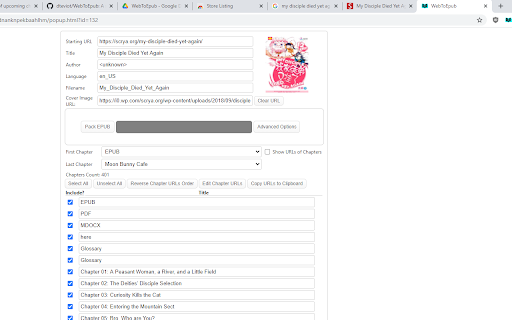
Extension that converts Web Novels (and other web pages) into an EPUB for offline reading. Works with many sites, including: 1.… Extension that converts Web Novels (and other web pages) into an EPUB for offline reading. Works with many sites, including: 1. Baka-Tsuki.org 2. ArchiveOfOurOwn.org 3. FanFiction.net. 4. royalroad.com 5. www.readlightnovel.com (partial support) 6. Numerous other light novel sites To use with Baka-Tsuki: 1. Browse to a Baka-Tsuki web page that has the full text of a story. 2. Click on the WebToEpub icon on top right of the Chrome window. 3. Check story details are correct. 4. Select image to use for cover. 5. Click the "Pack EPUB" button. 6. Wait for progress bar to finish (indicating the images being downloaded) and the generated EPUB to be placed in your downloads directory. To use with Archive Of Our Own: 1. Browse to first chapter of story you want. 2. Click on the WebToEpub icon on top right of the Chrome window. 3. Check story details are correct. 5. Click the "Pack EPUB" button. 6. Wait for progress bar to finish (indicating the additional chapters are being downloaded) and the generated EPUB to be placed in your downloads directory. To use with Royal Road/Readlightnovel 1. Browse to web page that has list of chapters of story you want. 2. Click on the WebToEpub icon on top right of the Chrome window. 3. Check story details are correct. 5. Click the "Pack EPUB" button. 6. Wait for progress bar to finish (indicating the additional chapters are being downloaded) and the generated EPUB to be placed in your downloads directory. Source code can be found at https://github.com/dteviot/WebToEpub. Or you can just unzip the chrome extension, as the code is javascript. If you'd like to help with testing the latest Beta version, the latest version and instructions for loading it can be found at https://github.com/dteviot/WebToEpub/tree/ExperimentalTabMode

Epublifier
A tool to convert website based books or list of pages to ePub format to read on your eReader/Kindle/etc. A tool that allows you to extract a list of html pages from a table of content page and compile them into an ePub book to be imported into your eReader of choice. For advanced users who can write javascript, you can add additional parser definition to customize parsing of any site. Check out the [wiki](https://github.com/maoserr/epublifier/wiki) for usage.

Fanfiction.net Story Parser
Improves the Fanfiction.net and Fictionpress.com Storylist by adding Filter Options. (+ Many more) A Userscript for www.fanfiction.net that allowes keyword based marking. ---- If you want to send me a Feedback, please do so on GitHub! --- - GUI - Customization (change colors, site width, hide story images, disable image hover effect) - Build filter to search for specific keywords. You can use those filter to: - Hide specific stories - Change Background / Hover / Info Text Color - Mark Chapters (Add a Tag to the name of the Story) - List Stories (Add a list of matching stories on the top of the story list) - Mention in Headline (Add a notification to the headline, how many elements of one filter has been found) - Search with filters within the story (You can define the max depth for search) - Add Config Options for specific Stories (set Marker or Hide Story) - Pocket Feature: Save an entire story to your Pocket (formally Read It Later) Account - Color Picker for easy Color selection - Switch pages with the cursor Keys - Allow text selection - Allows endless scrolling - Allows the sorting of Stories - Display only mode (Select a filter, only matching stories will be displayed) - Synchronization via Github

Manga Downloader Assistant
An extension to get necessary data to bypass Cloudflare and similar anti-bot protection for Manga Downloader desktop application Using this extension it's possible to acquire the necessary data for the desktop application of Manga Downloader to bypass the Cloudflare o similar anti-bot protections. Thanks to this you will be able to download again manga even from those websites with an anti-bot protection enabled. Note: the method used by this extension is compatible only with Manga Downloader v50 (or higher). Please visit https://redsquirrel87.com/mda for more detailed info and instructions.

Beautiful Epub Reader
📄 Read EPUB like PDF Continuous scrolling, calm layout, no page jumping. If you’re comfortable with PDFs, you’ll feel instantly at home. 🔁 Pick up right where you left off Reopen any book and continue reading from the exact same position. 📚 Your books, remembered Opened files and reading history are saved automatically. 🌙 Comfortable, customizable reading Night mode, sweet sidebar, font and text style controls — simple, but powerful. 🎯 Accurate EPUB rendering Reliable parsing across real-world EPUB files, with stable layouts and fewer surprises. 📂 Open local EPUB files Open downloaded and local EPUB files directly. (Requires enabling “Allow access to file URLs” in Chrome extensions.) ⚠️ Permissions Notice This extension requires the following access: file:///* — to allow interaction with local files when “Allow access to file URLs” is enabled in Chrome. wss://speech.platform.bing.com/* — to enable communication with Microsoft’s Edge TTS service via WebSocket.
