
lmdhnjoffbkodpdclifppkhohncpeleh
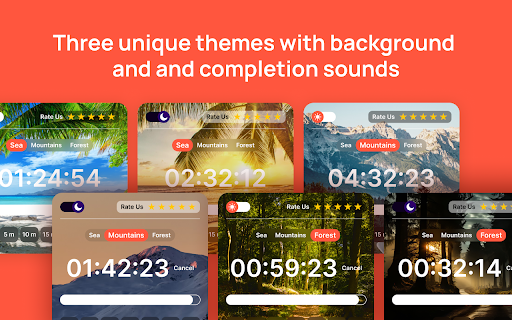


Boost your productivity with our 15 Minutes Timer! It allows you to set your seconds, minutes, hours, and time to countdown. Master Your Time with a Countdown Timer Extension. Time management is crucial for increasing productivity and achieving goals. Whether working on a project, studying for exams, or managing daily tasks, a countdown tool can be your best ally. Here, we delve into the benefits of using different countdown intervals, such as 10, 15, 20, and 30 minutes, and how these can improve efficiency. ✅ Professional: Email Management, Project Sprints, Client Calls ✅ Educational Environments: Test Preparation, Research Sessions, Break Management ✅ Personal Life: Meditation, Gaming ✅ Fitness and Health: Interval Training, Yoga and Stretching, Hydration Reminders ✅ Household Management: Cleaning, Gardening, Decluttering ✅ Hobbies and Leisure: Reading, Crafting, Learning New Skills The Power of a 10 Minute Timer The 10 minute timer is perfect for short, focused bursts of work. This concept, known as the Pomodoro Technique, involves working for a set period and then taking a short break. Here’s how it can help: ✅ Boost Focus: By committing to just 10 minutes of work reduces procrastination and enhances concentration. ✅ Quick Breaks: Take a brief break to refresh your mind after the timer rings. ✅ Task Management: Great for breaking down large tasks into manageable chunks. Many people find the 10 minute timer ideal for tasks like checking emails, quick brainstorming sessions, or tackling minor chores. The Efficiency of a 15 Minute Timer A 15 minute timer offers a slightly longer interval for tasks that require more attention but still benefit from short work periods. This is especially useful in the following scenarios: ✓ Meeting Prep: Quickly prepare for meetings or presentations. ✓ Reading Sessions: Focused reading time is needed to absorb key information without fatigue. ✓ Exercise Routines: Ideal for short workout sessions, ensuring you stay active throughout the day. Optimal Productivity with a 20 Minute Timer When tasks require more time, a 20 minute timer balances productivity and mental stamina. This duration is excellent for: Deep Work with a 30 Minute Timer For tasks that need deep concentration and longer focus, a 30 minute timer is perfect. This duration supports: Using a 30 minute timer helps create a flow state, where you become fully immersed in your work, enhancing productivity and quality. Integrating Minutes Timers into Your Routine To effectively integrate these timers into your routine, consider the following tips: 1. Set Clear Goals: Define your goal within each interval. 2. Eliminate Distractions: Ensure a distraction-free environment during each countdown period. 3. Review and Adjust: After each session, review your progress and adjust your next interval if needed. 4. Balance Work and Rest: Use short breaks to rest and recharge, maintaining overall productivity throughout the day. Professional Settings: ☑️ Meetings: Use timers to keep meetings on track, ensuring each agenda item gets adequate attention without overrunning. ☑️ Presentations: Practice delivering parts of your presentation within set intervals for better time management during the event. Educational Environments: 👉🏻 Study Sessions: Break study periods into focused intervals to enhance retention and understanding. 👉🏻 Group Work: Allocate specific time slots for group discussions and individual work, promoting efficiency and collaboration. Personal Life: ✓ Exercise: Manage workout routines precisely, ensuring balanced time for each exercise. ✓ Household Chores: Turn mundane tasks into manageable segments, making them less daunting and more achievable. Incorporating timers into your daily routine can significantly enhance your time management skills, productivity, and overall efficiency. Whether you prefer a 10 minute, 15 minute, 20 minute, or 30 minute timer, each interval serves a unique purpose and can be tailored to fit your specific needs. These tools can transform how you approach tasks, making your day more structured and productive. Start integrating these timers today and experience the benefits of optimized time management. Mastering the art of managing time is a journey, and using structured intervals is a proven method. Embrace these tools to unlock your full potential and reach your goals more efficiently.

Break Timer
Set a break timer to focus on your work. Our focus app will improve your productivity. Use a online timer to ease eye strain. ⏳ Meet a break timer - Chrome extension designed to remind you to take regular breaks. No need to worry about losing track of time - we have you covered. ⚙️ Key features include 1️⃣ Customizable break intervals 2️⃣ Audible and visual alerts 3️⃣ Simple and intuitive interface 4️⃣ Includes the pomodoro method timer 5️⃣ Setting up takes just a few clicks ⏰ This break timer perfect for Studying Working Any other online tasks ✨ Benefits of using our extension 💠 Improved focus 💠 Enhanced productivity timer features 💠 Better time management skills 💠 Reduced stress and burnout 🤩 Ideal for all users Professionals seeking a work and break timer to optimize productivity Students needing a focus to enhance study efficiency Anyone aiming to balance work and rest effectively 🦾 Top features 👇 We offer several unique features to suit any routine 💡 Flexible intervals: Set timers that work for you - whether it’s every 5, 10, or 25 minutes. 💡 Reminder sounds: Choose from different sounds to alert you when it’s time to take a pause. 💡 Customizable snooze: Running late? Use the snooze option to delay your timer. 💡 Lunch reminders: Set your thirty minute timer for a well-deserved lunch enjoy. 💡 Focus tools: Stay on task with custom work and break intervals. 🌟 Why choose us over other extensions ➤ User-friendly interface: Clean and intuitive design makes setting up your break schedules a breeze. ➤ Customizable settings: For quick refreshers, use the 5 minute break timer. Or longer timer for other tasks. ➤ Multi-device sync: Access your settings across multiple devices with ease. ➤ Regular updates: We constantly improve our extension based on user feedback. ➤ Audio & visual alerts: Both sound and pop-ups to catch your attention. 📲 How to get started 🤳 We take the hassle out of break management. Once you set it up, you’ll receive automatic reminders without needing to check the time. 1) Install the break timer extension from the Chrome Web Store. 2) Customize your break intervals and notifications. 3) Start working, and let the extension remind you when it’s time to pause. 4) Enjoy countdown features with both audio and visual alerts for a well-rounded experience. 💎 Tips for maximizing productivity 📍 Use the timing app to eliminate distractions during work sessions. 📍 When working on tasks that need intense focus, set an alarm for longer timing. 📍 Schedule regular pauses using our app to maintain energy levels. 📍 Try the 30 minute lunch break timer to ensure you take adequate meal breaks. 📍 Leverage the countdown timer to keep track of remaining time. ❓ What is our app? 🗣 Break timer is an extension that reminds you to take breaks at set intervals. It helps you balance focus and rest to improve productivity and well-being. ❓ How do I install the extension? 🗣 Visit the Chrome Web Store and click on the “Add to Chrome” button for the our app. The break timer download is quick and easy. ❓ Is this timer online? 🗣 Yes, our app operates directly in your Chrome browser, so no downloads are required. ❓ Can I set a timer for long study sessions? 🗣 Absolutely! Use the 25 minute timer or customize the interval for longer study periods. ❓ Is this extension available offline? 🗣 Currently, this application requires an online connection, making it a reliable online tool. ❓ Can I use this app for the pomodoro technique? 🗣 Absolutely! Our pomodoro method timer is perfect for breaking your work into focused intervals. ✨ Stay productive, stay balanced Privacy and security: We prioritize your privacy. Rest assured, our app does not collect any personal data. Enhance your workflow: Our app integrates smoothly with your daily activities. Whether you need a long lunch time or a short timer, it adapts to your needs. Stay focused with pomofocus: Pomo helps you maintain concentration during work periods and reminds you when it’s time to rest. 👩💻 Customize your experience 🔹 Set precise intervals: Choose any duration, like the five minute timer for quick breaks. 🔹 Visual colors: Select from various colors to make your experience more engaging. 🔹 Multi-language support: Available in multiple languages for global users. 🔹 Accessibility options: Adjust settings for visual and hearing preferences. 🔹 Notifications: Get desktop notifications from a break timer even when you are browsing other tabs. 🎯 Who can benefit from our timer app 🔸 Remote workers: Maintain a healthy work-life balance. 🔸 Students: Use it as a study break timer to improve learning efficiency. 🔸 Freelancers: Manage your time effectively between projects. 🌼 Why regular pauses matter ♦️ Taking breaks can significantly boost your productivity and creativity. ♦️ Our clock timer app serves as your digital assistant to ensure you don’t skip these essential pauses. 🕕 Time management made easy 🔺 With our application, managing your time becomes effortless. 🔺 Use the time tracker app to set up sessions, and let the extension handle the rest. 🔺 Whether it’s a 10 minute break timer or a custom duration, you have full control. 💭 Final thoughts 📌 Don’t let burnout hinder your success. Incorporate regular breaks into your routine with break timer. 📌 We value your feedback! Contact us with any questions or suggestions. 📌 Making time for rest isn’t just beneficial - it’s essential. 📌 With tools like the break timer extension, you can ensure you’re giving yourself the downtime needed to recharge and maintain peak productivity. 📌 Start taking control of your time and energy. Break timer is here to support your journey towards better productivity and well-being.

Pomodoro Timer PRO
Pomodoro Timer is a free and great tool that can help you boost your productivity and quality of your work. Capabilities: 1. Run after installation 2. Setting up work and break time 3. Manual start, stop and restart the timer 4. Blacklist/Whitelist switcher 5. Configure the list of sites that will be blocked/allowed during the work mode 6. Auto-block the site, if the tab has already been opened 7. Long break after each 4th pomodoro 8. Timer deactivation after 15 minutes of inactivity 9. Ability to select notification sound or disable sound completely v1.0.0 - More fresh design - Now by default after starting the browser the timer will be stopped. You can change it on Options page - Timer deactivation after 15 minutes of inactivity - Added notification sounds with ability to disable or change sound I will be glad to listen to all the comments and wishes.

Alarm, Timer and Stopwatch
A powerful alarm extension that supports multiple timers and stopwatches with five to ten-minute snooze. All in one extension to manage your schedules. You can define multiple alarms, use the stopwatch with as many "lap"s as required, or simply use the timer with pause and resume support. This extension uses the built-in API to set alarms hence the extension works even if the UI is hidden or your browser gets restarted. This extension offers alarm sound snoozing which snoozes the alarm sound 3 times with a 5-minute delay. The extension displays a high-priority desktop notification when either an alarm or a timer is fired, also it plays two different sounds to get the user-attention. As of version 0.1.3, the user can snooze each notification with a 5 to 10-minute delay. As of version 0.1.4, you can export and import your preferences

Online Timer
Use Online Timer, the perfect stopwatch and timer tool. Easily set and manage timers online for your tasks, reminders, and workouts. 🎯 Maximize productivity with the Online timer extension Boost your productivity with the best online timer for Chrome! If you need to control your time with the help of a timer, this extension will help you manage your time effectively. Use it as a stopwatch timer to complete your daily tasks or as a visual online timer to track time. Perfect for work, study, fitness, cooking and more! 🚀 Why you’ll love this online timer • It on any webpage • Fast timer control • Minimum unnecessary movements 🚀 Key features that stand out • Use the extension to quickly track deadlines • Constant visual control of time • Sync across devices with cloud support ⚡Speed up your workflow with powerful timer tools⏱️, allowing you to stay focused with a visual online timer on your display 🖥️ while studying or working, and keep track of your current tasks with the time counter feature. Using the start timer button ▶️ , you can instantly start the countdown mode. 📊 Top 4 ways to use this tool: 1. Track live meetings 2. Time workouts 3. Teach time management to kids 4. Log billable hours for freelancers 🛠️ Advanced capabilities of this online timer clock - Dark mode available on the interface - Use the online counter reset loop function Tracking your time in real time has never been easier. The pause button lets you pause and resume your session using the stopwatch controls. 🌟 How to install online timer extension ▸ Install the extension from the Chrome Web Store. ▸ Open the pop-up to access controls. ▸ Click on the button to start the online stop watch. ▸ Use the pause and reset button to controls. ▸ Use the minute buttons to add duration. ▸ Start and monitor time without distractions. 🔌 Easy setup & integration Get started in seconds by installing the timer online Chrome extension. No complicated setup, no sign-ups — just install and go. Perfect for professionals, students, educators, and anyone who wants to take control of their time. ⏱️ What makes this online stopwatch timer unique Zero Ads: No annoying interruptions. Lightweight: Fast performance with minimal resource usage. Regular updates: continuous improvement for better use of the extension ⚡ The timer online helps you: 1. Break tasks 2. Track progress 3. Stay disciplined 4. Analyze efficiency 📈 Transform how you manage time From classroom lessons using the stopwatch, to project planning with the online timer, this tool adapts to your needs. Stay ahead of deadlines and track each second with precision using tool. 💎 You can define specific durations for tasks like: 💠 breaks 💠 work intervals, 💠 cooking 💠 following the schedule 🔁 Transform your workflow with the online timer Whether you’re managing projects, studying, or relaxing, this Chrome extension’s adapt to your needs. Say goodbye to cluttered apps and hello to simplicity! 📑 Transparent usage policies ♦️ Clear guidelines on the proper use of online timer. ♦️ Commitment to transparency in all our operations. ♦️ FAQ section to cover more user queries. 🔄 Whether you're timing a presentation📈, workout🛠️, or a brainstorming session🧠, its capabilities help you accurately monitor your time. The online timer stopwatch is bundled with features that make it easy to pause, resume, or reset your timer whenever needed. 🔝 Improved user experience of the online timer ➤ User-friendly interface for effortless navigation. ➤ Absolute security and confidentiality of communications. ➤ Quick and efficient access to all features. ➤ Built-in online clock. In this fast-paced world🌐, we all want to be able to complete important tasks📈 and also spend time with our family and loved ones👪. Time is the most precious resource we have⏱. That's why we need useful tools that will help us with this. And these tools shouldn't be too complicated. 🏁 Start using the extension today Don’t waste another minute. Install now and unlock the full power of the online stopwatch timer. Improve focus, boost efficiency, and make every second count ⏰ 🔒 Can I use the online-stopwatch without internet? ➤ Yes! The tool works offline once installed. 🔒 Is there a browser performance impact from the timer online? ➤ No — this extension is lightweight and optimized for Chrome. 🔒 Will the visual online timer stop when switching between browser tabs? ➤ No! When switching between browser tabs, the extension will not stop and will continue to work.
