
bpakimmhdmcbgbcnhanfcpelcnookihi
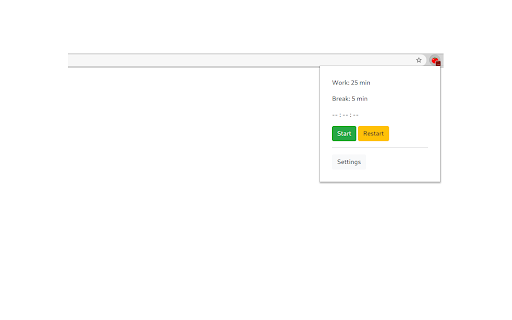


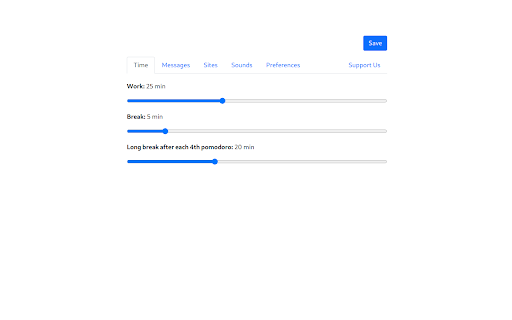
Pomodoro Timer is a free and great tool that can help you boost your productivity and quality of your work. Capabilities: 1. Run after installation 2. Setting up work and break time 3. Manual start, stop and restart the timer 4. Blacklist/Whitelist switcher 5. Configure the list of sites that will be blocked/allowed during the work mode 6. Auto-block the site, if the tab has already been opened 7. Long break after each 4th pomodoro 8. Timer deactivation after 15 minutes of inactivity 9. Ability to select notification sound or disable sound completely v1.0.0 - More fresh design - Now by default after starting the browser the timer will be stopped. You can change it on Options page - Timer deactivation after 15 minutes of inactivity - Added notification sounds with ability to disable or change sound I will be glad to listen to all the comments and wishes.

Pomodoro Timer
Boost productivity with this simple Pomodoro timer. Focus on tasks, minimize distractions, and manage your time effectively. Boost your productivity with the Pomodoro Timer & Focus Clock—your ultimate tool for time management and concentration. This simple yet powerful extension helps you stay focused, reduce procrastination, and achieve your goals through structured work and rest cycles. 1. Customize Your Sessions: Easily set the duration of your work and break sessions to suit your needs. 2. Stay Focused: Engage in deep work without distractions during your work sessions. 3. Get Notified: Receive clear notifications when it’s time to take a break or start a new session. 4. Achieve Your Goals: Repeat the cycle until your tasks are completed efficiently. The Pomodoro Technique has been proven to enhance productivity by breaking work into manageable intervals, followed by short breaks. This method keeps your mind fresh and focused, helping you tackle even the most daunting tasks with ease. • Customizable Timers: Adjust session lengths to fit your work style. • Background Notifications: Stay informed without interrupting your workflow. • Simple & Intuitive: No unnecessary features—just the essentials to help you focus. • Work Smarter: Minimize distractions and maximize productivity with structured work-rest cycles. Who Is It For? Whether you’re a student, freelancer, or professional, the Pomodoro Timer & Focus Clock is designed to help anyone looking to improve their focus, manage their time better, and accomplish more.

Pomodoro Timer
The aim of this app is to help you focus on any task you are working on, such as study, writing, or coding. This app is inspired by Pomodoro Technique which is a time management method developed by Francesco Cirillo. The Pomodoro Technique is a time management method developed by Francesco Cirillo in the late 1980s. The technique uses a timer to break down work into intervals, traditionally 25 minutes in length, separated by short breaks. These intervals are named pomodoros. — Pomodoro Technique, Wikipedia Pomodoro ™ and Pomodoro Technique ® are registered trademarks of Francesco Cirillo. This app is not affiliated with Francesco Cirillo. Features of the application A timer to use the Pomodoro Technique

Habitica Pomodoro SiteKeeper
Pomodoro Timer and Site Blocker that Plugs into Habitica and turns your time-wasting navigation tendencies into rewards. This extension has two main features: 1."Pay to Pass" Website Blocker: Website Blocker that plugs into Habitica and limits you from visiting websites that you decide. You can decide to visit these sites by spending Habitica currency, which you'll earn by developing good habits and doing chores. 2.Pomodoro Timer: Including a Pomodoro Timer. You can read about the pomodoro technique here: https://habitica.fandom.com/wiki/Pomodoro During Pomodoro mode, all websites in the list are blocked, websites with cost 0 are blocked only during pomodoro. A Pomodoro habit is created automatically for the user in Habitica, with an option in the extension settings to automatically score [+] or [-] of the habit when a Pomodoro is done successfully or fails accordingly. How to use: After installing the extension, click on the icon at the top right to open the menu. In here, you must set your API Credentials. You can then block a site by navigating to it and clicking block site. It will ask you to enter a cost. From this point on, when you visit this site, the extension will ask you if you'd like to spend GP to access it. To start a pomodoro timer simply click on the Tomato character. Click again to stop the timer. In the settings you will find a lot of option that allow you tweak and change the pomodoro behavior to fit best for you. For more information, recommended settings and version update log: https://habitica.fandom.com/wiki/Habitica_Pomodoro_SiteKeeper

Pomodoro Grande: Advanced Productivity Timer
A complete productivity app featuring a custom timer, visual task boards, time tracking, focus music, and a website blocker. Boost your productivity with Pomodoro Grande, the all-in-one Pomodoro timer designed to help you stay focused, block distractions, and manage your tasks effortlessly. 🎵 Why You'll Love It • Built-in Background Music – Stay in the zone with focus-friendly sounds. • Customizable Pomodoro Timer – Set work/break intervals that fit your workflow. • Pause & Resume Timer – Pick up right where you left off. • Auto-Start Sessions – Start your timer automatically when you open your browser. • Ultra Focus Mode – Block distractions for deep work sessions. • Website Blocker – Filter domains and subdomains to prevent time-wasting sites. • Kanban Board – Enhanced Todo management with a new Kanban board layout for better. • Today's Hourly Analytics – View your productivity breakdown by the hour. • Quick Break Skip – Stay flexible with one-click break skipping. • Custom notifications – Choose alert sounds or go silent. • Session analytics – Track your focus performance over time. • Customizable Badge – Personalize your extension badge color. • Dark Mode Support – Added ability to switch between Light, Dark, and System themes in Settings. Pomodoro Grande combines all the tools you need to focus, manage tasks, and block distractions in one powerful extension. 🔒 Privacy First – No Data Collection Pomodoro Grande respects your privacy. We don’t track you or collect any personal information.
