
lmbmeohhkfneddonhpnnechoflfbgbih

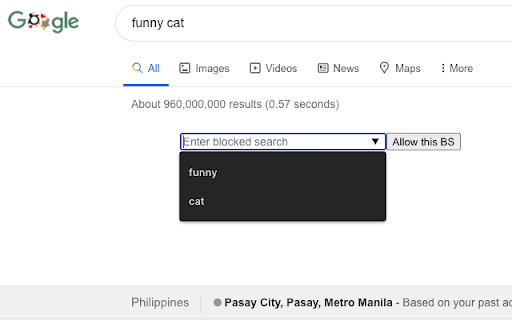

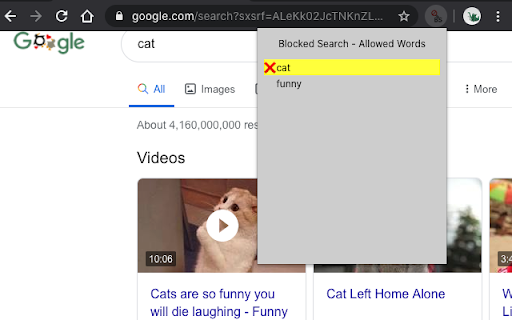
Stay focused & improve productivity. Easily block any distracting and unproductive searches. Stop procrastination once and for all! Example, you often need to search stackoverflow on google while debugging a problem. Just add the word stackoverflow on allowed searches. If you don't include the word stackoverflow on your google search, , e.g., css id not matching, this Blocked Search extension will block the search's results, you might be googling funny cats or latest gadgets instinctively! This extension will block that unproductive search and will only allow searches that pertains to stackoverflow, or other words or phrases added to the extension. To allow your search, you must search, e.g., stackoverflow css id not matching. Stay focused & improve productivity. Easily block any distracting and unproductive searches. Stop procrastination once and for all! 2.1.0 NEW: It is now allowed to exclude the first picture when randomizing lockdown pictures UPDATE: Upgraded to manifest v3 2.0.0 NEW: Selecting the allowed word/phrase from the pop-up will search the word/phrase in new tab 1.0.1 HOTFIX: Numeric and alphanumeric was not working, e.g., 5700, 5700U. This is fixed now, numeric and alphanumeric are allowed to be searched 1.0.0: Search is now working for non-English searches 0.13.1: Word parser bugfixes: * "spider-man" search should not match the "spider" in the storage * "c#" search should not match the "c" in the storage * "asp.net" search should not matches the "asp" in the storage 0.13.0: Pictures can now be dragged and dropped to lockdown pictures. Improved word parser, e.g., ".net" is distinguished from "net". 0.11.1: Bugfix: When in unblocked mode, clicking any part of the popup window with Block Search button, blocks the search. Blocking should only happen when user click the Block Search button, not the area surrounding it. Made a fix, blocking happens only when user clicks the Block Search button 0.11.0: Added help link. User is informed when the picture added is not an image. 0.10.1: Bugfix, next and back button for lockdown slides should not appear when there is only one picture. Made a fix. 0.10: Search can be unblocked for a period of time, default is 10 minutes, this can be changed by the user 0.9: Pictures uploaded by the user will be shown when search is in lockdown mode. User can upload inspiring pictures, or any pictures that can instill discipline to himself/herself 0.8.1: Bugfix for lockdown mode

YTBlock - Block any content from YouTube™
Block videos, comments, channels and much more! With this extension you can block any type of content in Youtube™. ✨ Features: • Blacklist words and phrases (regex supported). • Block channels, videos, comments, posts, and playlists. • Block videos by title, categories*, tags*, description*, duration, link, ID, views*, date* and published time*. • Block members only videos. • Block already watched videos. • Block video by language*. • Block shorts, live, premiere, and age-restricted videos. • Block channels and whitelist channels. • Block comments and posts by their content or by channel. • Block playlists by channel, title, and even mix playlists. • Toggleable block overlays. • Password protection. • Many more! ⚠️* Note: A Google API key is necessary to get information that are not visible in the YouTube™ page about videos and channels, such as tags, categories and descriptions. Within the extension there's instructions on how to get one.

Profanity-Blocker
An advanced bad-word-blocker Chrome extension that censors bad words and websites. This extension can detect double meaning words, offers an option to ignore and/or censor double meaning words. You can add and delete words or keep the default filter. Add a password authorization by going to the options menu, and toggle. You can keep records of the most words filtered! After installing this extension you will be redirected to our website!

Filter Anything Everywhere
Filter feeds, lists and comment sections on all websites at the same time with this universal keyword blocker. Tired of information overload? Take control of your browsing experience with this powerful Chrome extension! It filters out unwanted content from Facebook, Google News, Reddit, Twitter, YouTube, and more, all in one place. Key features: - One-click access to filter settings. - Block unwanted topics, clickbait, and spam. - Customize settings for each website. To get started, simply install the extension and click the icon next to the address bar to access the control panel. Fine-tune your settings to enjoy a clutter-free, personalized online journey. Embrace a cleaner, more personalized browsing experience – try Filter Anything Everywhere today! Feel free to submit issues and pull requests: https://github.com/yeahpython/filter-anything-everywhere History: * 1.3.2 - Improved language support, e.g. Cyrillic characters, Chinese, Korean, Japanese - Better support for emojis and special characters - Migration to Manifest V3 - Start using TypeScript/Node/Rollup/Jest/Prettier * 1.3.1 - The code has been cleaned up a bit for upload to GitHub. The latest version of the extension includes the cleanup. * 1.3.0 - Fix for YouTube search results - Support for Chinese characters - Performance improvements * 1.2.4 - Fixes issue where entire YouTube page is hidden. * 1.2.3 - Wildcard matching is now supported. "*" matches any number of non-whitespace characters, and "?" matches exactly one non-whitespace character. Examples: - - "col*r" matches "color" and "colour". - - "gr?y" matches both "gray" and "grey", but not "gravy" since "?" can only match one character. - - "*?coin" matches "bitcoin" and "dogecoin" but not "coin", since "?" requires at least one character.

Porn / Adult Blocker, Block Sites - BlockerX
Porn blocker for Chrome. Can block over 2 Mn porn websites. Can also block sites as per your preferences. If you're in search of an effective Porn Blocker to keep certain websites at bay while using Chrome, BlockerX is your ideal choice. Serving as both a powerful Adult Blocker and a tool to block sites, this Chrome extension significantly improves your browsing experience. With its prowess in being able to block sites, especially adult content, YouTube, social media, and various online distractions, BlockerX is more than your average Porn Blocker. BlockerX distinguishes itself not just as any Porn Blocker but as a holistic solution that includes features such as time monitoring on different websites, streak tracking to assist you in staying away from distractions for longer periods, and an accountability partner feature to keep you on track with your objectives. Porn Blocker: Activating the Porn Blocker feature of BlockerX seamlessly blocks over 2 million adult sites. BlockerX empowers you to add any undesirable/adult website to your block list. In its free version, it allows you to block up to three websites, making any page from a blocked website inaccessible through its efficient Porn Blocker function. Adult Blocker: This functionality, which is integrated with the porn blocking toggle also enforces safe search across all major search enginers, ensuring adult content is blocked from being accessed. Block Sites Feature: If you're wondering how you can block sites on Chrome, including pages with specific keywords, BlockerX has you covered. To block gambling sites, for example, just add "gambling" as a keyword to your block list, and BlockerX will prevent access to any page containing this word. The free version accommodates up to three keywords. Whitelist Option: Should BlockerX inadvertently block a site you need, the whitelist function comes to your rescue, ensuring that any listed site or keyword isn't blocked by the Porn Blocking feature. Insights on Browsing Habits: Gain valuable insights into how you spend your time online, helping you steer clear of time-draining websites. Accountability Partner Feature: Enhance your commitment to evading distractions with the help of a trusted partner, thanks to the Adult Blocker feature. Image Blocking and Incognito Mode Compatibility: BlockerX takes charge of filtering out adult content in real-time and works seamlessly even in Chrome's incognito mode, providing comprehensive browsing control. Unlimited Access: The premium version lets you block an unlimited number of websites and keywords, amplifying your ability to block sites and utilize BlockerX as an effective web blocker. Uninstall Notification: Stay informed if the extension is removed, ensuring accountability. Customization: Tailor your web blocker experience with customizable messages and redirection URLs. Daily Updates to Your Partner: Keep your accountability partner in the loop with daily reports on attempts to access content blocked by BlockerX. To summarize, BlockerX shines as a comprehensive solution for those wondering how to block sites or adult content on Chrome, surpassing the capabilities of standard site-blocking tools. It is indispensable for anyone aiming for a focused and efficient online experience.
