
lloccbliokkdnomkopfhhplmofplmbgk
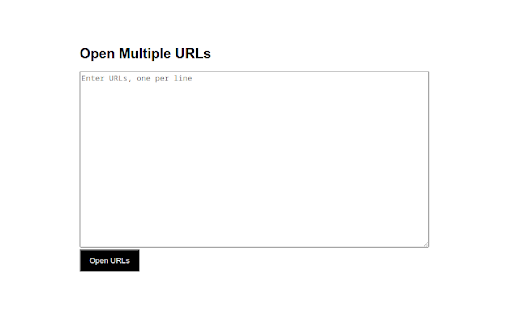
Open multiple URLs in bulk with customizable settings "Open Multiple URLs" Extension The "Open Multiple URLs" extension for Chrome is a simple yet powerful tool that allows you to open a list of URLs in separate tabs with just a few clicks. To use this extension, you need to prepare a list of URLs, either by copying and pasting from a document or entering them manually. Once you have your list ready, you can paste it into the extension's input box, and with a single click, all the URLs will be opened in separate tabs. The "Open Multiple URLs" extension also provides options to Customize the behaviour, such as specifying the opening order, opening URLs in incognito mode, and delaying tab openings. These features make it a versatile tool for efficiently handling multiple URLs. "Multi-URL Opener" Extension (will add this Features) The "Multi-URL Opener" extension is another fantastic option for opening multiple URLs in Chrome. With this extension, you can open a list of URLs from a text file or a manually entered list. It supports various formats, including plain text, CSV, or HTML files. Simply upload your file or enter the URLs, and the extension will open each URL in a separate tab. One of the notable features of the "Multi-URL Opener" extension is its ability to handle large lists of URLs efficiently. It can process hundreds or even thousands of URLs without overwhelming your browser or causing performance issues. "Tab Resize - Split Screen Layouts" Extension While not specifically designed for opening multiple URLs, the "Tab Resize - Split Screen Layouts" extension can be a valuable tool when you need to view multiple web pages simultaneously. This extension allows you to split your browser window into multiple sections, each displaying a different Webpage. By Utilizing this extension alongside the other URL-opening extensions, you can easily Organize and compare the content of multiple websites at a single glance. The "Tab Resize - Split Screen Layouts" extension provides various layout options, including horizontal and vertical splits, Customizable ratios, and the ability to save and restore layouts for future use. It's a handy companion when working with multiple URLs simultaneously. A: Yes, all the mentioned Chrome extensions are available for free on the Chrome Web Store. However, some extensions may offer premium versions with additional features for a fee. Q: Can I customize the order in which the URLs open with these extensions? A: Yes, both the "Open Multiple URLs" and "Multi-URL Opener" extensions allow you to specify the opening order of URLs. You can customize the sequence to suit your preferences. A: The extensions mentioned in this article are specifically designed for Google Chrome and may not be compatible with other browsers. However, similar extensions or alternatives might be available for other browsers. A: The extensions mentioned in this article have been widely used and reviewed positively by users. However, it's always recommended to review the permissions requested by any extension before installing and using trusted sources for downloading extensions.

Multiple URL Opener
Open multiple URLs in new tabs. Best bulker URL opener chrome extension Chrome extension to open multiple urls with single click. A useful and easy to use extension which allows to open a list of links in single a click. - Opens multiple URLs in one click - Ability to preserve input links - Load URLs in random or reverse order - Open the link when tab is selected This extension collects no user data. "Read your browsing history": This permission allows the extension to create tabs. It also allows the extension to get the URL's and preserve the input for the next time.

Open Multiple URLs
Extension opens a list of URLs. Bulk URL Opener extension. "Open Multiple URLs" extension takes a list of web pages in plain-text format and opens them all in new tabs. Paste the list into the text area (one website address per line), click [Open] or [ Open in Incognito]. You can load URLs from .txt file. You can download your URLs as .txt file. Can create folder with urls as bookmarks. Permissions: - "Storage" permission in order to save user input; - "Tabs" permission in order to get all opened URLs; - "Downloads" permission in order allow you to download URLs as .txt.

Bulk URL Opener Extension
Bulk URL Opener Extension just lets you open multiple URLs at once (in new tabs or windows). Usage: Enter each URL in new line (you can paste the list or import urls from file) and click the "Open All" button. The app will the open all the pages in separate tabs or windows (depending on your settings). Some of the options: * Load URLs from file; Export links to file * Extract urls from text (the tool will try to find valid links in whatever text you provide) * Open in tabs, windows or group by host (to group your links in separate windows for each domain) * You can set delay (in seconds) between opening pages * Open part of the current list The difference between this extension and other similar extensions is that if an URL doesn't include scheme, it will default to HTTPS. In other words, you may skip the protocol part for "http(s)://" sites and enter only the meaningful part. For example -- if you type "domain.com" it will be automatically translated to "http://domain.com". All similar extensions that I tested required fully qualified URL which wasn't very convenient for me and that's actually the main reason I made this tool.

Open Multiple URLs
Extension for Opening Multiple URLs Small utility that allows you to open a list of URLs. It will also allow you to read the URLs from all tabs in the current browser window.
