
llmjogpcihecjieffigognffalkjjdbn

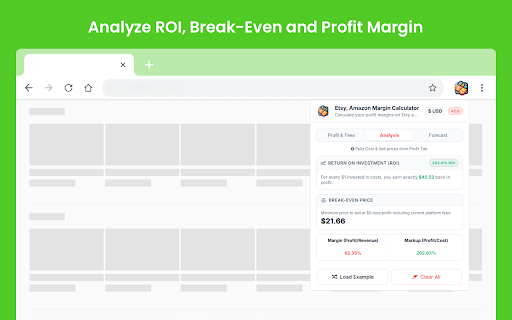

Calculate your profit margins on Etsy and Amazon effortlessly with our margin calculator! Etsy, Amazon Margin Calculator is a simple browser tool that helps sellers review profit, fees, and pricing before listing a product or changing a sale price. It works directly in Chrome and gives you a clearer view of cost, margin, and projected return. The extension can be useful as a practical margin calculator for marketplace pricing. Main Features ✓ Profit and Fee Calculation: Enter your cost and selling values to review estimated profit after fees. This makes the tool useful as a quick profit calculator for everyday product checks. ✓ Marketplace Pricing Support: The calculator is designed for Etsy and Amazon style selling workflows where fees, margins, and selling price all affect the final result. ✓ Analysis Section: The Analysis tab shows useful values such as ROI, break-even price, margin, and markup. This can help when reviewing whether a product price is sustainable. ✓ Forecast Section: The Forecast tab lets you estimate monthly sales and view projected revenue, total costs, and take-home profit. ✓ Pricing Insight: The extension also provides a suggested pricing point based on your current cost and margin target. Practical Usage This tool can help when checking whether a product price leaves enough room for fees and profit. It is useful for reviewing listing costs, comparing sale price with expenses, and checking whether the final return makes sense before publishing or updating a product. For sellers working on marketplace pricing, the calculator can also support quick checks for Etsy or Amazon without switching between different tools. How to use this? 1. Install the extension from the Chrome Web Store. 2. Enter the cost, selling price, and fee-related values in the calculator. 3. Open the Analysis tab to review ROI, break-even price, margin, and markup. 4. Open the Forecast tab to estimate monthly revenue and profit. 5. Adjust your numbers until the result matches your pricing target. Etsy, Amazon Margin Calculator provides a quick way to review pricing, fees, and expected profit directly in your browser.

EHunt - Etsy™ Rank Tool
Product & Shop analysis tools for all Etsy sellers. Make it easy to optimize your Etsy rank. 🚀 EHunt – The Growth Engine for Etsy Sellers A complete product & shop analysis tool that helps you discover best selling items on Etsy, optimize your rankings, and boost your sales. Want to stand out on Etsy? EHunt helps you: ● Quickly identify high-demand, low-competition keywords with our powerful Etsy keyword tool, boosting your listing visibility with advanced Etsy SEO tools. ● Discover best selling products on Etsy and turn them into profitable items that grow your revenue. ● Monitor your Etsy shop competitors with real-time data, optimize your strategy, and stay ahead of the competition. Stop guessing. Start making data-driven decisions that fuel your Etsy growth! 🌟 Core Features ✅ Product Research: Instantly find best selling items on Etsy by tracking total sales, weekly sales, and favorites. ✅ Competitor Analysis: Get detailed insights into your Etsy shop competitors, including top-selling products, new arrivals, removed items, historical trends, top categories, and popular tags. ✅ Keyword & Tag Research: Use our advanced Etsy keyword tool to uncover trending tags, high-demand & low-competition keywords, and boost your visibility with powerful Etsy SEO optimization. ✅ Batch Analysis: Analyze dozens of listings on one page with one click, saving time and effort. ✅ Historical Trends: Track changes in sales, reviews, favorites, and prices to guide your pricing and forecasting. ✅ One-Click Data Export: Download complete shop or product data for deeper analysis and planning. ✅ Real-Time Monitoring: Stay ahead with Etsy shop monitor features—track competitors, products, and keywords in real time with powerful Etsy tracking tools. 🔍 How to Use EHunt? ● On Etsy Search Pages: Instantly view product metrics (sales, favorites, listing time) below each product image. ● On Product Pages: Get a detailed table of product data below the carousel to optimize your listing. ● On Shop Pages: Access an embedded panel with shop details, including sales, number of listings, and ratings. ● Batch Analysis: Click the button to analyze multiple listings at once—see average price, 7-day sales, reviews, and favorites. 💡 Why Choose EHunt? ✔️ Trusted by 1,000,000+ sellers worldwide – EHunt is the go-to growth tool for Etsy entrepreneurs. ✔️ On-page Insights – Data is displayed directly on Etsy without switching tabs. ✔️ Proprietary Algorithms – Get insights in seconds that you cannot gather manually. ✔️ Easy to Use – Designed for Etsy sellers, with a clean interface that even beginners can use right away. Compared with popular Etsy tools such as Alura, Everbee, and Erank, EHunt not only covers the three core areas of product research, keyword research, and shop monitoring, but also offers batch analysis, historical trend tracking, and real-time monitoring—helping sellers gain a faster and more comprehensive competitive edge in the market. 👉 Start your free trial today!Uncover market insights, find best selling products on Etsy, and grow your shop with data-driven success. 🔗 Try it now: https://ehunt.ai/ Etsy product research & SEO optimization made simple. 📄 By using EHunt, you agree to our Terms of Service:https://ehunt.ai/terms

eBit: Your eBay Profit Calculator
Easily calculate the profit and expenses from an eBay sale. The ultimate companion for eBay sellers, designed to simplify the process of calculating your profit with ease and accuracy. Say goodbye to manual calculations and hello to streamlined profitability analysis. Features: - Instant Profit Calculation: With eBit, determining your profit from an eBay item is just a click away. Enter the purchase cost, selling price, shipping fees, and any additional expenses, and eBit will swiftly calculate your net profit. - Comprehensive Expense Tracking: Keep track of all expenses associated with your eBay sales effortlessly. eBit allows you to record shipping costs, eBay fees, PayPal fees, and other relevant expenses, ensuring accurate profit calculations. - Advanced Fee Calculation: eBit goes beyond basic profit calculation by factoring in eBay and PayPal fees. It provides you with a clear breakdown of all associated fees, enabling you to understand the true financial impact of your eBay transactions.

Amazon Sort by Review Count & Ratings - Shop Smarter!
Amazon Sort by Review Count & Ratings lets you sort results by review count and rating breakdown to find trusted products faster ⭐ Leave a Review! ------------------------- If you like the extension, leave us a review! (Hopefully 5 star!). If you don't like the extension or it doesn't work, drop us an email and we'll try and resolve the problem! Don't get caught out by the obvious clones of this extension that can't even write their own descriptions! ℹ️ How do you use the extension? ------------------------- 1️⃣ Search for a product on Amazon 2️⃣ Choose a department 3️⃣ Click on "Sort by Reviews" (Or Press Alt + S) 4️⃣ Optionally, filter out products based on minimum quantity of reviews 5️⃣ Enjoy! 🆓 This extension will always be free! If you want to say thanks and buy me a drink 🍻 then feel free to donate! 🙏 🚀 Features ------------------------- ⭐️ An easy to use 1 click solution to be able to sort by review count without needing to select a department! ⭐️ Global compatibility with all known Amazon stores! Be that Amazon.ca, Amazon.com, Amazon.co.uk... etc ⭐ Displays review score and high / low rating percentages on individual product pages ⭐ Shows high and low rating percentages directly in Amazon search results ⭐️ Multi-browser compatibility, works with all Chromium based browsers! ⭐️ Ability to show the user that it is faster to sort by reviews by selecting a department before sorting! ⭐️ Ability to show the user when the search results are already sorted. ⭐️ Easy to use hotkey to view the extensions instructions, simply navigate to Amazon and press ALT + A (A as in Amazon) ⭐️ Easy to use hotkey to sort the product search results, simply navigate to Amazon and press ALT + S (S as in Sort) ⭐️ Easy to use hotkey to access the extensions settings, simply navigate to Amazon and press ALT + C (C as in Configuration) 📝 Changelog ------------------------- ➤ 1.0 - ➤ The ability to sort by review count ➤ 1.1 - ➤ Prevented sorting pages that cannot be sorted to avoid confusion. (An Amazon restriction) - ➤ Added tooltips to help users see why the sort button is disabled - ➤ Added the ability for users to left click the pinned extension to see instructions with screenshots on how to use the extension. - ➤ Added a donation button inside the instructions popup and as a context menu option when right clicking in an Amazon website. ➤ 1.2 - ➤ Prevented already sorted pages from being sorted again to avoid confusion. - ➤ Added tooltips to help users see why the sort button is disabled because the page is already sorted. - ➤ Improved the speed in which the sort functionality becomes available. - ➤ Added the hotkey of Alt + A, so when you are on Amazon you can simply press the hotkey to see the instructions. - ➤ Added the hotkey of Alt + S, so when you are on Amazon you can simply press the hotkey to sort by reviews. ➤ 1.3 - ➤ Updated the name of the extension to "Sort by Reviews for Amazon" for consistency and simplicity. ➤ 1.4 - ➤ Added support for India, Egypt, European Union and Czech Republic - ➤ Improved support for Saudi Arabia & Singapore' alternative domains ➤ 1.5 - ➤ 🔥 Added support for Amazons new results page design/layout (currently only rolled out to Amazon.com) - ➤ 🔥 Added minimum number of reviews slider, to allow you to hide reviews that have only a few 5 star reviews. - ➤ 🔥 Added the overall rating to be visible immediately on the product search results, rather than requiring you to hover over the rating / view the individual products page. - ➤ 🔥 Added the 5 star reviews and 1 star review percentages to be visible immediately on the product search results, rather than requiring you to hover over the rating / view the individual products page. - ➤ Added support for Belgium, Poland & South Africa; If your localisation isn't supported please leave us some feedback and we'll add it! ➤ 1.6 - ➤ 🔥 Added support for Amazons latest results page design/layout. - ➤ 🔥 Added support for displaying the review score as well as high and low review percentages in an individual product page. - ➤ Replaced Amazons unattractive review score average with the one from this extension. (Thanks Amazon for agreeing that this is a great feature. 😉) - ➤ Improved the processing of products to reduce network usage, browser performance impact and overall speed. - ➤ Added temporary review data caching to improve performance and responsiveness. - ➤ Improved the handling of international amazon domains. ➤ 1.7 - ➤ Updated extension name, description, icon and promo title. - ➤ Added support for international delimitation. - ➤ Optimised performance to improve speed of processing review data. - ➤ Improved JavaScript safety to reduce potential issues when Amazon inevitably updates their designs again. ➤ 1.8 - ➤ Fixed the review handling for sponsored products. - ➤ Added an option to "Hide Sponsored" in the search results. - ➤ Updated the style of "Sponsored" badges to make it more obvious to consumers. ➤ 1.9 - ➤ 🔥 Added support for Sorting by Reviews without a Department/Category needing to be selected. - ➤ 🔥 Added gentle background processing to improve performance of sorting. - ➤ Improved mobile / low resolution responsiveness of the UI changes. - ➤ Improved the layout of sponsored review data. - ➤ Improved the retrieval of review data to prevent rare situations were review data is not collected and shown. - ➤ Optimised performance to improve speed of processing review data. ➤ 2.0 - ➤ 🔥 Added a "What's new?" popup on first visit to Amazon to introduce you to the new feature! 📢 - ➤ 🔥 Added the ability to hide toolbar elements (moves them to a discrete hover panel) - ➤ 🔥 Added auto-sorting for when department or category pages - ➤ 🔥 Added auto-sorting for when non-department/category pages with 3 different options: - ➤ ⚙️ Auto-Sort Prompt Mode - Notifies you when sorting is ready via a popup - ➤ ⚙️ Auto-Sort Discreet Mode - Notifies you when sorting is ready via a notification + change to button - ➤ ⚙️ Auto-Sort Instant Mode - Instantly sorts the page when sorting is ready - ➤ Added a full settings panel to the extension popover and via a settings cog. - ➤ Completed a major overhaul to improve performance ➤ 2.1 🆕 - ➤ Adjusted default option values for better support for new users. - ➤ Adjusted delays for better compatibility. - ➤ Improved background processing to use a service worker rate limiter for better compatibility. 🔏 Your privacy ------------------------- We respect our users privacy, this extension does not in any way, shape or forms track, collect, sell or do anything with your personal data, the extension has no connection to any website, service or server. 🔏 Legal ------------------------- "Sort By Reviews for Amazon" is not affiliated, partnered with, endorsed by, or connected to Amazon or its partners in any way, shape, or form. This extension is simply a user made quality of life improvement to help other users find the most reviewed products that they're searching for.

Amazon Wishlist Subtotal
Automatically totals your Amazon wishlists. Save time and frustration by letting this extension do the work for you. This extension will help you save time shopping on Amazon when using wishlists. It automatically calculates the items in wishlists so you don't have to. Feel free to contact me if you have an issues. Also would love to hear my users recommendations on what they would like to see added! Bugs: Currently need to fix loading custom colors. Extension functionality still works.
