
llimhhconnjiflfimocjggfjdlmlhblm
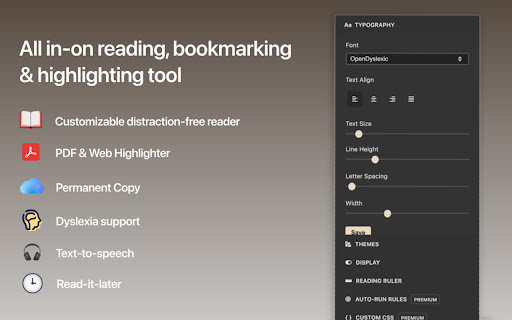

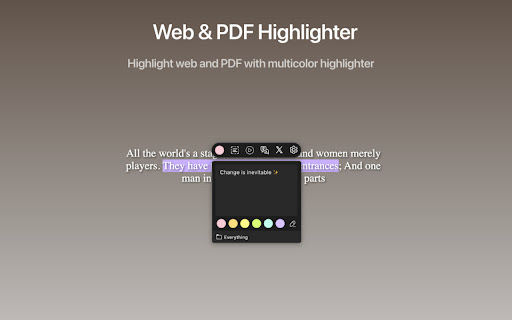

An all-in-one, distraction-free reader with dyslexia support, accessibility features, bookmarking, highlighting, and research tools Reader Mode is a feature-packed Chrome reading extension and web app that removes clutter, ads and distractions, while also includes advanced features such as dyslexia support, bookmarking, annotating, highlighting and text-to-speech. With Pocket shutting down, Reader Mode is the best alternative and perfect replacement — offering even more features to enhance your reading and research workflow. 📖 FEATURES • Distraction-free and ad-free "Reader Mode" • Web & PDF Highlighter • Share Reader Mode pages • Deletion of unwanted elements • Text-to-speech • Translation • Text Alignment • Custom theme • Custom CSS • Print page • Save page as PDF • Fullscreen mode • Auto-run ability • Auto-scroll • Save edited pages • Share To Twitter • Dyslexia Fonts • Dyslexia Ruler • Save and sync bookmarks all in one place • Sync to Evernote & Notion • and many more! To see all the features and learn more, check out https://readermode.io 📙 LEARN THE BASICS Learn how to use Reader Mode: https://help.readermode.io

Reader Mode Premium
A feature-packed distraction-free web reader with dyslexia support and research tools Reader Mode is a feature-packed Chrome reading extension and web app that removes clutter, ads and distractions, while also includes dyslexia support, bookmarking, annotating, highlighting, text-to-speech and many other features all in one tool. Features: ✔ Distraction-free and ad-free "Reader Mode" ✔ Deletion of unwanted elements ✔ Theme customization ✔ Custom theme ✔ Custom CSS ✔ Print pages ✔ Fullscreen mode ✔ Auto-run ability ✔ Save edited pages ✔ Share To Twitter ✔ Dyslexia Fonts ✔ Dyslexia Ruler ✔ Text To Speech ✔ Article Outline ✔ Text annotating and highlighting ✔ Notes List ✔ Auto-scroll functionality ✔ Dark Panel Mode ✔ Google Search ✔ Google Translate ✔ Remove footer option ✔ Cloud storage ✔ Share pages in Reader Mode format ✔ Read-it-later mode ✔ Full-text search ✔ Favourites ✔ Organization folders ✔ Tags for pages ✔ Sync styles & settings To see all the features and learn more, check out https://readermode.io Version 1.2.8 (22/4/2020) -Fixed saving and fetching article’s data issue -Fixed tag’s close button color on dark mode Version 1.2.6 (22/4/2020) -Fixed links not working after deletion mode -Remove auto-close ability for OptionsSavedPanel -Set max-width for all elements to 100% Version 1.2.5 (15/4/2020) -Added Tags feature -Title, Description and Author is now editable -Author is default to “Unknown author” if not found -Show “Saved” notice if article is already saved -Auto-saved page when highlighting Version 1.2.1 -Added sync styles -Fixed outline li default style -Removed default line-height css from default and app -Removed inline css styles -Removed Headings from settings -Removed cr-saved-info and cd-footer default colors -Fixed TTS Pitch not saving issue Version 1.1.6 -Added indicator when the main menu is active -Moved Custom CSS settings panel to the bottom -Fixed auto height for options panel -Fixed some font styles not saving issue -Rearranged font options position -Added premium fonts Version 1.1.5 -Used global address for Google Search -Updated description -Included li tag in text color changes Version 1.1.4 -Fixed notes dissapearance -Auto hide “Saved Panel” -Updated the color of ReaderMode’s icon Version 1.0.9 - Fixed reader’s width not-saving issue - Fixed overflow text for meta info - Added style for quotes content - Fixed auto-run rules grammar mistakes - Removed Helvetica Neue font - Set default font as Arial - Notes List is set to “Show” by default

Chrome Reader Mode
Reader Mode Chrome extension offers distraction-free reading. It removes clutter, ads allowing users to focus on the content The Chrome Reader Mode extension provides a clean, ad-free reading Chrome environment, allowing users to focus solely on content. Perfect for reading articles, blog posts, and text-heavy websites, this extension removes distractions and improves readability, making web pages simpler and more comfortable to navigate. Ad-Free, Clutter-Free Reading: Eliminate distracting elements like ads, sidebars, and pop-ups for a smooth reading experience. Enjoy a clutter-free webpage reading that enhances your focus. Offline Access: Save web pages offline for later reading, so you can access your saved articles even without an internet connection. Highlight & Annotate: Mark important sections and add notes directly on web pages to make your reading interactive and retain key information. This is part of the note-taking reader mode extension feature. Focus Tool: Utilize the built-in reading ruler to guide your focus and make reading easier on the eyes with the focus reading tool for Chrome in 2025. Install the Chrome Reader Mode extension from the Chrome Web Store. Visit any web page or article you wish to read in a simplified format with reader mode extension for Chrome. Click the Reader Mode icon in your Chrome toolbar. Read in a simplified reading experience, with options to highlight, annotate, and save for offline access. User-Friendly and Privacy-Focused With Chrome web reader, you don’t need to worry about intrusive ads or tracking; this extension prioritizes your reading experience and privacy. It’s a privacy-focused reader extension designed to provide a smooth and privacy-friendly ad blocker reader experience. Start your focused reading journey in 2025 by installing Chrome Reader Mode today!

Reeader - Minimal reader with speed reading
A simple and minimal way to read articles faster. Reeader is a minimal, distraction-free reader extension for Chrome that helps you read any article faster and with better focus. One click turns any cluttered webpage into a clean reading view with no ads, no sidebars, no popups, just the content you came for. What makes Reeader different from other reader extensions is the combination of two speed reading tools built into the same extension. Stop word fading dims the filler words in the text so your eyes skip them naturally. Margin fading pulls your eyes toward the center of each line so they travel less distance as you read. Both features work together to give you a noticeably faster reading pace without losing the natural feel of reading full sentences at your own speed. Most reader mode extensions do one thing: strip out the ads and change the background. That helps, but it doesn't make you a faster reader. Reeader is built around the idea that a clean layout is just the starting point. The real gains come from reducing how much effort each line of text demands from your eyes and brain. If you're a student getting through research papers, a professional keeping up with a lot of reading, or just someone who reads online every day, Reeader gives you a practical way to get through more in less time. Stop words are the small filler words that show up constantly in written English. Words like "the", "a", "an", "is", "are", "was", "of", "in", "on", "to", "for". They're grammatically necessary but your brain doesn't need to fully land on each one to understand a sentence. Reeader fades these words visually so they become less prominent on the page. As you read, your eyes are drawn to the high-information words, the nouns, verbs, and adjectives that carry the actual meaning of each sentence. You still read full sentences, you still read at your own pace, but the filler stops slowing you down. Once you get used to reading with stop word fading on, going back to plain text feels noticeably slower. When you read a line of text, your eyes start at the left edge and travel all the way to the right edge before jumping back to start the next line. That sweep happens hundreds of times in a single article. It adds up. Reeader's speed reading mode fades the words near the left and right margins of each line. This keeps your eyes closer to the center of the text. Your peripheral vision still picks up the faded edge words, but your eyes don't need to travel out to meet them. The sweep gets shorter and faster. Combined with stop word fading, the two features cover different parts of the same problem. Stop word fading reduces how many words need your full attention. Margin fading reduces how far your eyes travel to reach the words that do. Together they make a real difference to reading speed in a way that still feels natural, unlike tools that flash one word at a time and take all control away from you. Click the Reeader icon and the article opens in a clean, centered reading view on top of the page. Ads are gone. The sidebar is gone. Popups, banners, autoplay videos, social share buttons, all of it stripped away. Just the text, formatted properly with comfortable line width and good spacing. This is useful on almost every major news site and blog at this point, because web pages have gotten genuinely hard to read. Reeader works on top of the current page so you can close it anytime and go back to the original without losing your place. Three themes to pick from depending on your environment and preference. White theme is clean and high contrast, good for daytime reading or a well-lit room. Yellow sepia theme has a warm, paper-like tone that cuts down on blue light and is easier on the eyes for long sessions or evening reading. Dark theme puts light text on a dark background, which works well at night and for anyone who runs dark mode across their browser. Your theme choice is saved so you don't have to reset it every time you open Reeader. ★ ADJUSTABLE FONT SIZE AND LINE HEIGHT Font size and line spacing both affect how fast and comfortably you can read. Lines that are too tight make it hard to track where you are. Text that's too small makes your eyes work harder than they need to. Reeader lets you adjust both. Set them once and they stay that way. The adjustments also make Reeader more usable for people with dyslexia or visual sensitivity, where more spacing and a larger font can make a real practical difference. Reeader is fully open source. The complete code is on GitHub and you can look at exactly what it does. There's no data collection, no background tracking, no surprises. If you're a developer and want to add something or fix a bug, pull requests are open. If you have a feature request, open an issue or reach out directly. ──────────────────────────────────────── WHO IS REEADER FOR? ──────────────────────────────────────── Students and researchers who need to get through a lot of reading quickly without losing comprehension. The stop word fading feature is particularly useful when you're pushing through dense material and need your reading pace to keep up with your workload. Professionals who read as part of their job, whether that's following industry news, reading reports, or keeping up with technical content. The time spent reading accumulates fast, and even a modest improvement in reading speed has a compounding effect across a week. People who read a lot of articles daily and find inconsistent website layouts exhausting. Reeader gives everything the same clean format regardless of which site it came from. Anyone who reads at night and wants to cut down on screen glare and eye strain. The dark and sepia themes handle this better than most extensions. People with dyslexia or reading difficulties who benefit from clean layouts, adjustable spacing, and reduced visual noise on the page. Developers and people who like tools that do exactly what they say with no clutter. Reeader is open source, minimal, and focused on one job. 1. Install Reeader from the Chrome Web Store 2. Go to any article you want to read 3. Click the Reeader icon in your Chrome toolbar 4. The reading view opens immediately 5. Adjust the theme, font size, and features to your preference 6. Enable stop word fading or speed reading mode from inside the reader 7. Close the reader anytime to return to the original page Does Reeader work on all websites? It works on the large majority of article and blog pages. Some highly dynamic sites or paywalled content may not parse correctly. If you find a site that doesn't work, you can report it and it may be fixed in a future update. Does Reeader collect any data? No. Reeader does not collect, store, or transmit personal data or browsing history. The source code is public so you can verify this yourself. Is Reeader free? Yes, completely free with no paid tiers or subscriptions. What exactly is stop word fading? Stop words are common filler words like "the", "a", "is", "of" that appear constantly in text. Reeader dims these words visually so your eyes skip them and focus on the words that carry meaning. You still read full sentences but your pace picks up naturally. What is margin fading and how is it different from RSVP? Margin fading dims the words near the edges of each line so your eyes stay closer to the center and travel a shorter distance per line. RSVP tools flash one word at a time in a fixed spot, which removes your control over reading pace entirely. Margin fading keeps the natural reading experience intact and just makes each line more efficient. Will Reeader slow down my browser? No. Reeader only activates when you click the icon. It does not run in the background on every page you visit. Can I change the font family? Font size and line height are adjustable. Custom font family selection is something being considered for a future update. Is the source code available? Yes, the full code is on GitHub and open to contributions. Chrome doesn't have a native reader mode. Firefox has one built in, but it has no speed reading tools, no stop word fading, and limited customization. Safari's reader view is limited to Apple devices. Reeader fills that gap for Chrome users and goes beyond what any browser's native reader offers by including active reading tools on top of the clean layout. If you've been looking for a Chrome reader mode, a distraction-free reading extension, a speed reading tool for Chrome, or just a way to strip ads while reading articles, Reeader covers all of it in one lightweight extension. ──────────────────────────────────────── FEEDBACK AND CONTRIBUTIONS ──────────────────────────────────────── Reeader is actively developed and feedback from users directly shapes what gets built. If you have a feature request, found a bug, or want to contribute to the code, you can open an issue or pull request on GitHub or reach out on Twitter at @paritosh_pundir. If Reeader has been useful to you, leaving a review on the Chrome Web Store helps other readers find it and helps the project grow. It takes thirty seconds and makes a genuine difference. Thank you for using Reeader.

Reader View
Open any page in reader view mode; light, dark or sepia and clutter free. Reader View extension enables you to open any website in a simple and clutter-free environment. Simply click on the toolbar button to open the reader view UI. The current page will be reloaded in a plain format. Once the reader view interface is open, you can see a toolbar in the top left corner. Click on the second button from the top to open the settings view. There are three themes available for the reader view. The default theme is the - Light - color. But you can choose, Dark or Sepia options as well. Moreover, font size, line height, and page width can also be adjusted in the settings popup. The reader view is a format with minimal distractions. No, buttons, toolbars, background images, ads, or banners are allowed in reader view. It is much easier on your eyes and reduces eye strain if you spend a long time surfing the web. Please note that all changes are auto-saved to the memory in the add-on. Note 1: There are a few options available to open the reader view interface. Please right-click the toolbar button to see all the choices. By default, the reader view opens in the same-tab. Please note that, if you opt for the popup or sidebar view, the first time you access the reader view for a particular page, you will need to press the toolbar button twice to open the interface. Note 2: The reader view extension uses the Readability open-source library to render the page in a simple format. You can get more info about this library here: https://github.com/mozilla/readability To report bugs, please fill out the bug report form on the addon's homepage: https://mybrowseraddon.com/reader-view.html
