
jkpcgkblajgbddhfejnallcmcmdgcghd


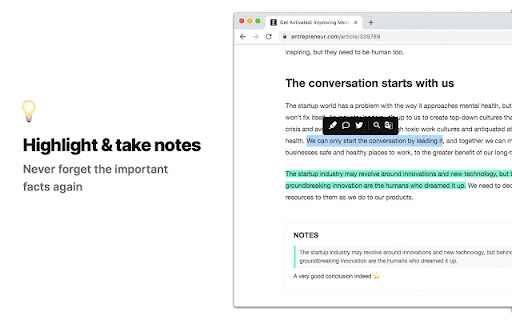

A feature-packed distraction-free web reader with dyslexia support and research tools Reader Mode is a feature-packed Chrome reading extension and web app that removes clutter, ads and distractions, while also includes dyslexia support, bookmarking, annotating, highlighting, text-to-speech and many other features all in one tool. Features: ✔ Distraction-free and ad-free "Reader Mode" ✔ Deletion of unwanted elements ✔ Theme customization ✔ Custom theme ✔ Custom CSS ✔ Print pages ✔ Fullscreen mode ✔ Auto-run ability ✔ Save edited pages ✔ Share To Twitter ✔ Dyslexia Fonts ✔ Dyslexia Ruler ✔ Text To Speech ✔ Article Outline ✔ Text annotating and highlighting ✔ Notes List ✔ Auto-scroll functionality ✔ Dark Panel Mode ✔ Google Search ✔ Google Translate ✔ Remove footer option ✔ Cloud storage ✔ Share pages in Reader Mode format ✔ Read-it-later mode ✔ Full-text search ✔ Favourites ✔ Organization folders ✔ Tags for pages ✔ Sync styles & settings To see all the features and learn more, check out https://readermode.io Version 1.2.8 (22/4/2020) -Fixed saving and fetching article’s data issue -Fixed tag’s close button color on dark mode Version 1.2.6 (22/4/2020) -Fixed links not working after deletion mode -Remove auto-close ability for OptionsSavedPanel -Set max-width for all elements to 100% Version 1.2.5 (15/4/2020) -Added Tags feature -Title, Description and Author is now editable -Author is default to “Unknown author” if not found -Show “Saved” notice if article is already saved -Auto-saved page when highlighting Version 1.2.1 -Added sync styles -Fixed outline li default style -Removed default line-height css from default and app -Removed inline css styles -Removed Headings from settings -Removed cr-saved-info and cd-footer default colors -Fixed TTS Pitch not saving issue Version 1.1.6 -Added indicator when the main menu is active -Moved Custom CSS settings panel to the bottom -Fixed auto height for options panel -Fixed some font styles not saving issue -Rearranged font options position -Added premium fonts Version 1.1.5 -Used global address for Google Search -Updated description -Included li tag in text color changes Version 1.1.4 -Fixed notes dissapearance -Auto hide “Saved Panel” -Updated the color of ReaderMode’s icon Version 1.0.9 - Fixed reader’s width not-saving issue - Fixed overflow text for meta info - Added style for quotes content - Fixed auto-run rules grammar mistakes - Removed Helvetica Neue font - Set default font as Arial - Notes List is set to “Show” by default

Lazy Scholar
Academic research assistant - find full-text PDFs, citations, and analyze papers Lazy Scholar automatically detects scientific articles as you browse and provides instant access to full-text PDFs, citation and journal metrics, research integrity checks, and much more: FIND FULL-TEXT ACCESS Stop hitting paywalls. Lazy Scholar searches multiple sources simultaneously: • PubMed Central (PMC) - Free official versions • Europe PMC - Open access and author manuscripts • Open Access repositories • Direct PDF links CITATION METRICS AT A GLANCE • Citation counts from Google Scholar, OpenAlex, and Semantic Scholar • Influential citations - papers that heavily cite this work • Citation percentile - see how this paper ranks in its field • Web attention - mentions on Reddit, Twitter/X, Wikipedia, news, and blogs • Related papers recommendations RESEARCH INTEGRITY • Retraction alerts - know immediately if a paper was retracted • Expression of Concern notices • Published corrections and errata • Preregistration detection • PubPeer comments - post-publication peer review • Hypothesis annotations SIDEBAR ANALYSIS PANEL • References tab - view all citations, verify they exist, check for retractions • Outline extraction - automatic section parsing (Abstract, Methods, Results, etc.) • Data & code links - find supplementary materials and repositories • Statistical extraction - p-values, confidence intervals, test statistics CONVENIENCE FEATURES • Right-click to search Google Scholar or PubMed • Omnibox search - type "ls" then your query • One-click PDF download PERFECT FOR • Graduate students and postdocs • Faculty and researchers • Librarians and information specialists • Science journalists • Anyone reading academic literature

Clearly Reader - Your AI Reading Assistant
A browser extension with reader mode for optimal experience. Features copy, translate, speech, and PDF and Markdown export. Clearly Reader - Redefine Your Web Reading Experience 【Key Features】 ✦ One-Click Reader Mode (Shortcut: Alt/Option + R) ✦ AI Article Assistant: Summarize/Translate/Chat With Article ✦ TTS: Read any article text to speech ✦ Cross-Device Sync & Cloud Storage ✦ Export Article to PDF, Word, and Markdown, etc. ✦ Add Article to: Pocket/Craft/Raindrop/Instapaper/Obsidian etc. 1️⃣ Ultimate Reading Experience • Remove ads, popups and distractions intelligently • Support dark mode & custom themes • Adjustable font, line height & page width • System fonts & custom CSS support • Unique book layout mode

ClearRead: Smart Reading Assistant for Dyslexia
ClearRead is a free browser extension that transforms online reading. It combines real time highlighting, Gemini AI-powered text simplification, reader line, dyslexia-friendly fonts, customizable spacing, filters, Focus Mode, and text-to-speech and smart word breakdowns to make complex text easier to understand. Its new Text Helper Popup allows quick highlighting, formatting, and simplification directly on any webpage. Built on research, real classroom testing, and feedback from educators and users across 40+ countries, ClearRead continues to evolve as a community-driven, empathy-led innovation — designed not just for accessibility, but for true inclusion.

Helperbird: Accessibility & Productivity App
Improve your reading, writing & accessibility. Including Immersive Reader, Summarize, Dyslexia support and more. Meet Helperbird, your all-in-one extension designed to help everyone with personalized support, making websites, apps, and PDFs more accessible and productive according to each individual’s abilities, learning style, and lifestyle. Whether you need dyslexia-friendly tools, writing aids, reading assistance, or accessibility features, Helperbird has you covered! 🤟 Tell me about the features •••••••••••••••••••••••••••••••••••••••••• Helperbird provides reading, writing, and accessibility options, including: 🗣️ Voice Typing 🏷️ Dyslexia Support 🖌️ Overlays 📏 Dyslexia Rulers 🌐 Immersive Reader by Microsoft 📰 Reading Mode: Removes ads and distractions 🔍 Text Extraction (OCR) ✂️ Summarizing 🔄 Rewording 🗣️ Text to Speech ➕ Maths Reader 🚨 And 30 More......... Designed to support different abilities and learning styles, making the web is accessible for everyone. 📖 Reading features •••••••••••••••••••••••••••••••••••••••••• 🌐 Immersive Reader by Microsoft 🔎 Simplify Feature 📰 Reading Mode: Removes ads and distractions 🅰️ Specialized Fonts 🗣️ Text to Speech 🎚️ Dyslexia Ruler 🔦 Line Focus Ruler 🎯 Reading Ruler ⚙️ Auto Scrolling 🏷️ Dyslexia Fonts ✅ Dyslexic Features 🔡 Text Size Adjustment 📏 Letter Spacing Adjustment 🌐 Word Spacing Adjustment 📏 Line-Height Adjustment 🎛️ Text Alignment ✨ Web Highlighter Marker 💎 🌍 Translation 📏 Paragraph Width 📐 Paragraph Borders 📖 Picture Dictionary 🖍️ Overlays & Tints ✂️ Summarize Websites and PDFs 💎 📸 Screenshot Reader 💎 🚀 Speed Reading 💎 🖌️ Highlight/Selector Colors 🎨 Font Colors 🖼️ Background Colors 🔗 Link Colors 🔊 Volume Booster ✍️ Writing features •••••••••••••••••••••••••••••••••••••••••• 📌 Sticky Notes on Websites and PDFs 💎 💭 Word Prediction 💎 🎙️ Voice Typing 💎 🗣️ Dictation / Speech to Text 💎 🌍 Translation ✅ Spell Check 💎 📊 Text Analysis 💎 ✨ Web Highlighter Marker 📖 Dictionary by Helperbird 💎 📚 PDF Reader by Helperbird 📸 Screenshot Reader 💎 🔍 Extract Text (OCR) from Images & Videos 💎 🖨️ Print ♿ Accessibility features •••••••••••••••••••••••••••••••••••••••••• 📏 Dyslexia Ruler 🔦 Line Focus Ruler 🎯 Reading Ruler ✏️ Paragraph Customizations 🅰️ Dyslexia Fonts (OpenDyslexic, Lexend Deca, +14 others) 🍃 Reduce Motion ⚙️ Auto Scrolling 💎 🌗 High Contrast Themes & Overlays 🎥 Video Playback Adjustments 💎 🌑 Grayscale Mode 🔗 Emphasize Links 🌈 Color Blindness Controls 🖍️ Overlays & Tints 🖱️ Increase/Decrease Cursor Size 💎 🖼️ Show Alt and Title Tags 💎 🚫 Hide Images and GIFs 💎 🔎 Saturation Control ⌨️ Shortcuts 🗣️ Phonics Reading 💎 📦 Pricing •••••••••••••••••••••••••••••••••••••••••• 🦉 Helperbird Free Free, packed with essential accessibility tools. 💎 Helperbird Pro Access all features for $30/year. 💎 Helperbird Pro Unlimited Unlimited users plus premium support for $1,500/year. 🔒 Privacy & Compliance •••••••••••••••••••••••••••••••••••••••••• - Strict privacy policy: No user data selling or Collection. - No third party scripts or tracking. - Compliance with COPPA, FERPA, GDPR. 🎉 Bonus •••••••••••••••••••••••••••••••••••••••••• Making Helperbird your number one accessibility & dyslexia software.
