
llficcondiabdnachhfpbelfmgebclfh
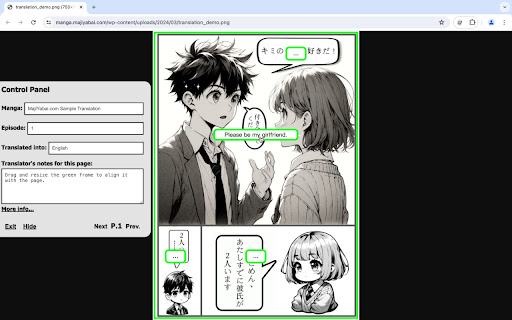
This extension provides an interactive UI for displaying translated text on manga websites. This extension is brought to you by MajiYabai.com - "Unveil the Manga Magic! Dive into the latest web manga episodes with our English and Chinese interactive translations, powered by our magical Chrome extension. Experience the thrill of Japan’s hottest manga without language barriers." Our unique Chrome extension provides an interactive way to display translated texts on top of the official manga websites. Readers can use our extension to load a “translation text file” from our site or their local computers. Our extension will then redirect them to the official webpage of the corresponding manga episode, and display the translated text through an overlying UI system. Our website and Chrome extension do not store or distribute manga image content, and therefore strictly comply with copyright laws and regulations.

Fakey - Manga Translator
AI-powered Browser Extension for Translating Manga, Assist Quiz and More The artificial intelligence capability of Fakey can help you to translate manga in real-time, answer Google Forms questions, help you with quiz on any websites. Meanwhile, it's ability to help you ease your daily task on web form includes generate dummy data in one click and auto fill web form. Artificial Intelligence ✨ Translate manga in real-time ✨ Summarize any page or YouTube video ✨ Answer Google Forms questions with AI ✨ Snip image of the question and let AI answer it What's new? 🐛 Fixed issue with certain sites

KanFan - Manga Translator
An immersive web manga translator that lets you enjoy raw manga effortlessly. Supports Japanese manga, Korean webtoons, English comics, and more while preserving the best reading experience ✅ Automatically detects and translates manga on most websites ✅ Immersive reading with translations embedded directly into the original image ✅ Hover translation button for manually triggering image translation ✅ Pre-translates the next page in advance ✅ Upload local manga images for translation ✅ Customize fonts, font size, and line spacing ✅ Free usage quota that resets every week

side-by-side translation
This extension creates an additional window for translation. Check source text and translated page side by side. This extension creates an additional window for translator. Check source and translated page side by side. This feature helps you with translation. Usage - Navigate to the web article you want to translate. - (Optional) Pin the this extention icon to your toolbar to make your experience more great! - Click the extension icon in your browser toolbar to activate the split pane for translation. - Alternatively, right-click on your page and click on the icon in the context menu. - Translate whole web page with Google Translator or DeepL ,etc. - Enjoy an enhanced reading experience with side by side translation! v0.0.10-12 Fix minor bugs v0.0.9 Add aligning src/dst height feature as possible & support button v0.0.8 minor env update v0.0.7 Support local files (Allow access to file URLs in the extension details)

Manga Translator Extension
AI-Powered Translator for RAW Manga, Manhua & Manhwa Just open the raw, click “Translate,” and start reading. MIT – Manga Image Translator lifts the text off the artwork, translates it, and redraws each bubble right where it belongs. The extension understands manga, manhwa, and manhua layouts, so once translated everything looks exactly the way the artist intended. MIT is free, lightweight, ad‑free, and requires no registration. Download it to Chrome and use it right away.
