
lknmjhcajhfbbglglccadlfdjbaiifig
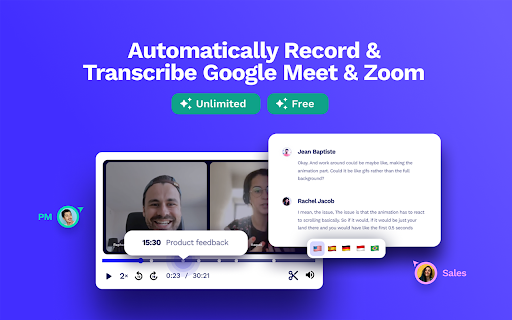

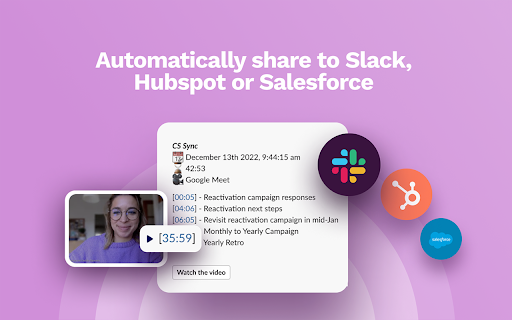


Automatically record & transcribe Google Meet for FREE. 500k+ users tl;dv is the free Google Meet recorder and AI note taker trusted by 1M+ users. Record Google Meet calls automatically, get accurate transcripts with speaker labels, and let AI summarize every meeting — so your team never takes manual notes again. Then go further: ask questions across all your meetings, auto-update your CRM, and let tl;dv handle the work you'd otherwise spend hours on. tl;dv is the easiest way to record Google Meet, get automatic transcriptions, and generate AI meeting summaries that turn every call into searchable, actionable notes. Used by 1,000,000+ teams worldwide. How to record a Google Meet with tl;dv: Install the extension → join your meeting → recording and transcription start automatically. That's it. What you get: - 👻 Bot-free or bot-present recording: choose invisible background recording or let our bot join the call. The choice is yours! - 🎥 Automatic Google Meet recording: free, no host permission needed - 💬 Google Meet transcription with speaker labels in 20+ languages - 🤖 AI meeting summaries: instant notes after every call, with custom templates for sales, hiring, coaching or whatever you need - 🧠 Multi-meeting AI: ask questions across your entire call library: "what are our top 3 objections this quarter?" answered in seconds, not hours - 🔍 Search your call library: find any word, theme, or pattern across all your meetings - 🔗 Auto-share recordings to Slack, Email, or Zapier the moment a call ends - 💡 Integration: push call context, action items, and deal updates straight into Slack, your CRM or any other tool where your work actually happens - 📌 Clip & timestamp key moments from any meeting - ✍️ Take notes during the call and sync action points to your team Works with Google Meet, Zoom, and Microsoft Teams. Free alternative to Otter.ai, Fireflies, and Gong Whether you want to record a Google Meet for the first time or replace your entire meeting workflow, tl;dv gets you set up in under a minute — and quietly handles the work you'd otherwise spend hours on. 🔒 Privacy-first. Your data is never sold. Full policy: tldv.io/privacy

Bluedot: AI notetaker & Meeting Recorder
Bot-free AI note taker & AI meeting notes for Google Meet, Zoom & Teams meetings. 🤖 AI notetaker for Google Meet, Zoom and MS teams. Generate AI meeting notes adapted to your use case (customer calls, all-hands, etc.) ⚙️ Automatically update your CRM, Notion, and more. ✨ Meeting highlights: Clip and share meeting moments. 💬 Annotation & comments: Annotate a particular part of your screen and leave time-based comments. 🎞️ Video editing: We transcribe all your recordings and then let you edit your video simply by editing the transcript. Delete an umm, an ah or a whole sentence! 💾 Video hosting: Store and organise all your videos in one place, using collections.

Api4Com - Extensão para Navegadores
Faça sua vida ficar ainda mais fácil com nossa extensão para navegadores A extensão para Google Chrome da Api4Com é uma ferramenta poderosa que o ajudará a tornar seus contatos mais fáceis e integrados ao seu CRM. Com ela você consegue fazer uma chamada selecionando qualquer número telefônico que esteja em seu navegador, basta clicar com o botão direito e discar, simples e rápido! Nossa integração com o Pipedrive permite inserir um botão para discar dentro do CRM, basta habilitar a integração no ramal desejado, a nossa extensão identificará e quando você estiver dentro do CRM, a mágica irá acontecer, além de facilitar a chamada com apenas um clique, também garante que a informação e gravação será inserida na proposta corretamente. Instale agora mesmo e aproveite todas essas facilidades para tornar o seu dia de trabalho mais produtivo.

Meet Assistant
Only way for you to record your precious meetings on google meet. Meet Assistant is the only free screen recording tool on google meet, providing you with the option of capturing unlimited videos and saving them on your system and drive side by side. Available for Mac, Windows and Linux.

Google Meet Transcripts & AI Summary
Google Meet Transcription, AI Summary and Insight. Get the most out of Google Meet! Transform Your Google Meet Experience with Laxis Elevate your Google Meet sessions with Laxis, your advanced AI meeting assistant! This powerful Chrome extension is designed to maximize productivity and enhance meeting management through an array of dynamic features. Pre-Meeting Preparation: • 📝 Customizable Templates and Tags: Easily set up personalized templates and tags for different meeting types. • 📅 Google Calendar Integration: Sync your meetings effortlessly with your Google calendar. During the Meeting: • 💬 Real-Time Transcription: Get accurate transcripts as the meeting unfolds. • 👨🏻💻 Speaker Recognition: Achieve 100% accuracy in identifying speakers. • 🏷️ One-Click Tagging: Mark important segments with tags like “Important,” “Follow up,” or “Action” for easy reference. • ☁️ Flexible Saving Options: Automatically save transcripts to the Laxis cloud or download them in Word, PDF, or TXT formats. Post-Meeting Follow-Up: • 🤖 LaxisChat: ChatGPT like chatbot to answer any questions related to your meetings • ⌨️ AI-Augmented Editor and Smart Summaries: Quickly summarize and edit action items, key points, topics and etc. • ✍️ AI writer: repurpose your conversation into engaging contents with a single click • ✨ Insight and Quotation Management: Organize and manage meeting insights and notable quotes. • 🔎 Advanced Search: Easily retrieve information across all your meetings. • 📥 Seamless Sharing: Distribute meeting outcomes with your team. Getting Started is Easy: 1. Install the Laxis Chrome extension. 2. Open Google Meet in your Chrome browser. 3. Laxis will automatically launch, enabling captions for real-time transcription. 4. Utilize in-meeting highlights and auto-scroll features for a streamlined experience. 5. Choose your preferred file format for downloads, or enjoy auto-saving with a registered Laxis account. Extensive Language Support: Laxis excels in English and supports over 40 languages, including French, German, Portuguese (Brazil), Spanish (Spain and Latin America), and many more. This comprehensive language support ensures that no detail is lost in translation, regardless of your team's linguistic diversity. Some advanced features may vary by language. To change language settings, adjust the captions in Google Meet settings. We Value Your Feedback! Visit our website or contact us for more information and support: • Website: https://www.laxis.com/ • Contact Us: https://www.laxis.com/contact Laxis is here to change the way you use Google Meet—try it today and experience meetings like never before!
