
lkmjkkaneihfniogckodfalmllgkbhcd


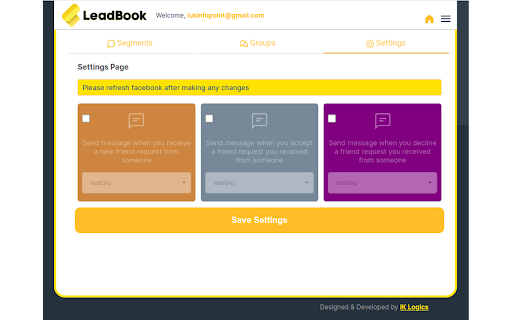


Expand and enhance your friend list effortlessly with just one click! ***Book 10+ meetings per day with your Facebook account at a click of a button! *** Have you ever wondered how you can monetize your Facebook account? Fill up your calendar everyday by running this chrome extension in the background. LeadBook allows you to target specific prospects in any group, friends list or follower list by using keywords that you select and then sends them a personalized message. For example you could target just CEOs & Realtors within a certain list and LeadBook will automatically send them a friend request and send them your personalized pitch. LeadBook also helps you to send automated messages when you get a friend request from someone or when you accept or decline a friend request.

Waalaxy - LinkedIn Automation Tool
Make LinkedIn your No. 1 acquisition channel with Waalaxy. Automated prospecting and recruitment made easy Waalaxy’s mission is pretty simple: Make LinkedIn your No. 1 acquisition channel. Our goal is to make automated prospecting and recruitment easier than ever. With our intuitive extension, you can easily import prospects directly from LinkedIn and set up your prospecting campaign with just a few clicks - no technical skills required! Here’s a glimpse of what you can achieve with Waalaxy: Automate your LinkedIn outreach and email follow-ups effortlessly. Extract profiles from LinkedIn People Search, Sales Navigator, and Recruiter Lite with just a few clicks. Set up personalized prospecting campaigns in minutes and let Waalaxy handle the rest, freeing up to 70% of your time to focus on.. well, whatever you want. Enrich vital prospect data instantly and sync it with your favorite CRM like Hubspot, Pipedrive and 2000+ apps through Zapier/Make. Stay organized and ensure that no lead slips through the cracks. Manage multiple LinkedIn accounts seamlessly within a unified workspace. Collaborate with your team, share leads, and analyze performance statistics, making Waalaxy ideal for sales, marketing, and recruitment teams. Streamline your LinkedIn conversations with Waalaxy's integrated inbox. Create message templates, schedule timely follow-ups and much more, all within one intuitive interface. Waalaxy is directly integrated into LinkedIn interface. It’s like activating the hidden god mode. Find your prospect’s email, schedule messages, create reusable message templates & more, directly in LinkedIn. Start using Waalaxy for 0€, for as long as you want with our freemium plan. Give a try to our premiums plans risk-free with a free trial. Our expert team is ready to assist you 5/7 day directly on the chat, ensuring you get the most out of every feature (and without having to wait days that someone replie to your emails). Join over 100,000 professionals who have revolutionized their LinkedIn prospecting with Waalaxy. Transform your outreach and experience accelerated lead generation today! Begin your journey with Waalaxy and turn multi-channel prospecting into a money-making game.

Growman: IG Email Extractor
Growman enables you to extract Emails from IG based on followers/followings, locations, and hashtags. 👋 Hi there! Looking to boost your business leads on Instagram? Look no further than Growman, the easy-to-use Instagram email scraper! With just a few clicks, you can effortlessly extract public email addresses from Instagram and save them to Excel xlsx files. 🚀 Here are some of our amazing features: Extract followers and following from any public Instagram profile. Extract based on hashtags or locations. Extract profile data such as Emails, biography, follower count, following count, phone, address, and more! Save your data in Xlsx format for easy access. 🛡️ Worried about security? Don't be! Growman does not ask for your Instagram password and does not store or transmit your data, including IG user information, visit history, posts, and social relationships. 🔒 However, please note that there is a certain risk that your account may be deactivated or blocked by Instagram when using the extension. We recommend controlling the frequency of your usage and using Growman at your own risk. 💰 Growman is a paid extension, but we also offer a free version that allows you to export the first 500 profiles from each extraction. Ready to take your Instagram business leads to the next level? Install Growman now!

Canned Responses & Company Wiki - Klutch
No more searching through emails and docs. Store all your responses and guides. Keep your company's knowledge base in one place. 1. Shortcuts! Keyboard shortcuts for canned responses in Klutch provide a lightning-fast way to access and insert pre-defined text snippets into your messages or documents. By assigning personalized shortcuts to each canned response, you can avoid the time-consuming task of typing repetitive messages manually. Just type the shortcut in any document or input field, and see the magic :) 2. AI email reply generator & Compose a brand new email using AI. With Klutch's new AI feature, you can reply fast to emails, with grammatically correct English, generated personalized AI email responses and write a whole new email from scratch. * Limited to 10 emails per month on the free plan, and unlimited on the paid plan. _____________________________ It’s time to bid farewell to cluttered cloud drives and duplicated documents across accounts and teams and say hello to a single place where you can store organizational knowledge! Klutch is every company’s best friend -- an easy-to-access knowledge management app and company wiki that helps teams collaborate better and faster. We have two kinds of information that you can add onto your knowledge base -- Pages and Responses. Pages are the backbone of every company's knowledge repository. Pages are where you put important company information that you can easily share with other colleagues. Pages contain “what’s to know” about your company and its processes like sales playbooks or internal customer support guides. Aside from being a source of company knowledge, you can also use Pages as your very own personal drive for company-related information and output. That way, you can keep things private until you’re ready to share them with others. On the other hand, we took Responses from our old product Tray Canned Responses and gave it a completely new look. It’s the part of Klutch that lets you create and share canned replies with colleagues and teams. Instead of different members of your team using different responses in customer communication, now they will all have access to the same ones. The ability to quickly copy responses will definitely save you and your team hours and hours of manual email writing and typing work, especially for sales and customer support teams that tend to send out several emails of the same kind during the day. We made Klutch with the desire to help teams (both remote and non-remote) retain company knowledge and use it in customer communication. We know how difficult it is to store so much important information across multiple drives and websites and how we can easily lose track of where we save or store files, so we created an app that combines both a company wiki and a canned response app in order to help teams save time and effort. Speaking of saving time, Klutch has dozens of ready-made templates that can help you build out your knowledge base. Or you can create your own. So when you find yourself repeatedly creating the same pages again and again, just make a template for the whole company to use. If templates aren’t your thing because you already have files and documents that simply need importing, Klutch has an import tool that lets you upload existing files and documents to your knowledge base. You can then assign the imported content to a private or team folder. It doesn’t matter if you’re starting from scratch or looking to move knowledge management apps. Whatever use case you have, Klutch has got you covered and will be more than happy to help you manage knowledge across teams. Looking for a canned responses & knowledge base platform for your team? Give Klutch a try :)

ELMessenger Pro
ELMessenger Pro is a tool that Turns Your Facebook Messenger Into A Color-Coded CRM And Generates TARGETED Traffic, Leads & Sales without having to pay for Paid ads. ELMessenger Pro lets you automate some of the most time-consuming & mundane tasks, without losing the organic and personal touch. Send automated friend requests to targeted people in your niche, with a personalized welcome message with their first name, so you can focus your time on just the people that get back to you. Hyper-target members of a specific group, by adding a profile tag your dream customers identify themselves as (Affiliate Marketer, Founder, CEO, Coach, Self Employed etc.) Organize your messenger inbox by creating color-coded tags like “Follow Up”, “Hot Lead”, “Interested” etc. and tag people inside your Facebook messenger. You will know exactly who a person is and where that person is in your sales cycle. Sort your leads based on a tag, which makes it super easy for you to follow up with them and never lose a sale because of not following up. Send broadcast messages based on a specific tag, so you can save your time and don’t need to message them one by one. ELMessenger Pro allows you to keep notes on people, so you never forget important information about a person. Create Google calendar events from within the messenger, so you get reminded to follow up with someone. Create message templates, which you can use as your personal clipboard, so you don’t have to re-write messages over and over again. Let ELMessenger Pro automatically reply to comments on your CTA posts, based on a specific keyword (like "info" or whatever you like) and send them a personalized message with the info they requested. ELMessenger Pro will help you filter, sort, organize, and market your products and services to your Facebook friends on your personal profile. Turning your Facebook Organic Marketing into a highly effective sales producing, client generating, Profile Profiteering machine. Check out our other Extensions to automate more of your Facebook processes and finally reach your organic marketing goals. If you are into Organic Facebook Marketing you need to be able to manage your Messenger and sync with your Google Calendar account. ELMessenger Pro does that for you and more. Once you see how powerful ELMessenger Pro is for your business you will not want to use any other app. - Google Calendar Integration - Automatically apply a tag - Notes - Filter by: Tag, Note, and Last Response - Messenger Broadcasts - Messenger Campaigns - Automatically re-tag after sending a Broadcast - Delete Friends Based on Tag - Canned Responses - Post Friender | Automatically send Friend Requests, The First Message, and Automatically tag Facebook users who engaged with a Post. - Smart Campaigns | Set campaigns so that you don't send the same message to the same person twice. - Engagement | Automatically add comments to posts in groups and on your wall and send direct messages to individuals that interact with your posts. - Emoji's - Images - In App Education so you can easily navigate the ELMessenger tool and Dominate your Facebook Marketing. - Enhanced NOTE automations - Frameworks | Be able to share global segments, tags - Pipelines | Move your leads through your Facebook Messenger to your outside CloudKii® CRM - Links | Send a link in messenger to collect users emails with their permission before sending over to your offer. These will also connect to your CloudKii® CRM All right in side the FACEBOOK MESSENGER - Export your Contacts to a Google Sheet - Manage inactive friends based off of time - See when contacts last engaged with you
