
lkjaebkedoblfeglnhbgbjbdodjdogpe
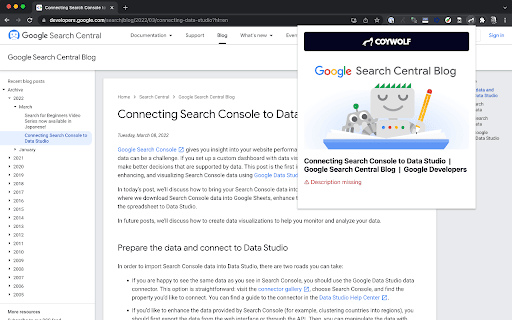


Check and preview the social sharing details from a page's Open Graph metadata The Open Graph Checker by Coywolf makes it easy to check if a page has essential Open Graph metadata. If a page does have the necessary Open Graph metadata, the extension will display a preview of the image, title, and description. The extension will also report if the image, title, or description are missing. Social media marketers will find the extension helpful to see how a news article, blog post, or product page will appear on social networks. If they don't like the image, title, or description, they can update the page and then use Coywolf's Open Graph Checker to preview the changes. The extension always attempts to retrieve the page's non-cached version to assist in viewing the most recent changes. We hope you enjoy using it, and please don't hesitate to send us feedback. If enough people think this tool is useful, Coywolf will add more features to it. We are all about optimizing and making things better.

Localhost Open Graph Debugger
Localhost Open Graph Debugger is a Chrome extension designed to check the Open Graph meta tags on locally hosted websites. By temporarily hosting the meta tags on our site, it simplifies the process, allowing you to easily verify them without the need for tunneling tools like ngrok.

Social Media Link Preview
Shows a sample preview of OG and twitter card content of the current page This extension will show a sample preview of a webpage that is shown when it is shared on social media such as X (twitter), LinkedIn, Discord, and Facebook. The goal of this extension is to provide a general idea and actual result may slightly vary. Works on local websites as well.

Open Graph
This is a simple Chrome extension that allows users to quickly check the Open Graph (OG) meta tags of any webpage. This tool is especially useful for developers who need to verify if the right OG tags are rendered for different pages during development, or for anyone who wishes to preview the thumbnail or other OG tag information of a website.

Website SEO Checker
Get free on-page SEO report by 100+ parameters with the best website SEO checker ☑️ Overview – quickly check essential SEO data: URL structure, metadata, indexation, and canonical settings. ☑️ Content – analyze headings, keyword density, text length, and text-to-code ratio for better structure. ☑️ Links – identify external, internal, and subdomain links, plus dofollow/nofollow status and anchor text. ☑️ Hreflangs – instantly verify hreflang setup and language targeting for international SEO. ☑️ Images – detect missing alt/title tags, broken images, and check sizes with on-page highlighting. ☑️ Structured Data – instantly identify and validate Schema.org markup for better SEO performance. ☑️ PageSpeed – measure mobile and desktop performance with actionable optimization insights. ☑️ GSC+GA4 Insights – assess search performance & indexing plus user behavior and conversion metrics. ☑️ Issues & Monitoring – detect SEO issues, track technical changes, and monitor page updates over time. Deep dive into Sitechecker Chrome Extension’s capabilities to unlock the full potential of your SEO workflow. 1️⃣ Get a quick technical overview of any page to ensure it meets SEO best practices. • Inspect URL structure, status code, and page size. • Review meta title, description, and H1 heading. • Analyze indexation settings, including robots meta tags, X-Robots-Tag directives, and robots.txt rules. • Validate canonical tag settings to prevent duplicate content issues. 2️⃣ Analyze content structure to improve keyword relevance and readability. • Review heading hierarchy (H1–H6) and highlight them on the page. • Copy the entire heading structure in one click for easy documentation. • Measure text length in words and characters. • Calculate text-to-code ratio to optimize content efficiency. • Get keyword density insights for single, two, and three-word phrases. 3️⃣ Audit all links on a page to improve internal linking and track external references. • Detect external, internal, and subdomain links. • Check dofollow/nofollow status and analyze HTTP response codes. • Review anchor text usage and link destinations. • Search for specific links and highlight them directly on the page. • Copy all detected links in one click for easy analysis and outreach. 4️⃣ Ensure proper hreflang implementation for international SEO. • Detect missing or incorrect hreflang attributes. • Validate language targeting and regional settings. • Check backward links to confirm proper hreflang setup. 5️⃣ Optimize images to improve SEO and user experience. • Identify missing alt and title attributes. • Detect broken images and oversized files. • Highlight image details directly on the page for easy fixes. 6️⃣ Validate structured data for better search visibility. • Detect Schema.org markup and review structured data implementation. • Identify missing or incorrect structured data elements. • Ensure key rich snippet attributes are correctly applied. 7️⃣ Measure page speed and get actionable insights for optimization. • Check page loading speed for desktop and mobile. • Identify slow-loading elements affecting performance. • Get recommendations to improve Core Web Vitals. 8️⃣ Unlock real-time GSC + GA4 insights to track performance, user behavior, and conversions. • View clicks, impressions, CTR, and average position over 7/30/60/90 days. • Analyze top search queries and how they drive traffic. • Inspect URL crawling, indexing status, and mobile usability issues. • Measure user behavior with engagement metrics like bounce rate and average session duration. • Track conversions with key events and key event rate. • Break down performance by traffic source (Google Organic, Direct, Social, Bing, etc.). 9️⃣ Monitor SEO issues and track page changes over time. • Detect technical errors, broken links, and missing metadata. • Track content updates and structural modifications. • Get alerts for critical SEO changes.
