
lkeokcighogdliiajgbbdjibidaaeang


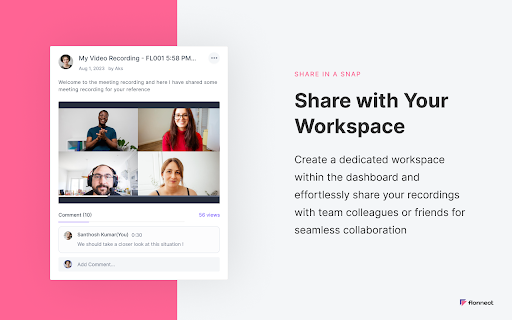


Allows Screen Recording from your Webcam and Desktop Record your screen or camera along with your audio. This extension supports all types of screen recordings for free with unlimited usage. ✅Free to Use ✅No Watermark ✅No Lag screen recording ✅Unlimited Usage ✅Includes audio recording with Webcam ✅Easy to share the video link with teammate ✅Annotate video while recording Note: Please update your browser to the latest version and grant the permissions to record your screen and audio. Install the Screen recorder chrome extension to capture screen video. It offers multi features such as >>Simple Screen Recorder >>Reaction camera or webcam recorder >>Screen & Webcam recorder (With Picture in Picture Display) Here is how to use Screen Recorder Extension: >> Click on the Extension icon >> Then select one of the 3 options of screen recording >> You can choose to record audio or disable it >> Grant the permission to record your screen and mic options >> Tap on the record button and it will start the recording >> Later download the file or view the recording it in the active tab Supported Screen Recorder types: ✅Entire Full Screen of Desktop ✅ Single Tab ✅ Active browser Special gratitude to roOt_d3viL for continuous testing the product. The Screen Recorder Extension is ideal for professionals, educators, and anyone needing a reliable tool for capturing screen content. With added benefits like quality control settings, multi-part uploads for faster video handling, and features like trimming and transcription, your screen recording experience is elevated to new heights. Perfect for tutorials, presentations, or just sharing ideas, the Screen Recorder Extension is your go-to tool for all screen capture needs. Install now to revolutionize the way you record and share content! What’s New in the Latest Versions: • Version 7.5.1-7.6.0: Added backup option for offline users. • Version 7.4.0-7.5.1: Added a dev mode for easy bug reporting and integration with tools like jira. • Version 7.3.11-7.4.0: Black friday integration • Version 7.3.11-7.3.12: Camera integration with presentation mode. • Version 7.3.8-7.3.11: Seo optimized sharing link • Version 7.3.7-7.3.8: Added one click integration with github pull request page. • Version 7.3.5-7.3.7: Added one click integration with gmail and gmeet. • Version 7.3.0-7.3.5: Increase performance of video uploading api. • Version 7.2.2: UI/UX enhancements for a more intuitive experience. • Version 7.2.1: Resolved bugs for a smoother operation. • Version 7.2.0: Introduction of the VP9 codec, ensuring high-quality 1080p video recordings. • Version 7.1.3 - 7.1.1: Fixes for downloading and uploading issues, along with video compression for smaller file sizes and Mac-specific bug resolutions. • Version 7.1.0: Major UI/UX overhaul, workspace features, and collaborative functions. • Version 7.0.0 - 7.0.4: From movable camera features to annotation tools and bug fixes – a series of updates to refine your recording experience. • Version 6.0.0: Auto-upload and video redirection enhancements for a more efficient workflow. • Version 5.2.0 - 5.1.1: Offline storage for recent videos, multi-part uploads for increased speed, and auto-generated thumbnails for a better library overview. • Version 4.1.0 - 4.1.3: Crucial bug fixes in screen recorder functionality and multiple video uploads. • Version 3.1.1 - 3.0.0: Quality control options and link generation for easy video sharing. • Version 2.0.1 - 2.0.3: UI/UX improvements and chrome tab audio capture options. • Version 1.0.2 - 0.0.1: Foundational features including webcam recording, improved UX, multi-language support, and initial bug fixes. Make your virtual communication as efficient and effective as possible. Get the Screen Recorder Extension today and transform your screen captures into powerful tools of engagement.

Screenshot - Webpage Screen Capture
Convenient screenshot tool. Capture, edit and save them to jpeg, gif or png, drop comments and share. Screenshot is an all-in-one platform for all your needs. Just choose what you need now! This handy tool integrates seamlessly into your browser, providing a quick and efficient way to capture the content you see on your screen. All for Free & No sign in needed! Here are some features: ▸ Whole Page screen capture - No matter how long the page is, you can turn the page into a picture for easy editing and sharing. ▸ Visible Area screen capture - Fast capture the viewable area of the current web page. ▸ Selected Area screen capture - Select and capture anything you want. Our extension is not only feature-rich but also incredibly user-friendly. You'll be capturing screenshots in no time. Best of all, it's completely free, so there are no hidden costs or subscriptions to worry about. If you have any questions, suggestions or feature requests, feel free to submit to our Screeshot team.

RecordBlast — Powerful Screen Capture Tool
Record your screen, tab or webcam with audio. Annotate in real-time with drawing tools. Free, fast & powerful screen capture tool. 🎬 RecordBlast — Powerful Screen Capture Tool Record your screen, browser tab, or webcam in stunning quality — completely free. No sign-up required, no time limits, no watermarks. Just click and record. Tired of screen recorders that force you to sign up, limit your recordings to 5 minutes, or slap a watermark on your videos? RecordBlast is different. ✅ No account required — start recording instantly ✅ No time limits — record as long as you need ✅ No watermarks — your videos, your brand ✅ No cloud upload required — everything stays on your device ✅ 100% free — no hidden paywalls 📺 Screen Recording Capture your entire screen, a specific window, or any application. Perfect for tutorials, presentations, and demos. 🌐 Tab Recording Record a single browser tab with crystal-clear quality. Ideal for recording web apps, online meetings, and streaming content. 📷 Webcam Overlay Add a camera bubble to your recordings. Draggable, resizable, and beautifully circular. Make your tutorials personal with a face-cam overlay. 🎙️ Audio Capture Record system audio from your computer and/or microphone. Capture music, sound effects, narration — or all at once. Draw and annotate directly on your screen while recording. No post-editing needed! ✏️ Pen — Freehand drawing in any color 🖍️ Highlighter — Semi-transparent highlighting ➡️ Arrow — Point to important elements 🔲 Rectangle — Frame areas of interest ⭕ Circle/Ellipse — Highlight circular areas 📝 Text — Add text annotations on the fly ↩️ Undo — Made a mistake? Just undo 🗑️ Clear All — Start fresh with one click Choose your color and brush size from the annotation toolbar. All annotations are baked into the recording automatically. • Circular camera overlay with live preview • Drag anywhere on screen • Resize by dragging the corner • Camera position saved between sessions • Works with built-in and external webcams • Picture-in-Picture mode for full-screen recording A sleek, minimal toolbar appears during recording with everything you need: ⏱️ Timer — See exactly how long you've been recording ⏸️ Pause/Resume — Take a break, then continue ⏹️ Stop — Finish your recording 🎙️ Mic toggle — Mute/unmute microphone on the fly ✏️ Draw — Open annotation tools 👁️ Hide — Minimize toolbar to a small dot 🖐️ Drag — Move the toolbar anywhere on screen The toolbar auto-fades after 8 seconds so it doesn't distract. Hover to bring it back. • 1080p — Full HD recording (default) • 4K — Ultra HD for maximum clarity No artificial quality caps. Record in the highest quality your hardware supports. Power users love keyboard shortcuts. Record without even touching the mouse. Enable an optional 3-second countdown before recording starts. Gives you time to prepare your screen and get everything in position. When you stop recording, your video is automatically saved to your computer. No extra clicks, no sign-up forms, no cloud uploads. Your recording goes straight to your Downloads folder. RecordBlast speaks your language: English, Español, Deutsch, Français, Português (BR), Português (PT), Italiano, Polski, 中文 (简体), 中文 (繁體), 한국어, हिन्दी, 日本語, Türkçe, Українська, العربية, Русский • All recordings stay on YOUR device • No data sent to external servers • No tracking, no analytics, no cookies • No account required • Open and transparent — what you see is what you get 💡 PERFECT FOR 🎓 Students & Teachers — Record lectures, create study materials 💼 Professionals — Create presentations, record meetings 🐛 Developers — Record bug reports with annotations 🎮 Gamers — Capture gameplay moments 📱 Content Creators — Create tutorials and how-to videos 🛠️ Support Teams — Show customers how to fix issues 📊 Sales Teams — Create personalized video messages ☁️ Cloud storage — Save recordings online and access from anywhere 🔗 Share links — Share your videos with a single link ✂️ Video editor — Trim, cut, and polish your recordings 🎨 Custom branding — Add your own logo to recordings Stay tuned for updates! If RecordBlast helps you get things done, please leave a review! Your feedback helps us grow and improve. Got questions or suggestions? We'd love to hear from you.

Screen Recorder
Record your computer's screen with just one click! Screen Recorder extension helps you record video from the computer's screen. To work with this addon, please click on the toolbar button. Once the recorder interface appears, please adjust desired options, and then click the - Start - button. The video source could be your screen, window, or tab. The audio source can be the system's audio, microphone, mixed, or no audio at all. When you click the start button, a popup will appear within the interface. This popup window allows you to select the desired screen, tab, or window. To start recording please click on the - Share - button. When you are done recording the screen, please press the toolbar button (or the stop button on the app interface) to stop the recording process. The recorded video will be download to your computer automatically (on the default download location). By default, recorded media is in - webm - format. To get more information about webm video format, please visit this Wikipedia page (https://en.wikipedia.org/wiki/WebM). If you want to change this format to a different one, please use a different software. Moreover, to switch the interface theme to dark, please press the moon icon in the right toolbar. To report bugs, please fill out the bug report form on the addon's homepage (https://mybrowseraddon.com/screen-recorder.html).

Reelia Record - Screen Recorder & Editor
Record screen, website and webcam to a video - free, quick and easy. Reelia Record – Free, Fast & Easy Screen Recorder & Editor Effortlessly capture and share your screen, website, or webcam in one click! • No Sign-Up Required • No Watermarks • Completely Free 🎥 Record Your Way: • Versatile: Record your screen, specific app, browser tab, or just your webcam. • Engaging: Embed webcam & mic for screencasts. • Clearly Communicate: Annotate live while recording. • Focus Viewers: Highlight mouse clicks & movements. 🖊️ Edit Effortlessly: • Organized: Local library for your recordings. • Powerful Editor: Trim, cut, crop & merge clips. • Flexible: Easy undo/redo for any edit. 🔥 Why Reelia? ✔️ Unlimited Recording: No limits. ✔️ No Watermarks: Your content, your brand. ✔️ HD Quality: Crystal-clear videos. ✔️ Privacy First: Everything stays on your computer. 🚀 Help Shape Reelia! We're always improving based on your feedback! ✔️ Recording Library – Done! ✔️ Bug Fixes & Performance – Ongoing! 💡 Ideas or Bugs? Let us know via the "Support" tab in the Chrome Web Store. 🙌 Love Reelia? Share with friends & leave a review! Your support means the world to us! 😊
