
ajhidbbpmnhjjffefekncbdbeopghnnn
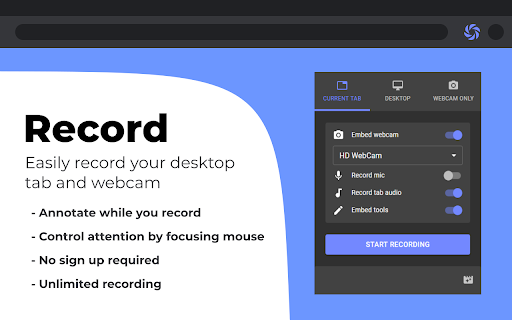

Record screen, website and webcam to a video - free, quick and easy. Reelia Record – Free, Fast & Easy Screen Recorder & Editor Effortlessly capture and share your screen, website, or webcam in one click! • No Sign-Up Required • No Watermarks • Completely Free 🎥 Record Your Way: • Versatile: Record your screen, specific app, browser tab, or just your webcam. • Engaging: Embed webcam & mic for screencasts. • Clearly Communicate: Annotate live while recording. • Focus Viewers: Highlight mouse clicks & movements. 🖊️ Edit Effortlessly: • Organized: Local library for your recordings. • Powerful Editor: Trim, cut, crop & merge clips. • Flexible: Easy undo/redo for any edit. 🔥 Why Reelia? ✔️ Unlimited Recording: No limits. ✔️ No Watermarks: Your content, your brand. ✔️ HD Quality: Crystal-clear videos. ✔️ Privacy First: Everything stays on your computer. 🚀 Help Shape Reelia! We're always improving based on your feedback! ✔️ Recording Library – Done! ✔️ Bug Fixes & Performance – Ongoing! 💡 Ideas or Bugs? Let us know via the "Support" tab in the Chrome Web Store. 🙌 Love Reelia? Share with friends & leave a review! Your support means the world to us! 😊

Webcam + Screen Video Recorder Video Editor
Screen Recorder App with Webcam Video Recorder, Video Editor, Upload Video in a Single Extension. Screen Recorder App with Webcam Video Recorder, Video Editor, Upload Video in a Single Extension. StoryXpress is an online free Screen Recorder with Webcam, Online Video Editor, Hosting & Analytics, all in one place. Use the screencast recorder or the webcam to express yourself better. This is a flexible tool to record with or without Screen recording, Audio, or Face Cam, all combinations work, with even Offline Recording functionality! This is best suited for teams involved in frequent meetings or to coordinate with various internal/external stakeholders. Be it your customer success team, sales, marketing, or HR, with quick video messages, you can reduce the load of texts, emails & lengthy conversation threads. -TRUSTED by 10 out of Forbes Top 50 Companies -500,000+ users and Millions of recordings created Not just a screen recording tool, StoryXpress is packed with features that make video creation a cakewalk for everyone: -Online Video Editor to Trim, Crop, or Blur any part of a recording. -Analytics to track metrics like how many people watched it, for how long. -Various Customisations like player settings, intro, and outro that turn a simple recording into a branded experience. -Picture in Picture mode to show your camera bubble outside chrome as well as on desktop, other apps, and browsers. - Easy, one-click access to the recordings library, help-center and account settings from within the Chrome Extension. - Ability to record the tab audio: The updated extension lets you record the system audio along with your screen. This means you can now record your Google Meetings, Zoom calls, webinars & interviews. - Annotations: A simple annotations menu is easy to use and navigate while you’re in the middle of a recording. No confusing options, just a highlighter brush whose color and size you can adjust. No need to manually erase the curves you draw to catch your prospect’s attention. Whatever you draw disappears automatically after five seconds. - 1080 p recording option for Lite, Pro and Plus users - You can choose the recording quality with a drop down as well, only for Pro Users. - Offline Recording: Start your recording even when there is no internet connection. Why will you love StoryXpress? -It is QUICK & SIMPLE to use. -Greatly successful at REMOTE communication. -Useful in PITCHING to clients. -An amazing tool to solve your CUSTOMERS’ queries. -Trouble-free to create tutorials for schools, customers, and teams. -Makes communication effective & personalised. ZERO% failure rate with uploading: Just after the recording, we take you to a locally hosted intermediate page that you can use to track the progress of your upload and retry uploading in case it fails due to internet connectivity issues. ZERO% failure rate, no more work getting lost due to upload issues or poor internet connection. What you can do with the StoryXpress Screen recording extension? StoryXpress extension enables you to: -) Record your webcam & screen together. -) Edit - trim, crop, or blur them before publishing -) Share instantly with an easy-to-share link. -) Embed videos in App or Website landing pages. -) Upload Your Offline files to the platform. -) Analyse performance statistics in real-time. -) Download without watermarks. Sales rep: Pitch your product/services online to clients by starting with a Face only webcam Introduction. Freelancers: Showcase your portfolio, and suggestions with a prospective client, or share an update on the work status so far with StoryXpress free screen recorder. Marketers: Record presentations using the free screen recorder, download them offline, share the link on Social Media & Emails & track the performance through analytics. HR Teams: -Design effective training programs to Onboard New Employees remotely. -Automate the hiring process by introducing the job role and company vision using the video & screen recorder. Customer Service: -Solve user problems with a recorded video. -Make use of the Draw, Focus & Text Tool to highlight steps while offering a solution. Teachers: - Create lectures & then edit them using the Online Video Editor and share them with Students. QA Teams: - Share the bugs on the product using the screenrecorder and highlighter; Our free screen recorder lets you do everything quickly and easily. No more wasting your time typing long cryptic emails! Simply, get this amazing extension for Chrome in your toolkit and see the conversions happening in a flash. FAQs you might have: → On What Devices Can I Use this Online Tool? It works on most of the operating systems. All you need is a chrome browser installed and you can record anything - tabs on Chrome or other browsers, Desktop Screen, or your webcam. Just one click to open the gateway for narrating and sharing ideas, stories, and updates. → How to use StoryXpress to record? - Download the screen recorder extension. - Choose from 3 recording modes - Screen + Cam, Screen only, Cam only. - Start Recording. - Use the Draw tools like a cursor, pen, eraser, focus, and text tools. → Can I customize my Videos on StoryXpress for pc? StoryXpress comes with an online editor that lets you customize your screen-captured video or your uploaded files in numerous beautiful ways. You can use these customizations to make your message more interactive, informational, and personalized. A truly white Labelled Platform gives you a wide range of customization options and tools to brand and promote your content. Create a branded landing page for your business. Create a perfect hook with the FaceCam Introduction. Customize the player with your theme colors to suit your brand. Create GIF thumbnails to instantly improve the open rate. Add attractive annotations- like a text or a marker to point up relevant information to the user. Make your content interactive and compel viewers to take the desired action. Files and Folders: Arrange your content using folders. Share folders with your team members and control who sees what. Leads Page: View all the leads captured on a single page Channel Subscribers: Have your viewers subscribe to your channels and manage the subscribers Video Replies: Receive responses from your viewers without them having to sign up/downloading the StoryXpress Chrome extension Smoother UI: UI improvement for the sidebars for a smoother user experience. Also, an easier way to manage and install your integrations. Transcripts - Automatically generate transcripts Notifications in the Dashboard: Get all the latest updates and notifications in your dashboard. → Is StoryXpress Screen recording software useful for YouTubers too? StoryXpress helps YouTubers to record screens with sound. It is helpful for YouTube screencasts, especially those who review a digital product, do a podcast, or create a reaction on a game. StoryXpress is the best YouTube recording tool for screencasting on chrome and desktop screens. It can be your go-to screen share tool to screen record on mac or pc, with sound. You can also use this as a Google Meet recorder and Zoom recorder

Screen Recorder & Screenshot App for Chrome | Scrnli
Screen recorder for Chrome, take screenshots, record screen and video, capture, edit and share instantly Scrnli is a powerful screen recorder and screenshot tool for Chrome that lets you capture your screen, record video, take screenshots, and share content instantly. Use Scrnli to record your screen, capture full pages, edit screenshots, and create video recordings for work, study, or communication. Why Choose Scrnli screen recorder and screenshot app Screenshot Tool for Chrome - Capture full page, selected area, or visible screen Screen Recorder for Chrome - Record screen, browser tab, or desktop video Edit Screenshots - Annotate, draw, add text, arrows, and highlights Instant Capture - Take screenshots and record screen with one click Easy Sharing - Share screenshots and videos instantly via link Save and Download - Save screenshots and screen recordings locally Lightweight Extension - Works smoothly without slowing down Chrome Secure and Private - Your data stays safe and under your control What You Can Do with Scrnli Take Screenshots - Capture full page screenshots or selected areas Record Screen Video - Record tutorials, meetings, and presentations Create Tutorials - Record screen and explain processes visually Improve Communication - Share screenshots and videos instead of text Save Important Content - Capture and store useful information How to Use Screen Recorder & Screenshot Tool 1. Install Scrnli from the Chrome Web Store 2. Click the extension icon 3. Choose screenshot or screen recording mode 4. Capture your screen or record video 5. Edit, save, or share instantly Capture and record your screen in seconds with this easy-to-use screen recorder for Chrome. Full Page Screenshot - Capture entire web pages Visible Screen Capture - Capture what you see Area Screenshot - Select and capture specific areas Instant Editing - Add text, arrows, and highlights Screen Recorder Features Record Screen - Capture desktop, browser tab, or window Video Recording - Record video with smooth performance Quick Sharing - Share recordings instantly Save Video - Download recordings for offline use Why Users Install Scrnli Screen Recorder • Easy screenshot and screen recording tool • Fast capture and editing features • Share screenshots and videos instantly • Lightweight and simple to use • Perfect for work, study, and daily tasks Privacy and Security Scrnli Screen Recorder does not collect or store personal data. Your screenshots and recordings remain private.

Desktop Screen Recorder
Record the computer's screen, entire application or a single browser tab with audio support Desktop Screen Record is a powerful recording tool that captures the screen for sharing content. This extension has three modes: 1. Capture the entire screen. This mode supports monitor selection if more than one display is detected. 2. Application window capturing. It only captures one application's window, and the video size would be equal to the application's window size. 3. Browser tab mode. The extension captures the content of one browser tab only. You can optionally switch to a different tab during the recording This extension can record in HD quality if the recording is placed on a high-quality LCD monitor. Also, it supports audio recording. The user can either ask the extension to record the system sound (whatever is playing in the background) or use the user's microphone device for recording. The output format of the media files is the WebM format, which is the best choice for media sharing due to its compression level and real-time rendering. Features: 1. It is possible to use this extension to record long screen captures since it directly writes chunks to the disk while recording. 2. Recover recordings in case of a browser crash. 3. Use a built-in tool to draw or write during the presentation 4. Record audio from speaker, microphone, or both 5. Adjust video quality (HD, Medium, Low, or Default) 6. Define global shortcuts to pause, resume, or stop recording. 7. Record as long as you need. There is no watermark on the recording 8. Writes the stream directly to the disk. There is no need for recovery after a possible browser crash.

ApowerREC Screen Recorder
One-click to start your unlimited recordings! ApowerREC Screen Recorder is a lightweight screen recording software providing a bunch of amazing features. With its high flexibility, you can customize the whole screen, browser window, or tab exclusively. More so, if you desire include the audio, sure it can! Multifunctional Screen Recorder ▶ Microphone & System sound recorder Record system sound, microphone, or both audio sources at the same time. ▶ Browser Recorder Screen record a selected browser tab. ▶ Desktop Recorder Record all the desktop activities. ▶ Webcam Recorder Include webcam screen into the recording. ▶ Application window Recorder Record designated application interface. Contact Us ☛ Customer Service: support@apowersoft.com ☛ Desktop Program: https://www.apowersoft.com/record-all-screen
