
lkammhocidhjgpnfpghodgbjmjkcnhpi

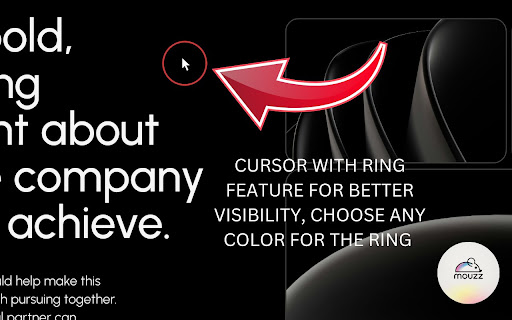


Free professional mouse enhancement with spotlight effects and custom cursor mouse tools for presentations and tutorials 🎯 Take Your Presentations & Tutorials to the next level with Professional Mouse Enhancement powered by Mouzz. Mouzz is the ultimate free mouse enhancement extension that makes your cursor visible, engaging, and professional for presentations, tutorials, screen recordings, and online teaching. Perfect for educators, content creators, business professionals, and anyone who wants to create compelling visual experiences. 🔍 Spotlight Mode - Create dramatic focus effects by dimming everything except the area around your cursor - Adjustable spotlight size (40px-300px) for different screen sizes - Perfect for highlighting specific content during presentations - Works flawlessly on Google Slides, PowerPoint Online, Canva, and all web-based presentation tools ⭕ Cursor Ring Enhancement - Add a customizable colored ring around your mouse cursor for maximum visibility - Adjustable size (20px-100px) and opacity settings - Choose from any color to match your brand or presentation theme - Eliminates the "where's my cursor?" problem during screen sharing 🖱️ Custom Cursor Tools - Replace your default cursor with professional designs - Upload your own custom cursor images - Built-in cursor collection for different use cases - Perfect for branding and creating unique visual experiences 🎓 Perfect for Education & Business - Online Teaching & Tutorials - Make your cursor highly visible during video lessons - Guide students' attention exactly where you want it - Works perfectly with Zoom, Teams, Google Meet screen sharing - Essential for coding tutorials, software demonstrations & step-by-step guides - Business Presentations - Professional appearance for client meetings and conferences - Compatible with Google Slides, Google Sheets, Google Docs & Google Presentations - Enhance your screen recordings for training materials - Perfect for sales demos and product showcases - Ideal for YouTube tutorials, course creation, and instructional videos - Make your content more engaging and easy to follow - Professional touch for webinars and live streams 🚀 Easy to Use & Highly Compatible - Universal Web Compatibility - Works on ALL websites and pretty much everything within Google Chrome - Google Workspace (Slides, Docs, Sheets) - Microsoft Office Online - Educational platforms (Canvas, Blackboard, Moodle) - Any Chrome-based software or application - Instant Activation - One-click activation from the Chrome toolbar - Keyboard shortcuts for quick toggling (Alt/Option + Q/W/E) - No page refresh required - works immediately - Cross-platform support (Windows, Mac, Linux, Chromebook) ⚙️ Advanced Customization - Professional Settings -Fine-tune spotlight size, opacity, and softness -Customize ring color, size, and border width -Hide default cursor for cleaner presentations -Performance mode for older devices -Save your preferences automatically -Smart Features -Auto-enable cursor tools when uploading custom cursors -Debounced settings to prevent system overload -Cross-tab synchronization -Privacy-focused with local storage only 🎯 Use Cases & Benefits For Educators: -Online teaching and remote learning -Interactive whiteboards and smart boards -Student engagement during virtual classes -Accessibility enhancement for better visibility For Content Creators: -YouTube tutorials and how-to videos -Course creation and e-learning content -Twitch streaming and live demonstrations -Professional screen recordings For Business Professionals: -Sales presentations and client demos -Training materials and onboarding videos -Conference presentations and webinars -Remote team collaboration For Designers & Developers: - Design reviews and feedback sessions - Code walkthroughs and pair programming - User experience testing - Portfolio presentations 🛡️ Privacy & Security - No data collection or tracking - All settings stored locally on your device - No external servers or cloud dependencies - Open source transparency - GDPR and privacy regulation compliant ⌨️ Keyboard Shortcuts - Alt/Option + Q: Toggle Cursor Ring - Alt/Option + W: Toggle Spotlight Mode - Alt/Option + E: Toggle Custom Cursor 🎉 Why Choose Mouzz? ✅ Completely Free - No hidden costs, subscriptions, or premium tiers ✅ Professional Quality - Enterprise-grade features for everyone ✅ Universal Compatibility - Works on every website and web application ✅ Easy Setup - Install and use immediately, no configuration required ✅ Lightweight - Minimal resource usage, won't slow down your browser ✅ Regular Updates - Continuous improvements and new features ✅ Expert Support - Comprehensive documentation and user guides Transform your presentations, tutorials, and screen recordings today with Mouzz - the professional mouse enhancement tool trusted by educators, content creators, and business professionals worldwide. 💻 Love Mouzz? Try Mouzz for macOS! Get cursor spotlight, ring, trail, click effects, zoom, and more — natively on your Mac desktop. Works system-wide across every app, not just the browser. Available on the Mac App Store: https://apps.apple.com/us/app/mouzz-cursor-highlighter/id6760307235?mt=12

Page Spotlight
Highlight any webpage with a customizable spotlight for better demos and tutorials. 🔦 Page Spotlight – Bring the Focus Back to the Page! Page Spotlight is a lightweight and intuitive Chrome extension that lets you activate a spotlight effect on any webpage — perfect for tutorials, presentations, screen recordings, and guided demos. - 🔘 Adjustable Focus Area & Shape Choose between circular or rectangular spotlight shapes and easily resize to match your needs. - 🎨 Customizable Mask Color & Opacity Modify the background overlay color and transparency to create a soft or strong focus effect. - ✨ Laser Pointer Cursor Mode Transform your mouse cursor into a laser pointer for guiding attention during live interactions. - 🎯 Pointer Customization Adjust the laser dot's size and color to match your presentation style. - 💾 Auto-Saved Preferences All settings are saved automatically for a seamless experience across browsing sessions. - ⌨️ Keyboard Shortcuts Supported Quickly toggle spotlight mode or adjust the focus size using handy hotkeys. ❤️ Perfect for: - 👩🏫 Teachers & remote instructors - 🧑💻 Tutorial creators & YouTubers - 📊 Presenters & product managers - 🧠 Anyone who needs to draw attention to key elements on a page ✨Page Spotlight helps you present with clarity and keep your audience focused, every time!

spotlight
✨Spotlight your cursor🔦 ✨Highlight your mouse pointer while sharing your screen! 🔦 1. Click toolbar icon. 2. Press `shift` key. Mouse wheel to change circle size. 3. Toggle off to disable spotlight. 4. Mouse over toggle button and click cancel button to close.

HighlightCursor
Makes your highlight big and allows you to change its size. HighlightCursor: Enhance Your Focus with a Custom Mouse Highlight Tired of losing your cursor during presentations, online tutorials, or even just daily browsing? HighlightCursor is the simple, elegant solution to make your mouse pointer stand out! HighlightCursor adds a vibrant, customizable highlight around your mouse cursor, ensuring it's always visible and easy to track. Perfect for educators, presenters, gamers, or anyone looking to improve their digital focus and accessibility. ✨ Key Features: Customizable Size: Easily adjust the highlight's size (from subtle to prominent) directly from the extension's intuitive popup. Always Visible: Your highlight remains consistently visible across all compatible web pages, providing a seamless browsing experience. Simple Toggle: Quickly enable or disable the highlight with a convenient switch in the popup whenever you need it. Privacy-First Design: HighlightCursor operates entirely on your device. We do not collect, store, or transmit any of your personal data, browsing history, or website content. Your privacy is our priority! 💡 Why You'll Love HighlightCursor: Boost Presentations: Guide your audience's attention effortlessly during screen shares and webinars. Improve Tutorials: Make your online demonstrations clearer and more engaging. Enhance Accessibility: Assist users with visual impairments or those who simply prefer a more prominent cursor. Stay Focused: Reduce eye strain and improve productivity by keeping your attention on the task at hand. Your highlight size and enabled/disabled preference are saved locally on your device for convenience and are never shared. Ready to bring clarity and focus to your browsing? Click "Add to Chrome" today and experience the difference!

spotlight-viewer
Spotlight curssor effect Spotlight effect that follows mouse movement
