
ljojmlmdapmnibgflmmminacbjebjpno
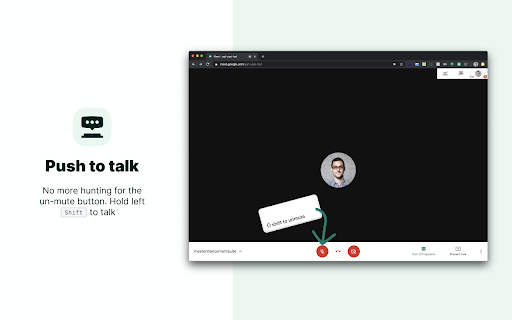


40 new features for Google Meet such as mute all, remove all, auto admit, emojis, mirror videos, background color, and push to talk! Meet Enhancement Suite is the best Google Meet extension with a set of over 40 features and smart defaults & now with Google Meet Transcripts & AI summarization. providing insights to help you get the most out of Google Meet. Join over 200,000 people who are using Meet Enhancement Suite to make their work from home lives easier & meeting recall faster using AI. This chrome extension for Google Meet is packed with features that make it the best Meet extension for teachers, students, and anyone else working remotely. BASIC FEATURES • Push to Talk: quickly mute and unmute yourself with the press of a key • Auto Join: skip the join screen and get straight to the meeting • Auto Join with Participants: automatically join the Meet only if participants are present • Quick Leave: quickly leave a hangout by pressing Shift + K • Return to home screen on leave: automatically returns you to the Meet home screen after leaving a Meet • Leave Confirmation: asks to confirm when you try to leave a meeting • Auto Ignore Presentation Overlay: auto hide `infinity mirror' alert when presenting • Always Play Chimes: always hear chime sounds when participants join and leave, or a when a new chat message is received • Quick Start: quickly start a new Google Meet with the click of a button • Set Background Color: set custom background color for your Meet • Auto Captions: automatically enable captions on calls • Auto Mute: auto mute microphone on join • Auto Video Off: set video to off on join • Participant Video Style: show or hide participant names and speaking icons PRO FEATURES • Save, Search, & Summarize Google Meet Transcriptions Using AI • Auto-Minimize video: auto-minimize your video when you join a meet • Adjust Meet Volume: adjust the volume level of the Meet • Auto Record: automatically start recording the Meet when you join (requires Google Workspace plan) • Sort Participant List: adds toggle to sort the participant list by last name • Meet Attendance: collect attendance of participants / students who attended your meeting and export to a CSV • Auto-Unmute: stop others from muting your mic • Speaker Highlight: adds a colored border around speaking participants • Find Active Meet Tab: click the extension icon to find the active Meet tab • Quick Emoji Reactions: adds quick emoji shortcuts to the chat window • Meeting Timer: displays a meeting timer in top menu bar • Toggle Bottom Bar: toggle the bottom control bar to appear or disappear • Mirror Videos: mirror all videos in the Meet • Auto Admit New Entrants: automatically admit all new entrants (see FAQ below for more details) • Auto Deny New Entrants: automatically denies all new entrants (see FAQ below for more details) • Mute All: mute all participants in a Meet with a single click (see FAQ below for more details) • Remove All: remove all participants in a Meet with a single click (see FAQ below for more details) • Do Not Disturb Mode: remain focused by hiding new comments and participant pop-ups • Picture-in-Picture: view a participants video in a hovering video on top of your screen • Dark Mode: give your eyes a rest by turning Google Meet into dark mode. • Hotkey Editing: customize your push-to-talk hotkey • Hide "Add Others" pop-up: hides "Add Others" pop-up when joining a Meet • Auto Pin Chat: automatically open and pin the chat every time you join a Meet • Transparent Bar: make the bottom bar transparent so it doesn't cut off participants videos • Auto Hide Top Bar: hides away the top menu bar when the bottom bar disappear • Auto Copy Meet URL: automatically copy Meet URL to clipboard • Hide Mute Pop-up: hides the "Are you speaking" pop-up from appearing when muted • Display Clock: always display the clock in the top right hand corner of Google Meet PRIVACY Please view our privacy policy for more information: https://www.meetenhancementsuite.com/privacy-policy HOW TO USE 1) Install the Chrome extension 2) Click our black icon in the top right corner of your browser to configure your settings 3) Join a Google Meet and enjoy your new features! SEARCHING YOUR MEETING TRANSCRIPTS WITH AI Login to our web portal so you can search and summarize meeting notes using AI: https://app.meetenhancementsuite.com/login FEEDBACK AND FEATURE REQUESTS We'd love to hear your feedback or features requests – head over to https://www.meetenhancementsuite.com/feedback CHANGELOG Head over to this page to view our change log: https://www.meetenhancementsuite.com/changelog FAQ Please see our FAQ for answers to our most commonly asked questions: https://www.meetenhancementsuite.com/faq/ DOCS If you need any support please first check out our documentation: https://docs.meetenhancementsuite.com/

Meet Chat Transcribe
Transcribe Google Meet Chats to a Google Doc. When engaged, chats will be saved to a Google doc in the Meet Chat Transcripts folder of your Google Drive.

Grid View for Google Meet™
Grid View for Google Meet™ This extension helps to adds a button to use a grid layout in Google Meet. This extension adds a button to the top right bar (next to chat & participant list) to enable grid-view in Google Meet. Grid view gives every participant an equal sized video for use in meetings without a primary speaker (such as working from home silent meetings ). Try Grid View for hangouts meet. This extension forcibly loads every participant's video camera, when grid view is enabled and may cause performance issues in extremely large meetings . This software is helpful for Google Meet Grid View, it helps teachers who need to ensure students are paying attention during online classes. It also works for google hangouts meet - Fixed the bug for grid view not working correctly. - Added in "Push to Talk" functionality as well. By default, this functionality is switched off. Useful to prevent meeting blunders as you need to press the "space bar" to begin talking. Removes the risk of having "live microphone". Includes a variety of options to enhance your meeting: include your own video, highlight who is speaking, and hide participants without video! Updated so it works with new design of Google Meet. To begin using this extension for Google Meet or google meet app, here is what you need to do Install the Software Extension Go inside a Google Meet meeting. Click on the extension icon when you are IN the meeting to activate our extension. Please NOTE you HAVE to be inside the Google Meeting before you click on the extension icon for this grid view to be enabled. Grid View will be enabled once you click on the extension icon when you are in a Google Meet online video call. Please note if you have a large number of participants inside your Google Meet call, it may cause the meeting connection to be unstable if your internet connection is slow/you are using a older computer. Leave us some feedback if you have any questions/issues for Grid View for google video conference Disclaimer: Please note this extension is NOT made by Google and is made by an independent development team. All copyrights belong to their respective owners. Google doesn’t endorse or sponsor this Chrome extension. This is not owned by, it is not licensed by and is not a subsidiary of Google Inc.

Dualless
Dualless - For those who don't have dual monitor. Dualless is a poor man's dual monitor solution. It splits your browser windows into two by just 2 clicks. The ratio can be adjusted according to your needs.You may have a browser window showing on the right that occupy 30% of your screen. Then the rest of space leave to Google+. The extension simulates the environment of dual monitor. Utilize the space for 16:9 monitor * Split current browser window into a pair. And resize their position and size according to the ratio specified by user. (3:7,4:6,5:5,6:4,7:3) * Merge splitted browser windows back to a single window , or make it occupy the full screen area. * MacOS X like windows management. When one of the splitted windows got focused, the other in pair will be shown together. They always occupy the whole screen. * Press middle key on split window button will duplicate the current page on other window. * Bookmark management. Relaunch your favior site in a new tab and windows will be splitted in the recorded ratio. The software is released under open source license of GPL 2.0 * Bug Fix - crash browser during split / merge * Bug Fix - splitted window size is invalid * Changes: Migrated to Extension V3 API Release 0.4 * Added auto maximize mode * After splitted, if one of the window close, the remaining one will be maximized to occupy all the space * Added bookmark support Release 0.3 * Now works with maximized window! * Press middle key on split window button will duplicate the current page on other window. * Vertical split is supported. * Options page is added. User may enable/disable pairing mode(MacOS simulation) * Ubuntu with Unity works better now

Virtual Backgrounds for Google Meet™
Virtual Backgrounds for Google Meet™ Virtual Backgrounds for Google Meet Want to use a different background when you're in an online video call using Google Meet or hangouts meet? Amaze the other participants in this video call when you show up with the most trendy backgrounds during your Google Meet call or google hangouts meet call. Please Note if you are having issues with changing your background, its due to the following issues. 1) SWITCH OFF the Web Camera inside the Google Meet Call and Switch it back on for the Virtual background to work. This solves over 90% of the issues of the extension virtual backgrounds not working for users/individuals. - Host permissions are needed because our extension needs to insert in the background image when you're on the Google Meet website. Please note we do NOT capture any personal data and the only reason we need host permissions is to insert the background image during your Google Meet/Hangout call. To begin using this software for google meet app, here is what you need to do. Install the software Go to Google Meet and enter your video call. If you have any feedback/suggestions for our virtual backgrounds extension for google video conference, please contact us. Please note you can also use the push to talk functionality inside Google Meet after installing this extension. Simply configure the settings and you can "automatically mute" yourself inside Google Meet, press the "space bar" to talk to ensure no hot microphone issues. Disclaimer: Please note this extension is NOT made by Google and is made by an independent development team. All copyrights belong to their respective owners. Google doesn’t endorse or sponsor this Chrome extension. Virtual Backgrounds for Google Meet is not owned by,it is not licensed by and is not a subsidiary of Google Inc.
