
bgdpkilkheacbboffppjgceiplijhfpd
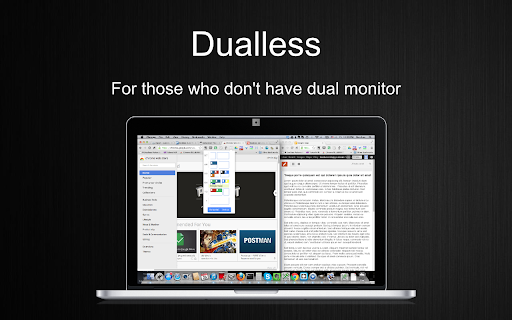

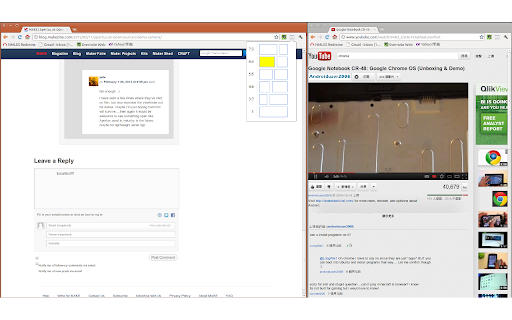
Dualless - For those who don't have dual monitor. Dualless is a poor man's dual monitor solution. It splits your browser windows into two by just 2 clicks. The ratio can be adjusted according to your needs.You may have a browser window showing on the right that occupy 30% of your screen. Then the rest of space leave to Google+. The extension simulates the environment of dual monitor. Utilize the space for 16:9 monitor * Split current browser window into a pair. And resize their position and size according to the ratio specified by user. (3:7,4:6,5:5,6:4,7:3) * Merge splitted browser windows back to a single window , or make it occupy the full screen area. * MacOS X like windows management. When one of the splitted windows got focused, the other in pair will be shown together. They always occupy the whole screen. * Press middle key on split window button will duplicate the current page on other window. * Bookmark management. Relaunch your favior site in a new tab and windows will be splitted in the recorded ratio. The software is released under open source license of GPL 2.0 * Bug Fix - crash browser during split / merge * Bug Fix - splitted window size is invalid * Changes: Migrated to Extension V3 API Release 0.4 * Added auto maximize mode * After splitted, if one of the window close, the remaining one will be maximized to occupy all the space * Added bookmark support Release 0.3 * Now works with maximized window! * Press middle key on split window button will duplicate the current page on other window. * Vertical split is supported. * Options page is added. User may enable/disable pairing mode(MacOS simulation) * Ubuntu with Unity works better now

Visor
Screen dimmer and reading aid, may help with fluency, eye-strain, concentration and comprehension whilst reading. Version 2.0.4: Bug-fixes and updated style. As well as being a great general purpose screen dimmer, Visor's overlays and point of focus feature may be assistive to users with visual perceptual difficulties such as Dyslexia, Scotopic Sensitivity Syndrome and Visual Stress. Whilst research shows results vary from person to person, some users may find that the use of overlays can help with fluency, eye-strain, concentration and comprehension whilst reading. In addition to the traditional overlay method, Visor also employs a point of focus feature, designed to further reduce visual confusions and the tendency to skip lines. This horizontal focal point tracks your mouse, giving full focus to the content being read, whilst reducing the visual noise of the surrounding page. Visor requires no special permissions, so must be reactivated with each page load. Note: This extension will not work on Chrome's start page, options pages or the Chrome web store. This is a restriction of chrome.

Meet Attendance
Meet Attendance requires logging in and Syncing your Chrome browser. When in Meet select the participants view. Accept the permissions. Close and reopen the people to capture attendance. Click the Attendance icon to open the Attendance Spreadsheet. Mouse over for further options, Add a sheet in the Spreadsheet, Create a new Spreadsheet, Turn Attendance collection off, Auto Scroll through participants, Snapshot attendance. Attendance duration will be tracked. Premium: Compare your classroom roster to the participants in the meet. Know who is absent from your Meet. Set the frequency for auto capturing attendance. Leaving the Participants view open attendance will be captured at the set frequency. Subscribe to premium for $2.50 monthly. Subscription management at claycodes.web.app

Call Timer for Meet
This extension adds a timer to your Google Meet calls with customizable time limits and alerts. ═══════════════════════════════════════════════════════ CALL TIMER FOR MEET ═══════════════════════════════════════════════════════ Track your Google Meet call duration with a sleek timer. Set time limits, get alerts, and view total call time automatically. Call Timer for Meet helps you stay on track during your Google Meet calls with a clean, unobtrusive timer that integrates seamlessly into the Meet interface. ⏱️ Real-Time Timer • Automatically starts when you join a meeting • Displays elapsed time in an elegant floating button • Shows total call duration when you leave the meeting 🎯 Smart Time Management • Set custom time limits for your meetings • Visual red alert when time limit is reached • Optional sound notification to stay on schedule • Configure everything with a simple hover panel 🎨 Seamless Integration • Positioned next to Google Meet's native controls • Matches Google Meet's design language • Hover to access all settings and controls • No intrusive popups or distractions 🌍 Multi-Language Support • Available in 17 languages • Automatic language detection based on your browser • Supported: English, Spanish, French, German, Italian, Portuguese, Polish, Russian, Ukrainian, Chinese, Japanese, Dutch, Swedish, Danish, Catalan, and more ♿ Accessible Design • Full ARIA support for screen readers • Keyboard navigation friendly • High contrast colors for readability • Enhanced Performance: Uses modern browser APIs for better efficiency and lower CPU usage • Improved UI: Cleaner design with smooth animations and transitions • End Screen Display: Beautiful time summary on the "You left the meeting" screen • Sound Notifications: Optional audio alert when reaching your time limit • Better Integration: Timer positioned alongside Meet's native buttons for a cohesive experience • Bug Fixes: Resolved timer reset issues and improved state management This extension does NOT collect, store, or transmit any personal data. Everything runs locally in your browser. Your privacy is fully respected. If you notice any translation errors or would like to contribute a translation for a new language, please contact us through the support section. v4.0.1 • Fixed Windows compatibility issues with improved element detection • Enhanced Mac reliability and initialization timing • Increased wait time to 60 seconds for better compatibility • Implemented MutationObserver with fallback strategies • Added race condition protection and improved error handling • Code cleanup and improvements v4.0.0 • Major UI/UX redesign with native Google Meet integration • Added sound notification feature with user control • Implemented MutationObserver for better performance • Enhanced end-call screen with total time display • Fixed timer reset and state management bugs • Improved accessibility with ARIA attributes • Updated all translations and added Ukrainian support • Migrated from JavaScript-injected CSS to native CSS loading • Removed unnecessary permissions for better security v3.0.1 • Added timer position validation on screen resize v3.0.0 • Updated styles for new Google Meet interface • Added draggable timer functionality • Added reset timer and reset position buttons v1.0.4 - v1.0.0 • Initial release with basic timer functionality • Turn on/off timer feature • Red alert when exceeding 45 minutes • Display total call time on call end Enjoying the extension? Please leave a review - it helps other users discover it!

Auto Highlight
*Auto Highlight* automatically highlights the important content on article pages. This extension automatically highlights the important content on article pages. To use, click the highlighter icon in the location bar. Clicking multiple times changes the highlighting coverage. As the page receives more highlighting from clicking the icon, the icon will show less available ink in the highlighter. Please let me know if you find particular pages where the extension does not work well. *Auto Highlight* currently uses an algorithm for picking important sentences based on term frequencies in the entire article. With examples of problematic pages, I can possibly improve the technology. I would also like to incorporate more advanced techniques from extraction-based article summarization research. The source code is available on GitHub: https://github.com/dstein64/highlight Privacy Policy: This extension does not collect user data nor transmit user data remotely. Options for the extension are saved locally.
