
ljifndkfgdhbahjggbonjaoehpeagnmj
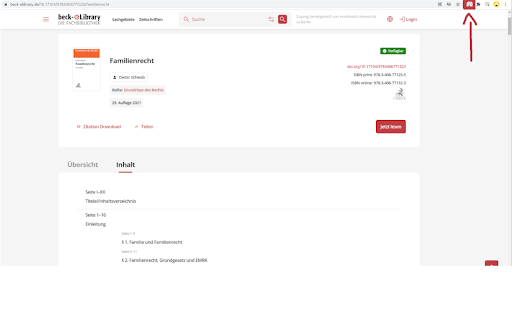
Mit diesem Hilfsmittel können Bücher aus der Beck eLibrary oder der Nomos eLibrary mit einem Klick heruntergeladen werden.… Mit diesem Hilfsmittel können Bücher aus der Beck eLibrary oder der Nomos eLibrary mit einem Klick heruntergeladen werden. Normalerweise ist dies nur mühsam, kapitelweise möglich. Mit dieser Erweiterung können alle Kapitel auf einmal heruntergeladen werden und müssen anschließend nur noch zu einem PDF zusammengefügt werden. Dies ist z.B. mit dem PDF24 Creator (https://tools.pdf24.org/en/creator) möglich.

PDF Downloader
A very simple essential extension which automatically downloads all PDF files from open tabs

Bulk PDF Downloader – Download All PDFs on a Webpage with One Click
Download all PDF files linked on a webpage with a single click. Download every PDF on any webpage instantly. No more clicking each link individually. Stop wasting time opening PDF links one by one. Bulk PDF scanner and downloader for every website. This extension collect PDFs from any webpage with a single click and bulk download PDFs. Perfect for students collecting research papers, professionals gathering documents, or anyone who works with multiple PDF files. One-click downloads - Find and download all PDFs instantly Smart scanning - Automatically detects all PDF links on any page Time-saving - No more right-clicking or opening tabs manually Speed control - Choose download speed (fast, normal, or slow) Clean interface - Simple, modern design that's easy to use Perfect For: Students downloading research papers and notes Researchers collecting academic documents Professionals gathering invoices, forms, and reports Anyone dealing with multiple PDF files regularly Visit any webpage with PDF links Click the extension icon Press "Scan PDFs" Select All or Specific PDFs to Bulk Download Easily What You Get: ✓ Instant PDF detection and downloads ✓ Works on most standard websites ✓ No ads or unnecessary permissions ✓ Clean, user-friendly interface ✓ Real-time progress tracking ✓ Multiple download speed options Download smarter, not harder. Save time and clicks with Bulk PDF Downloader.

PDF Mage
Click to save page as PDF PDF Mage lets you save the page you are currently viewing as a high quality PDF file. Features: - Saves a page with a single click of a button - Works with any page you are currently viewing, even if it requires a login - No watermarks applied - Automatically downloads the saved PDF file - Capable of saving parts of a web page as PDF Note: this extension requires an Internet connection to operate. It uses an external API to convert a web page into a PDF file and lets you download the file once the conversion is completed.

Download Master - Free Download Manager
With this extension you can download all images, videos, pdf, doc and any other file linked on the web page you are visiting. You can choose specific set of files or use the filters to choose all files of the same type in a single click. "Download Master" helps you to download them all in one click and easily manage the files in browser's Downloads tab. 1. Filter based on files type: Our extension will display files type of the site you visit to let you filter to download only specific file type of that website 2. Custom filter: If file types filter is not enough, you can filter the file based on the characters you filter for the link to download. 3. Display options: The default setting is not "Show all links" which means we will hide the file types that not to be downloaded often like html and instead show the regularly downloaded file types like mp3, pdf, png, jpeg... Another option you can select is "Show file size", which let you know the size of each file in the website you visit. This will help you know the size in advance to choose which file to download. ✔ We care about our users, with the extension "Download Master", you get FREE download manager for your browser. We do our best to support all filetypes & all kind of websites. Thus we literally need your support to continue development and maintain the extension. Please Rate the extension, Share it and Donate. Thank you! ★★★ Terms and Conditions Use "Download Master" at your own risk, it comes with no warranty or guarantee, neither explicit or implicit towards functionality or usability. The author shall not be held liable for any damage or loss of data caused by its use. By downloading and installing "Download Master", you agree to these terms. Abide by Google Terms of Service, the extension does not enable unauthorized access or download of copyrighted content or media on some websites (such as YouTube). Do not use "Download Master" to download copyrighted content or media, the extension only works in case you're allowed to download the files and the webmaster lists them as downloadable links in the webpage you visit.
