
ljajflekancplollknchkelcbmepgjpe

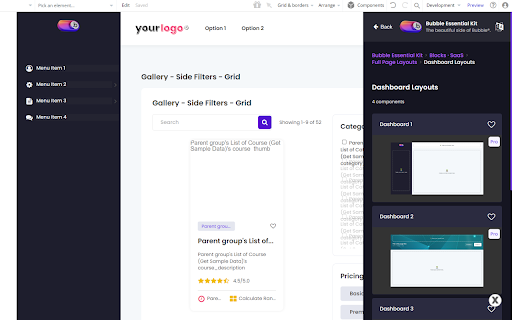
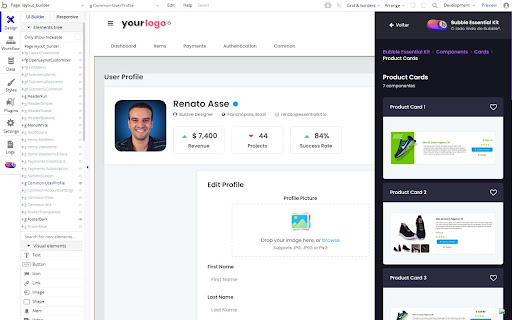

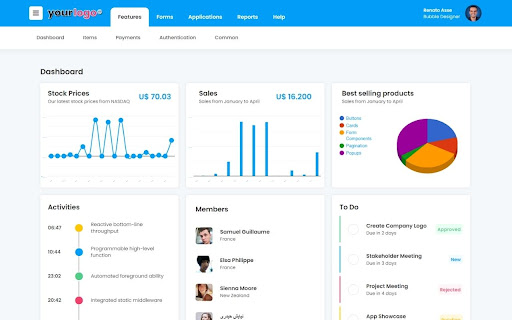
Bubble.io #1 companion. Component Library and essential tools to help Bubble.io developers build beautiful applications. Bubble Essential Kit is the #1 Bubble.io Component Library. Use beautifully designed bootstrap components to create amazing applications just by copying and pasting directly into your Bubble.io app. -- Bubble Essential Kit Component Library -- Copy and paste 350+ beautiful, pre-styled and fully responsive buttons, alerts, repeating groups, tables, cards, popups, inputs, dropdowns, radio buttons, and much more. All components are based on Bootstrap, the #1 framework for designing responsive websites and applications. So you can paste any components and they will all fit together, as they share the same visual identity. You will never struggle with Bubble's design and responsive engine again. -- Full Dashboard Layouts -- Bubble Essential Kit features not only atomic components, but also full layouts and blocks (headers, menus and content). You can build fully responsive beautiful dashboards in seconds. -- Landing Page Blocks -- Yes, you can build beautiful Landing Pages on Bubble. I know, you probably use Wordpress or other site builders because Bubble lacks what it takes to build a nice looking landing page, right? Well, that's before you met Bubble Essential Kit. Bubble Essential Kit has all the components you need to build a high conversion beautiful landing page. -- Color Palette -- Bubble Essential Kit has all the main colors used in Bootstrap: just get it and paste it into your Bubble component properties. Using this palette, it's impossible to build an ugly component in Bubble. -- Form Builder -- With the Form Builder, you simply select the number of fields, choose the type and name of each field, and it will generate the finished form. Just click on Paste and you will have your form ready in seconds. -- Private Component Libraries -- In addition to the Bubble Essential Kit's hundreds of components, you can also upload your own components and share with your team. If you use the same components, colors and workflows in different applications, you can create your own library and share it with whoever you want. This feature is fantastic for freelance developers and development agencies who want to speed up their creation and reuse their visual identities.

Adminer - Ads and Product Finder
With the Adminer extension you can mine thousands of winning products and ads automatically from your Facebook. Adminer accompanies you in all phases of product sales: mining, analysis and validation. With artificial intelligence, you have data to make the best decisions and make your business much more profitable. Find the products that customers want to buy! Enable the extension to hide organic posts from your Feed and only view ads. Enable automatic scrolling to capture and save products faster. Find out what's being sold and find best-selling products in just a few clicks. Our features: - Simplified product search - Automatic feed scrolling - Library of captured products - Advanced analysis filters ...and much more! How to use? 1 - Install the extension 2 - Create your account at https://adminer.pro 3 - Click on "How to Mine" in the side menu Adminer is for people who dream and want to go even higher. You're one of them? More information at https://adminer.pro

Figma to Bubble Converter
Convert your Figma designs into responsive, pixel-perfect Bubble elements in just a few clicks — for free. Convert your Figma designs into responsive, pixel-perfect Bubble elements in just a few clicks — for free. This tool is ideal for founders who got started on Figma and are ready to start developing. Figma is great at design. Bubble is great at turning design into real apps. Now you don’t have to choose. Make sure the Figma plugin is installed. Select your Figma design using that plugin. Bubble can convert Figma assets with up to 1,000 elements but works best with designs built using auto layout. Once you submit a Figma design using the Figma plugin, copy it using this Chrome extension. You’ll automatically see it available to copy. Paste into your Bubble editor. Turn your polished designs into production-ready apps — no rebuilding required. Access is free with a Bubble account. See additional documentation here. Note: This tool is not affiliated with, endorsed by, or sponsored by Figma.

Transcribe & Chat to Videos | Scribe
Instant transcripts that let you chat with any video using AI. Ask questions, get summaries, create flashcards. Get transcripts & ask AI anything about the video. - "What are the key takeaways?" - "Summarize this in 30 seconds" - "What did they say about pricing?" - "Create flashcards from this lecture" - "Turn this into a tweet thread" The AI analyzes the transcript and answers any question instantly. Switch between English, Spanish, German, Japanese, Korean, French, Portuguese, Arabic, and 40+ more languages with one click. Free forever. Install now and then please leave a review.

Page Ruler
Measure page elements size in pixel with an easy-to-use ruler. Page Ruler is an extension that lets you measure distances (in pixels) on a webpage. It draws a rectangular ruler when you move your mouse on the page. The ruler has width, height, start and end all labeled with corresponding metrics in pixels. When you move your mouse, the rectangle changes its size and all the numerics are updated. To activate the addon please press the toolbar button once. Likewise, to disable the addon please press the toolbar button again. This addon works with mouse clicks in desktop machines. For touch-enabled devices, you can work with touch to draw the rectangle within the page. If you have a feature request in mind or found a bug to report, please fill the bug report form on the addon's homepage (https://mybrowseraddon.com/page-ruler.html).
